

- Detect new vulnerabilities as developers open or update PRs, instead of after merge.
- Gate merges based on security and compliance.
- Enforce policies that can block risky PRs or fail CI builds.
- Give developers fast feedback on open source, SAST, and secrets findings tied to their changes through PR comments and PR Runs in the Endor Labs UI.
- Run PR scans with endorctl to run pull request scans from the CLI. This approach supports scanning the pull request branch and scanning changes relative to a baseline branch.
- Configure PR scans to trigger scans automatically from an SCM app or a CI pipeline when someone opens or updates a pull request or merge request.
Pull request scan workflow
The following workflow describes a robust approach for scanning pull requests and merge requests against a stable baseline branch.- Establish and maintain a baseline branch Scan your baseline branch, such as main, regularly with monitoring scans or CI scans. See Set a default branch for how Endor Labs chooses and uses the default branch. See Scanning strategies and Branches and workflows for more information on branch strategy, default branch setup, and recommended scan flags.
-
Trigger PR scans on feature branches
Configure PR scans for PRs targeting the baseline branch, for example,
main. For large monorepos, enable incremental PR scans to focus only on changed dependencies and code. - Use policies to enforce standards Use finding and action policies to decide when to warn, break builds, or block merges for PR scans.
- Integrate first-party scans Optionally, for app-triggered scans, enable SAST and secrets in the SCM integration when you install or manage the app. For CI-triggered scans, include the appropriate endorctl flags and steps in your pipeline so each run covers dependencies, first-party code, and secrets as needed. To analyze first-party code changes with AI SAST on pull requests, see AI SAST PR scans.
View PR scan findings
Endor Labs stores PR scan findings as PR Runs and keeps them for three weeks to accommodate new PR activity. PR Runs shows only scans for the branch you have selected. Switch branches at the top of the project page to see another branch’s runs. Endor Labs scopes each run by its PR Baseline; runs without one, including CLI scans run without--pr-baseline, fall under the default branch.
To view PR scan results in the Endor Labs:
- Select Projects from the left sidebar.
- Search for and select your project from the list.
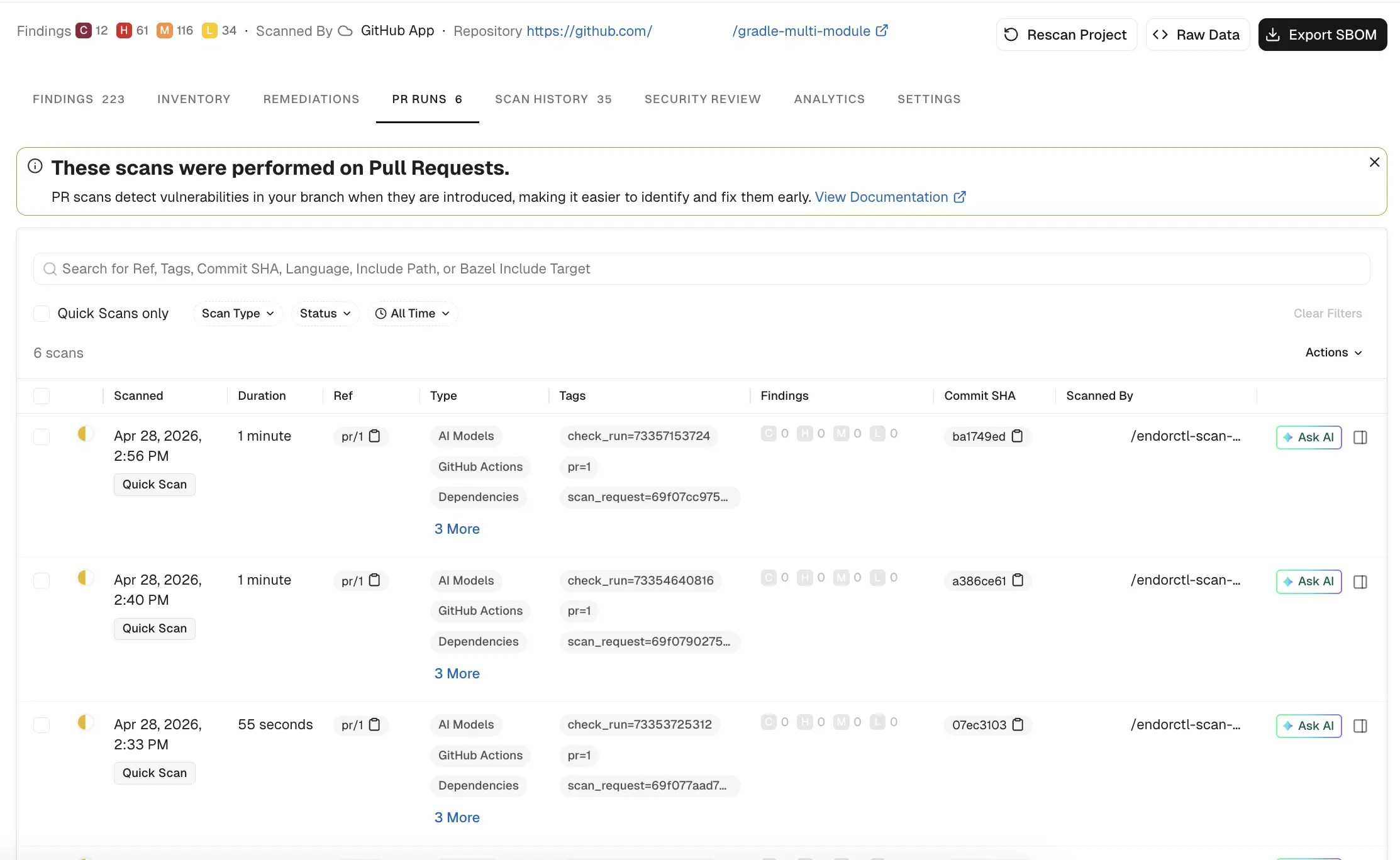
- Select PR RUNS to review the past scans. PR Runs captures the commit ID, Commit SHA, the referenced branch, its findings, and the tags added to the scan as configured in the policies. Select the specific PR scan to view its findings in detail. You can view the scan metadata, severity summary, and open any scan for findings, issues, and logs.
FAQs
How long are PR scan results retained?
How long are PR scan results retained?
Endor Labs retains PR scan findings as PR Runs for three weeks.
Why don't I see all my PR scans under PR Runs?
Why don't I see all my PR scans under PR Runs?
PR Runs is scoped to the branch you have selected for the project. Select a different branch to view the PR Runs recorded against it. A PR Run without a recorded PR Baseline, including a CLI scan run without
--pr-baseline, appears under the default branch. See View PR scan findings for more information.Why does a finding appear as new when the baseline already fixed it?
Why does a finding appear as new when the baseline already fixed it?
Endor Labs reports a finding as new if the baseline includes a fix for the issue and the pull request modifies the affected package. To resolve the finding, rebase the pull request on the latest baseline and re-run the PR scan.
Why do two PR scans on the same pull request produce different results?
Why do two PR scans on the same pull request produce different results?
Results can differ when the PR or baseline branch changes, when you update the scan profile, or when Endor Labs updates the vulnerability database between runs. PR Runs store the findings produced at the time of execution. Subsequent PR scans evaluate the pull request using the current scan profile and the latest analysis data.
Do PR scans block merges automatically?
Do PR scans block merges automatically?
No, PR scans do not block merges by default. Blocking requires an action policy that breaks the build and a required status check that enforces the result. See Block pull requests on findings for the steps.
Can I run PR scans on a branch other than my default branch?
Can I run PR scans on a branch other than my default branch?
Yes. The branch must already be a monitored version of your project, and you must allow it as a PR scan target branch under Monitored versions in the project’s settings. Enabling PR scans on a non-default monitored branch consumes additional scan credits. See Enable PR scans on monitored non-default branches for the steps.
Why did PR actions keep the old behavior right after I changed the PR scan target branch setting?
Why did PR actions keep the old behavior right after I changed the PR scan target branch setting?
A change to the PR scan target branch setting can take up to 10 minutes to apply. See Enable PR scans on monitored non-default branches for details.
Why does an incremental PR scan fall back to a full scan?
Why does an incremental PR scan fall back to a full scan?
Endor Labs falls back to a full PR scan when no valid baseline exists for the project or when it cannot determine what changed relative to the baseline. Scan the baseline branch at least once before you rely on incremental scans. See Troubleshoot incremental PR scan performance for more checks.