

Endor AI Chat
Use the Endor AI Chat to understand vulnerabilities and view recommended actions. It leverages AI to provide contextual explanations, guidance, and next steps for issues detected in your project. With AI-powered context, you can reduce time spent digging through raw data and accelerate triage and remediation.Prerequisites
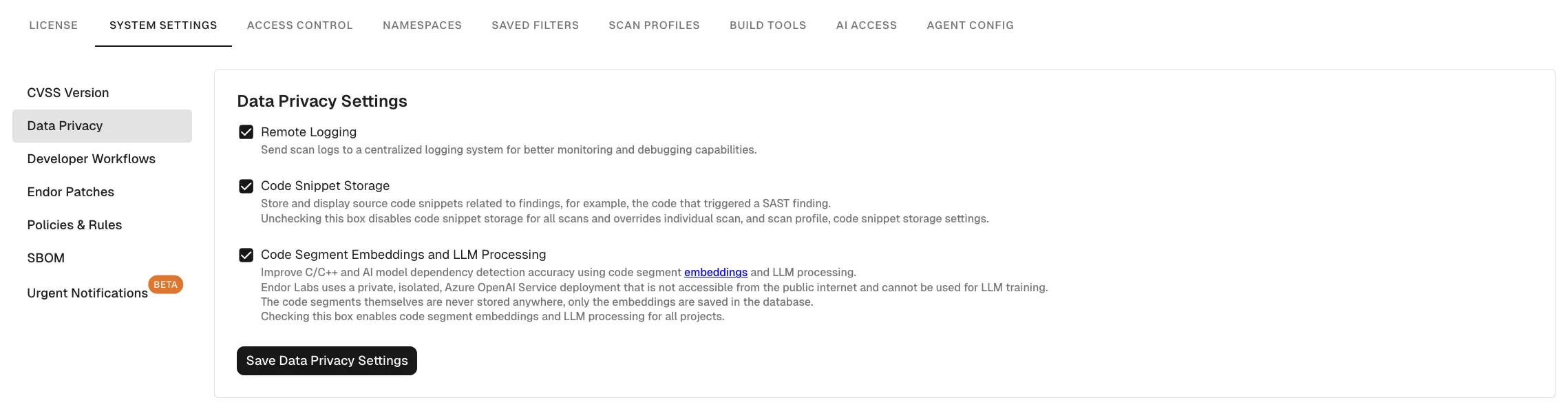
To start using Endor Ask AI chat, you must enable Code Segment Embeddings and LLM Processing in Data Privacy settings.- Select User menu > Settings from the left sidebar.
- Select SYSTEM SETTINGS > Data Privacy.
- Select Code Segment Embeddings and LLM Processing.
- Click Save Data Privacy Settings.
Use cases
- Investigate vulnerabilities: Use the AI chat to simplify technical details and generate summaries.
- Summarize scan results: Analyze scans performed by endorctl over time.
- Understand vulnerabilities: Ask natural-language questions about vulnerabilities in the database.
- Understand packages: Get quick explanations for package resolution and reachability errors.
Example questions
- Summarize this finding.
- Is this vulnerability exploitable?
- How do I remediate this?
- Is this a true positive SAST finding?
- Which issues were introduced or resolved?
- Why is this considered high severity?
Data scope for AI responses
Endor Ask AI chat agents generate answers based solely on specific data available within the Endor Labs platform:- Findings
- Scan results
- Vulnerabilities
- Package versions