Scan pull requests as soon as they are raised in your repository. PR scans detect vulnerabilities in your branch when they are introduced, making it easier to identify and fix them early. PR scans help you to:
  • Detect new vulnerabilities as developers open or update PRs, instead of after merge.
  • Gate merges based on security and compliance.
  • Enforce policies that can block risky PRs or fail CI builds.
  • Give developers fast feedback on open source, SAST, and secrets findings tied to their changes through PR comments and PR Runs in the Endor Labs UI.
Endor Labs supports scanning pull requests and merge requests to evaluate the impact of proposed changes before they are merged. You can run PR scans in the following ways:

Pull request scan workflow

The following workflow describes a robust approach for scanning pull requests and merge requests against a stable baseline branch.
  1. Establish and maintain a baseline branch Scan your baseline branch, such as main, regularly with monitoring scans or CI scans. See Set a default branch for how the default branch is chosen and used. See Scanning strategies and Branches and workflows for more information on branch strategy, default branch setup, and recommended scan flags.
  2. Trigger PR scans on feature branches Configure PR scans for PRs targeting the baseline branch, for example, main. For large monorepos, enable incremental PR scans to focus only on changed dependencies and code.
  3. Use policies to enforce standards Use finding and action policies to decide when to warn, break builds, or block merges for PR scans.
  4. Integrate first-party scans Optionally, for app-triggered scans, enable SAST and secrets in the SCM integration when you install or manage the app. For CI-triggered scans, include the appropriate endorctl flags and steps in your pipeline so each run covers dependencies, first-party code, and secrets as needed. To analyze first-party code changes with AI SAST on pull requests, see AI SAST PR scans.
The following diagram shows how a pull request scan flows from the baseline to the merge decision.

Scan PRs using endorctl

You can scan pull requests or merge requests using endorctl for GitHub, GitLab, and Bitbucket. The --pr flag runs the scan for the current commit and records the results as PR Runs that do not affect main branch monitoring scans and reports. Endor Labs stores PR and MR scan findings in PR Runs for three weeks, after which they are removed to accommodate new PR scans. Before you run PR scans, scan your baseline branch at least once so incremental PR scans have a baseline to compare against. A PR scan command combines the following flags. The following sections explain how these flags work together. To go straight to the ready-to-run command, see Set up PR scans step by step.

Perform incremental PR scan

An incremental PR scan scans only the parts of the codebase and dependencies that have changed since the last full baseline scan.
  • Endor Labs identifies packages and dependencies in the PR and scans only those that changed relative to the baseline.
  • If no dependencies changed, the scan is skipped, and Endor Labs reports No changes found.
  • Incremental PR scans only report findings that do not exist in the baseline and are associated with changed dependencies in the PR.
  • You can enable incremental PR scans using the --pr-incremental flag or the equivalent CI settings. This flag is also available for SAST incremental scans and Incremental secret scans.
You need to set a baseline for incremental PR scans so only findings new relative to that branch are reported. For GitHub App or GitLab App scans, or when PR comments are enabled, the baseline is detected automatically. Otherwise, pass --pr-baseline when you run the scan. See Set a default branch for how the default branch is chosen and used.
Baseline mismatch in PR scansIf a finding is fixed in the baseline by upgrading or downgrading a dependency and a PR still modifies that package, the finding can be reported as new. To mitigate this, rebase the PR with the latest baseline content and re-run the PR check.

Publish findings as PR comments

Endor Labs can post new findings as review comments on the pull request or merge request. Comments are posted according to your action policies. To publish comments:
  • Set --enable-pr-comments and --scm-pr-id so the scan posts comments to the right PR and infers the baseline from its merge target.
  • Authenticate with --scm-token or the ENDOR_SCAN_SCM_TOKEN environment variable.
  • Configure an action policy with Branch Type Pull Request so violations generate comments.
See Pull Request comments for app-based setup, the required action policy configuration, and comment templates.

Skip unaffected languages during incremental PR scans

When you combine --pr-incremental with --quick-scan, Endor Labs inspects the changed files in the pull request before resolving dependencies for each language. If the pull request contains no build file changes for a language, Endor Labs skips dependency resolution for that language entirely. This behavior is enabled by default for all supported languages and ecosystems in endorctl v1.7.1002 and later. The scan log records each skipped language.
Skip Java dependency resolution: No relevant changes detected

Skip unaffected packages during incremental PR scans

When a pull request does change build files, Endor Labs can prune further and resolve dependencies only for the packages those files affect. This reduces incremental PR scan times in large repositories and monorepos. Endor Labs classifies each changed build file by its scope of impact:
  • A single package, such as gradle.lockfile.
  • A package and every package under it, such as a parent pom.xml, settings.gradle, or gradle.properties.
  • The entire repository, such as gradle-wrapper.properties, files under buildSrc or .mvn, and version catalogs like gradle/libs.versions.toml.
Packages that no changed file affects are not resolved again, and their results carry forward from the baseline scan. Package-level skipping is enabled by default for Java and Kotlin projects that build with Maven or Gradle, in endorctl v1.7.1046 and later. Support for more ecosystems is rolling out in upcoming releases. To turn off package-level skipping, set ENDOR_SCAN_INCREMENTAL_DEP_RES=false before you run the scan.

Troubleshoot incremental PR scan performance

If an incremental PR scan takes longer than expected or does not skip dependency resolution, do the following checks:
  1. Verify that endorctl is v1.7.1002 or later. Package-level skipping for Java and Kotlin requires v1.7.1046 or later.
  2. Confirm that the scan sets both --pr-incremental and --quick-scan.
  3. Confirm that the scan is a pull request scan. Scans tagged merge-to-main resolve all dependencies.
  4. Check the scan log for Detected N changed files. An unexpectedly large count means the pull request diff could not be computed correctly.
  5. Look for skip confirmations in the scan log, such as Skip dependency resolution for 3/12 maven modules: No relevant changes detected.

Configure PR scans in SCM apps

The Endor Labs SCM integrations let you scan pull requests or merge requests when they are opened or updated. In the integration settings, enable PR or MR scans to run them automatically and, optionally, enable pull request comments to post findings as review comments. Action policies apply to PR scans the same way as to other scan types. The following describe platform-specific setup and configuration options:

Run PR scans from CI

PR scans can be run from a continuous integration pipeline by invoking endorctl scan with pull request flags in jobs triggered by pull request or merge request events. This approach provides control over when scans run, supports posting findings as PR or MR comments, and allows policies to be enforced, such as failing builds or blocking merges. The scan profile assigned to the project determines the toolchains and environment used for the scan.

Block pull requests on findings

A PR scan reports findings, but it does not block a merge on its own. To gate a pull request, ensure that you have the following configurations:
  • An action policy that breaks the build when the findings you care about appear.
  • A required status check in your source control manager that enforces the result before a merge.
The action policy decides which findings block a pull request, and the required status check is what stops the merge.

Create an action policy that breaks the build

In Endor Labs, create an action policy and choose the Break the Build enforcement action. Select the policy template for the finding types you want to gate, such as SCA, secrets, or SAST. The policy applies to PR scans the same way it applies to other scans. See Create an action policy from template for the full procedure.

Configure the required status check in GitHub to block merges

GitHub blocks a merge only when the Endor Labs check is a required status check on the target branch. The check you require depends on how Endor Labs scans your pull requests. The check appears as a selectable option only after it has reported on a pull request within the last seven days. Open or update a pull request so the Endor Labs check runs once, then add it to your branch protection rule. To add the check to a branch protection rule:
  1. In your GitHub repository, select Settings > Branches.
  2. Next to the rule for your default branch, click Edit.
  3. Select Require status checks to pass before merging.
  4. Enter the check name (Endor Labs Automated Scan for the GitHub App, or your workflow job name for GitHub Actions), and select it from the results.
  5. Click Save changes.
To create a rule instead, click Add branch protection rule, enter a Branch name pattern, and follow the same steps. GitHub also supports requiring status checks through repository and organization rulesets, which GitHub now recommends. Use an organization ruleset to enforce the check across many repositories at once. For more information, refer to About rulesets. After you require the check, GitHub keeps the merge blocked until the check passes. A check that concludes as neutral or skipped does not block the merge, even when it is required. Endor Labs reports a neutral result when there is nothing to scan, such as a pull request with no relevant changes. For more information, see Managing a branch protection rule and About rulesets, and Troubleshooting required status checks in the GitHub documentation.

Ignore files in PR scans

Ignore files let you dismiss findings by committing a file in your repository as part of a pull or merge request. During a PR scan, Endor Labs applies the ignore file from the repository version being scanned. Findings that match entries in the ignore file are excluded from PR Runs, do not appear in Pull Request comments, and do not trigger action policies.
Tenant setting required for ignore filesYou must allow ignore files to dismiss findings in Settings > SYSTEM SETTINGS > Developer Workflows for scans to process ignore files.
To add or update entries, use endorctl ignore and validate the file with endorctl validate ignore. See Dismiss findings using an ignore file for more details on ignore file format and structure.

Scan profiles for PR scans

A scan profile defines the configuration applied to PR scans for a project, including languages, toolchains, path filters, and parameters such as enable_automated_pr_scans and enable_pr_comments. For CI-initiated PR scans, the scan profile determines the toolchains and environment configuration used to execute the scan.
App-triggered PR scans run only when both of the following are true.
  • Pull Request scans or Merge Request scans are enabled during SCM app installation so the app receives PR or MR events.
  • Pull request scans or enable_automated_pr_scans is enabled in the scan profile assigned to the project.
To scope app-triggered PR scans to selected projects, enable Pull request scans only in the scan profiles assigned to those projects. In GitLab, MR scans can alternatively be scoped by configuring merge request webhooks for selected projects. See Configure scan profile through the UI for more information on scan profile settings.

Pull Request comments

PR comments are automated comments posted on pull or merge requests when Endor Labs detects policy violations during a PR scan. Enable them in your SCM integration or using --enable-pr-comments in CI, then configure an action policy with Branch Type Pull Request. See Pull Request comments and Action policies for setup and configuration.

Set up PR scans step by step

Add the following flags to your scan command in order, and verify each step in your CI pipeline before adding the next.
1

Start with a PR scan

Run a PR scan on the current commit. Endor Labs records the results as a PR Run instead of a monitoring scan.
endorctl scan --namespace <your-namespace> --pr
2

Scan only what changed

Add --pr-incremental and point --pr-baseline at the branch the PR merges into. The scan reports only findings that are new relative to the baseline.
endorctl scan --namespace <your-namespace> --pr --pr-incremental --pr-baseline=main
3

Speed up the scan

Add --quick-scan to skip call graph generation and skip dependency resolution for languages and packages the PR does not affect.
endorctl scan --namespace <your-namespace> --pr --pr-incremental --pr-baseline=main --quick-scan
4

Post findings as PR comments

Add --enable-pr-comments with --scm-pr-id and an SCM token. Remove --pr-baseline because the scan now infers the baseline from the merge target of the PR. This is the recommended command.
export ENDOR_SCAN_SCM_TOKEN=<your-scm-token>
endorctl scan --namespace <your-namespace> --pr --pr-incremental --quick-scan \
  --scm-pr-id <pr-or-mr-id> --enable-pr-comments
5

Block merges on findings

The scan reports findings and posts comments, but it does not block merges on its own. Pair the command with an action policy that breaks the build and a required status check on your target branch. See Block pull requests on findings.
6

Optional: Point to GitHub Enterprise Server

If your organization runs GitHub Enterprise Server, add --github-api-url with the API URL of your server.
endorctl scan --namespace <your-namespace> --pr --pr-incremental --quick-scan \
  --scm-pr-id <pr-or-mr-id> --enable-pr-comments --github-api-url=<your-github-api-url>

Adjust the command for your setup

  • Run without PR comments: Stop after step 3. Keep --pr-baseline and do not set --enable-pr-comments or --scm-pr-id.
  • Include reachability analysis: Drop --quick-scan to resolve dependencies fully and generate call graphs. The scan takes longer, but findings include reachability information.

View PR scan findings

PR scan findings are stored as PR Runs and kept for three weeks to accommodate new PR activity. To view PR scan results in the Endor Labs:
  1. Select Projects from the left sidebar.
  2. Search for and select your project from the list.
  3. Select PR RUNS to review the past scans. PR Runs captures the commit ID, Commit SHA, the referenced branch, its findings, and the tags added to the scan as configured in the policies. Select the specific PR scan to view its findings in detail. You can view the scan metadata, severity summary, and open any scan for findings, issues, and logs.
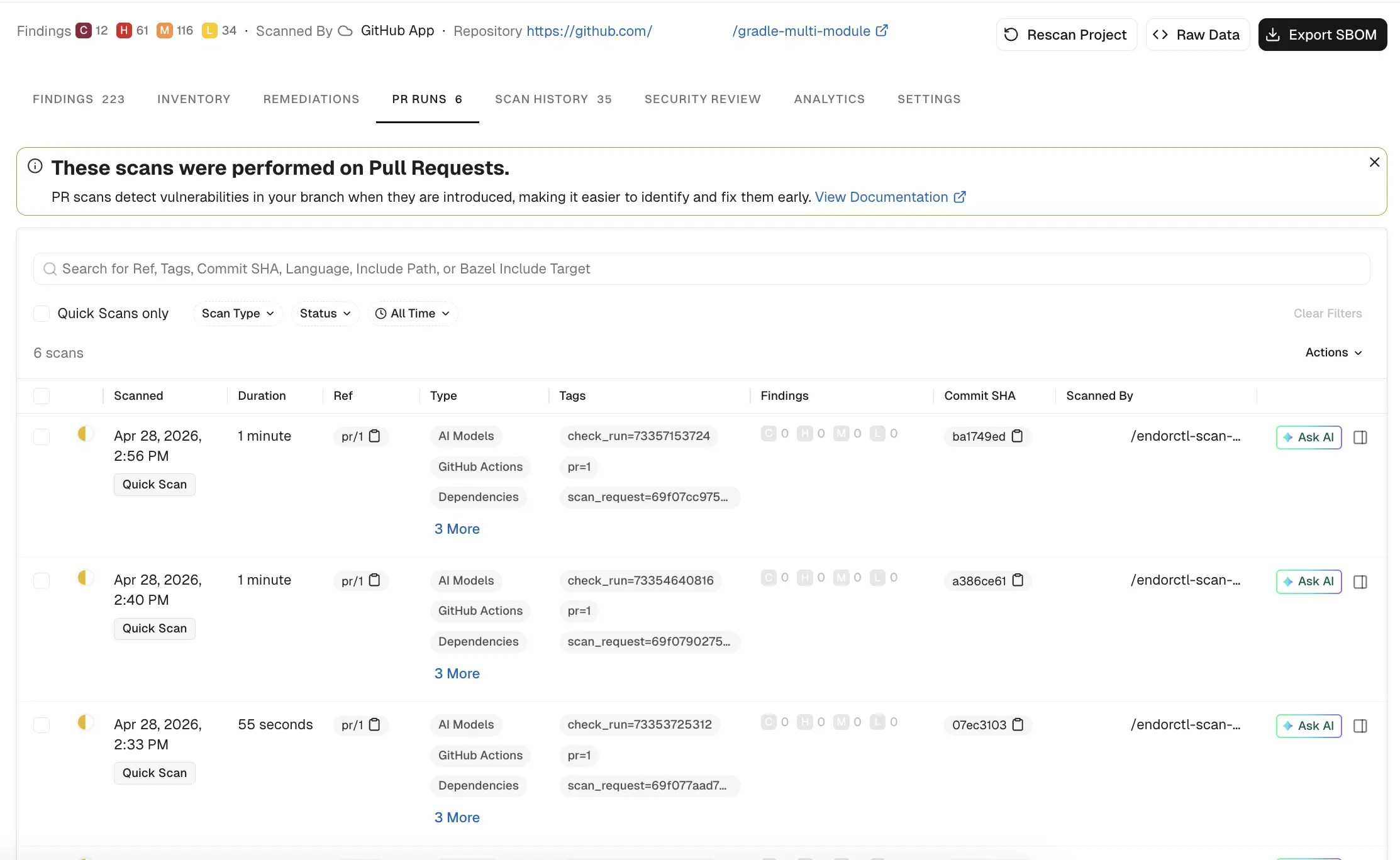
PR scan results in PR Runs

FAQs

Endor Labs retains PR scan findings as PR Runs for three weeks.
Endor Labs reports a finding as new if the baseline includes a fix for the issue and the pull request modifies the affected package. To resolve the finding, rebase the pull request on the latest baseline and re-run the PR scan.
Results can differ when the PR or baseline branch changes, the scan profile is updated, or the vulnerability database is updated between runs. PR Runs store the findings produced at the time of execution. Subsequent PR scans evaluate the pull request using the current scan profile and the latest analysis data.
No, PR scans do not block merges by default. Blocking requires an action policy that breaks the build and a required status check that enforces the result. See Block pull requests on findings for the steps.
Endor Labs falls back to a full PR scan when no valid baseline exists for the project or when it cannot determine what changed relative to the baseline. Ensure the baseline branch has been scanned at least once before relying on incremental scans. See Troubleshoot incremental PR scan performance for more checks.