

post-command hook. Your step’s command runs first, then the plugin installs endorctl, authenticates to Endor Labs, and runs the scan. The plugin supports the same scan options and outputs as the Endor Labs GitHub Action.
To integrate Endor Labs into your Buildkite pipelines:
Before you begin
Ensure that you complete the following prerequisites before you proceed.- Have the value of your Endor Labs tenant namespace handy.
- Generate an Endor Labs API key and secret, or use a cloud identity for keyless authentication. See Managing API keys to create credentials.
- Install
jqon your agents if you turn on build annotations. - On Windows agents, install Git Bash. The plugin hooks delegate to Bash.
The plugin installs endorctl only. Install your build toolchain, such as Java, Node.js, or Bazel, on the agent image or in your step’s
command.Install the plugin
You can vendor the plugin into your repository or reference the public Git repository in your pipeline. Vendoring gives you a reviewed, pinned copy that also works in air-gapped environments.Vendor the plugin
-
Clone the plugin repository at the latest release tag.
-
Copy the sync script into your repository.
-
Run the sync script from your repository root.
The script copies the plugin runtime files into
.buildkite/vendor/endorlabs-buildkite-pluginand writes aVENDOR_SOURCE.jsonrecord with the source commit. -
Commit the vendored plugin and the sync script.
-
Reference the vendored plugin in your pipeline steps.
Reference the public Git repository
Reference the plugin directly from GitHub, pinned to a release tag. Copy the current pinned reference from the card above.Authenticate to Endor Labs
The plugin reads credentials from environment variables on the agent. You pass the variable names, not the values, so secrets never appear in your pipeline YAML or on the endorctl command line.Use API credentials
Store your credentials as Buildkite cluster secrets:- In Buildkite, go to Agents > your cluster > Secrets.
- Create a secret named
ENDOR_API_CREDENTIALS_KEYwith your API key as the value. - Create a secret named
ENDOR_API_CREDENTIALS_SECRETwith your API key secret as the value. - Optional: Create a secret named
ENDOR_NAMESPACEwith your tenant namespace to keep it out of your pipeline YAML.
Use keyless authentication
If your agents run in AWS, GCP, or Azure, you can authenticate without storing Endor Labs API credentials:- Set
aws_role_arnon agents with ambient AWS credentials, such as an EC2 instance profile or EKS IRSA. - Set
gcp_service_accountto your Endor Labs federation service account on GCP agents. - Set
enable_azure_managed_identity: trueon Azure agents with a managed identity.
endorctl doesn’t accept Buildkite OIDC tokens for authentication, and GitHub keyless authentication works only in GitHub Actions. On Buildkite, use API credentials or cloud keyless authentication on the agent.
buildkite-agent oidc to federate with cloud providers. On AWS, you can exchange that token for AWS credentials and then set aws_role_arn, so the AWS identity authenticates to Endor Labs. For more information, refer to OIDC with AWS in Buildkite.
Configure your pipeline
The following example builds a project and scans it for dependency and secrets findings, with a build annotation for the results.- Replace
commandwith your project’s build steps. The scan starts after the command completes. - Replace the plugin reference with the pinned public Git reference if you don’t vendor the plugin.
- Turn on the scan types you need, such as
scan_sastorscan_secrets.
Running endorctl scan.
Set up PR scans and branch tracking
The plugin reads the Buildkite build environment and passes branch and pull request context to endorctl automatically: Buildkite agents often check out commits in a detached HEAD state. You don’t need to configure branch tracking manually because the plugin passes the branch name fromBUILDKITE_BRANCH.
Builds for pull requests run as PR scans. On other builds, Buildkite sets BUILDKITE_PULL_REQUEST to false and the scan records a monitored version. Set pr: false to record a monitored scan even on a pull request build, or set pr_baseline to force a PR scan without one. See PR scans to learn how Endor Labs tracks point-in-time scans.
To post new findings as pull request comments, set enable_pr_comments: true and set scm_token_env to the name of an environment variable that holds your SCM token. The token must be a personal access token or bot token from your SCM provider. See PR comments to learn how comments appear on pull requests.
Annotate builds with scan results
Setannotate: true to post a build annotation when the scan completes. The annotation shows severity counts, admission policy status, and a findings table scoped to the scan types enabled on that step. Annotations require jq on the agent and the default JSON output.
Use annotate_findings_limit to control the table size. The value -1 lists all critical and high findings, 0 shows severity counts only, and a positive number adds up to that many medium and low rows.
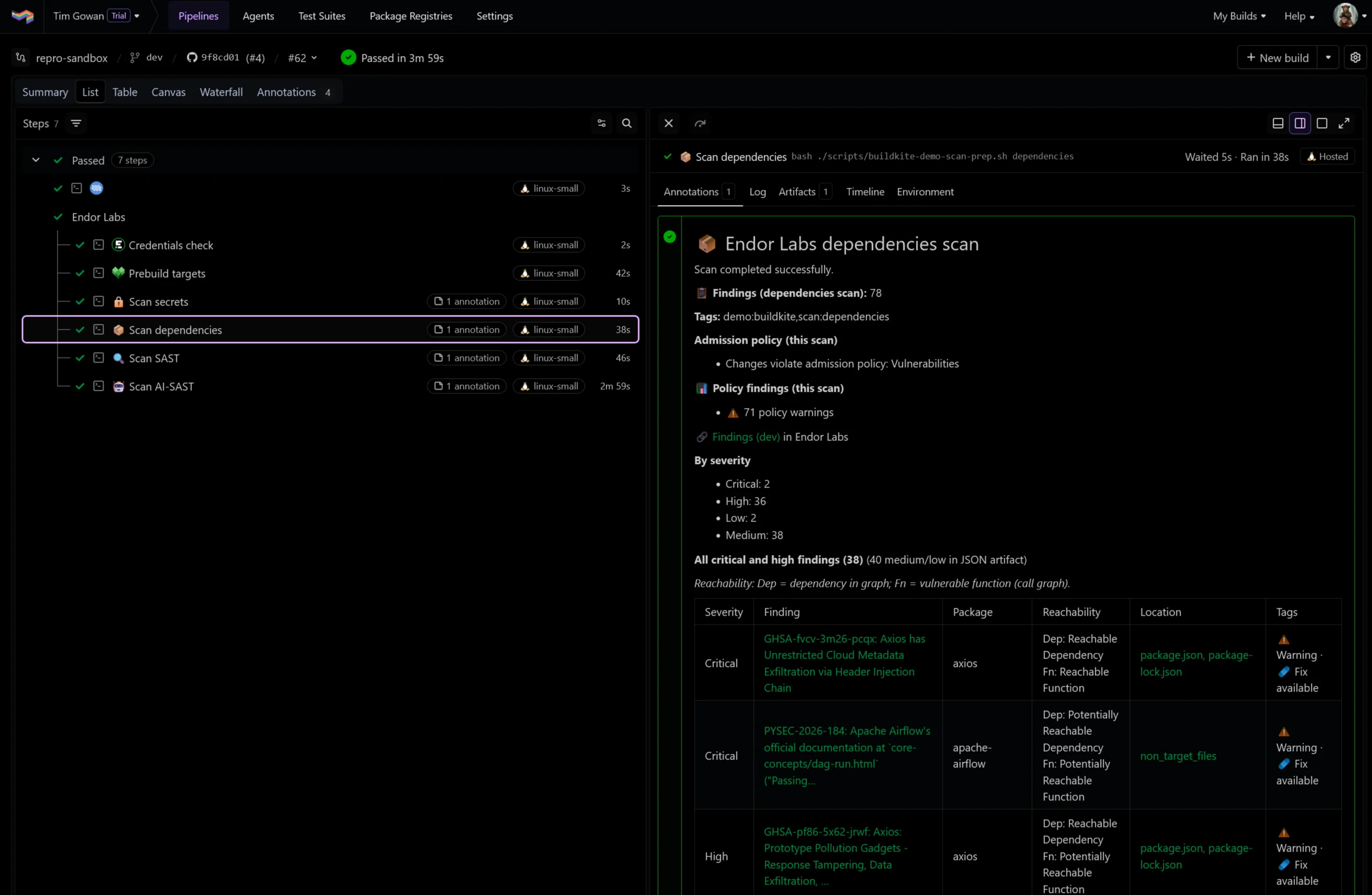
annotate_scope: job to attach each annotation to its own step. Job-scoped annotations require Buildkite agent v3.112 or later.
Control build failures
When a blocking admission policy matches, endorctl exits with code128 and the step fails. This is the default behavior, controlled by fail_on_policy: true.
- Set
fail_on_policy: falseto treat a blocking admission policy as success. - Set
soft_fail: trueto soften other nonzero exits. It doesn’t bypass exit128whilefail_on_policyistrue. - Set
exit_on_policy_warning: trueto also fail the step on warning policies.
Run SAST scans
SAST scan
Setscan_sast: true to scan your source code for security weaknesses.
AI SAST detection agent scan
To run an AI SAST detection agent scan, setadditional_args to --ai-sast. The AI SAST detection agent identifies security vulnerabilities beyond traditional rule-based SAST detection.
Scan container images
Container scans run in a separate step from repository scans. Setscan_container: true with an image or image_tar, and turn off scan_dependencies.
os_reachability: true to identify which packages in the image are used at runtime. See Scan container images and Container reachability for details.
Sign and verify artifacts
Setmode: sign or mode: verify with an artifact_name to run artifact signing workflows instead of a scan. Scan options aren’t valid in these modes. See Artifact signing to learn about signing and verification.
Plugin configuration reference
The following tables load directly from the plugin’s plugin.yml at the latest release, so they always reflect the current plugin version.Common options
These options apply to every plugin invocation. Onlynamespace is required.
Authentication options
Use one authentication method per step: API credentials or one cloud keyless option.If you use Endor Labs with an EU tenant, use
https://api.eu.endorlabs.com instead of https://api.endorlabs.com.Scan types
Turn on at least one scan type whenmode is scan.
Scan configuration options
These options adjust what a scan covers and how projects are named and tagged.Container scan options
These options apply whenscan_container is true.
PR scan options
These options control PR scan detection.Annotation and output options
These options control build annotations, output formats, and uploaded artifacts.Build failure options
These options decide when a scan fails the step.Artifact signing options
These options apply whenmode is sign or verify.