

AI finding tag. Findings that pass the agent’s validation also carry the True Positive finding tag. Each finding includes the vulnerable code location and a data flow trace from source to sink. It also includes an attack vector with an exploit payload and reproduction steps, an assessment of security controls, and a CWE classification with severity based on your application’s context.
To improve detection results, you can add AI context rules that give the agent codebase-specific guidance to read during the scan.
To run an AI SAST detection agent scan:
- Enable the AI SAST - Detection rule in finding policies.
-
Run the following command.
Language support
The AI SAST detection agent supports the following languages:- C
- C++
- C#
- Go
- IaC YAML
- Java
- JavaScript
- Kotlin
- Python
- Ruby
- Rust
- Scala
- Swift
- TypeScript
Scan AI agent skills
Beyond application source code, the AI SAST detection agent analyzes AI agent skill files, such asSKILL.md, AGENT.md, and CLAUDE.md, for security weaknesses. The instructions and supporting scripts that a skill directs an agent to run can introduce risk on their own. The agent therefore treats these files as scan targets rather than configuration.
The detection agent flags skill issues such as:
- Unsafe shell command construction in supporting scripts.
- Plaintext secret or token handling in skill instructions.
- Risky external installs, such as pulling
@latestfrom an untrusted source.
AI finding tag, the same as findings from application code. It is distinct from skill scoring, which discovers installed skills and assigns a risk score rather than generating findings.
AI detection process
The AI detection agent uses a large language model (LLM) with full-repository context to systematically discover vulnerabilities.1
Index the repository
Scan the entire codebase and build a semantically searchable representation. The agent generates file hashes, function hashes, and embeddings to capture the intent of every function. It stores them with metadata such as callers and file locations. Maximum coverage at this stage minimizes false negatives later in the pipeline.
2
Analyze application context
Read deployment files such as Dockerfiles, Kubernetes manifests, and CI configurations to understand the application’s exposure and the framework mitigations in place. Skip files that cannot produce SAST findings, such as non-executable files. The agent uses these prioritization signals to focus security analysis on the functions that matter.
3
Run security analysis
Review the behavior of prioritized code using LLM-based reasoning with full-repository context. The agent traces reachability to confirm whether code actually calls the vulnerable paths. It follows source-to-sink chains across functions and files, and detects sanitizers or other stopping logic that may prevent exploitation.
4
Generate findings
Emit confirmed vulnerabilities as new findings labeled with the
AI finding tag and treated as true positives. Each finding includes an attack vector with a concrete exploit payload and reproduction steps that show how to trigger the issue. It also includes a suggested code-change diff that shows how to fix the vulnerable code.5
Classify findings
Map each finding to a CWE and assign a severity based on the context of the application rather than the CWE category alone.
View AI SAST detection agent findings
The AI detection agent generates new SAST findings by identifying security vulnerabilities beyond traditional rule-based detection. The agent labels each finding with anAI finding tag, the CWE associated with the vulnerability, and a CVSS-style severity computed from the application context.
To view AI SAST detection agent findings:
- Select Findings > SAST from the left sidebar.
- Use the Attributes filter and select Yes under the AI SAST filter to view findings generated by the AI detection agent. To view only the findings that the agent validated, select True Positive under AI Analysis.
- Select a finding.
-
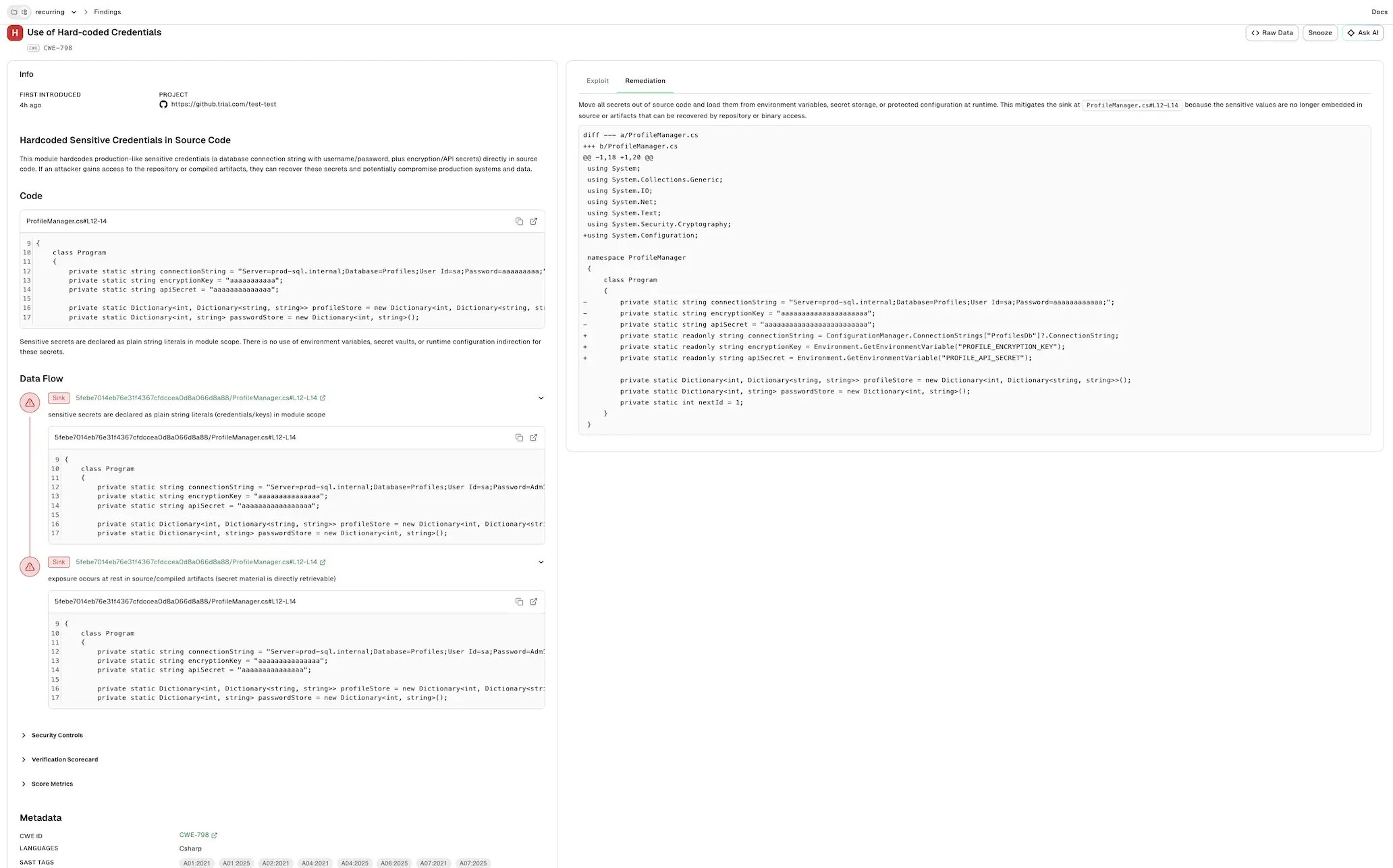
Select Info to view the agent’s analysis and supporting evidence for the finding.
- First Introduced: When the finding was first introduced.
- Project: The project that contains the finding.
- Summary: An agent-generated title and an explanation of the vulnerability, including the affected function, the untrusted input it consumes, and the potential impact.
- Code: The vulnerable code location, with the file path, line numbers, and the relevant code snippet.
-
Data Flow: A trace of the issue across the code locations involved. Each stage carries a role label and shows the location, a short description, and the relevant code snippet. A finding can have more than one stage of the same role.
- Source: Where untrusted input enters the application.
- Propagation: How the code passes or transforms the input as it moves toward the sink.
- Sink: Where the input reaches the vulnerable operation.
- Security Controls: The controls relevant to the finding, each with a status of present, missing, weak, or unknown and a short rationale. The specific controls depend on the vulnerability, such as input validation, sanitization, secrets management, or access control.
- Verification Scorecard: Each criterion the agent verified, the evidence drawn from the code, and the resulting verdict such as confirmed, refuted, or not applicable.
-
Classification: The agent’s final classification of the finding, such as
TRUE_POSITIVE. -
Score Metrics: The factors behind the severity score, each with an assigned value and a rationale. The scoring factors are:
- Attack Vector: How an attacker reaches the vulnerability, such as over the network, on an adjacent network, locally on the host, or with physical access.
- Attack Complexity: How much effort or favorable conditions an attacker needs to successfully exploit the vulnerability.
- Privileges Required: The level of access an attacker must already have before they can exploit the vulnerability.
- User Interaction: Whether a separate user must take an action, such as clicking a link, for the exploit to succeed.
- Confidentiality: The impact on the secrecy of data if an attacker exploits the vulnerability.
- Integrity: The impact on the trustworthiness and correctness of data or system state if an attacker exploits the vulnerability.
- Availability: The impact on the availability of the affected system or service if an attacker exploits the vulnerability.
- Metadata: Classification details such as the CWE ID, affected languages, and SAST tags applied to the finding.
--disable-code-snippet-storageflag, the agent does not generate exploit reproduction or remediation. -
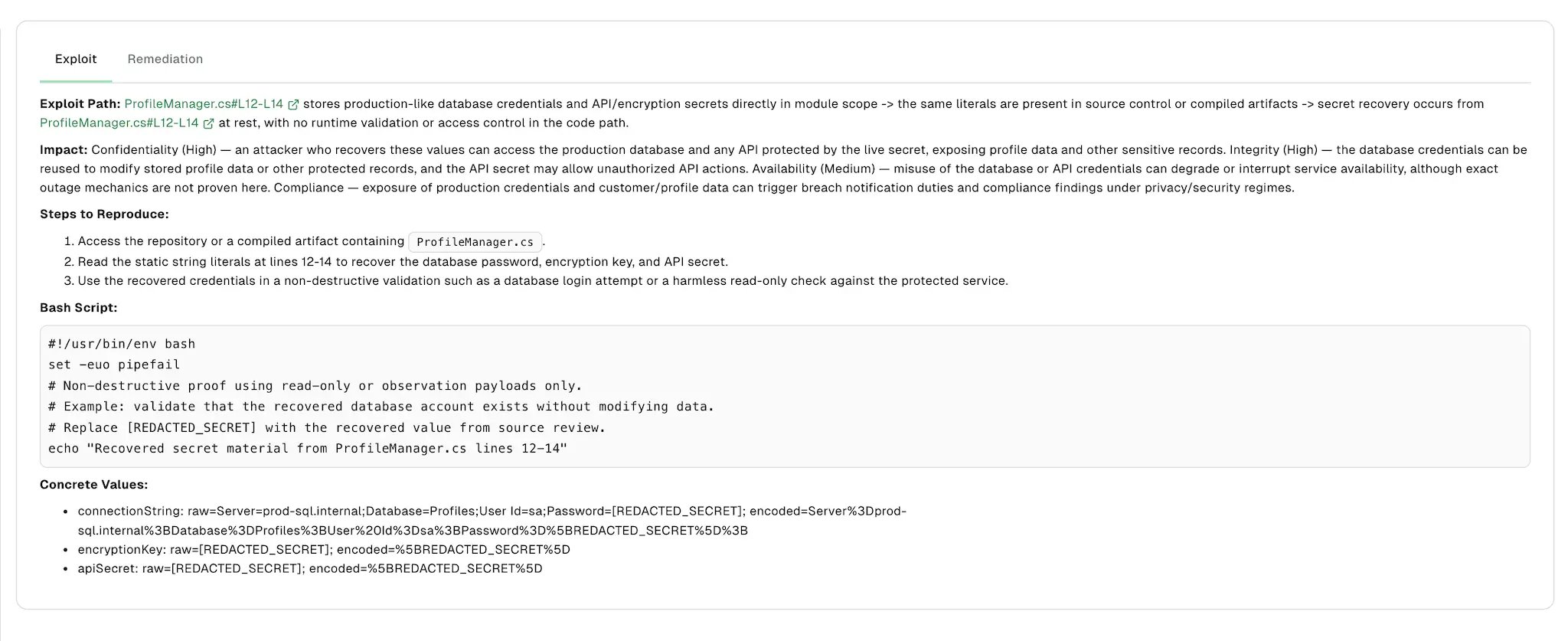
Select Exploit to view the exploit reproduction.
- Exploit Path: The chain of code locations an attacker traverses from the entry point through propagation to the vulnerable sink.
- Impact: The security impact of the exploit, such as its effect on confidentiality, integrity, and availability.
- Steps to Reproduce: Ordered steps that trigger the vulnerability.
- Bash Script: A runnable script that reproduces the exploit.
- Concrete Values: The specific raw and encoded values used to reproduce the exploit.
-
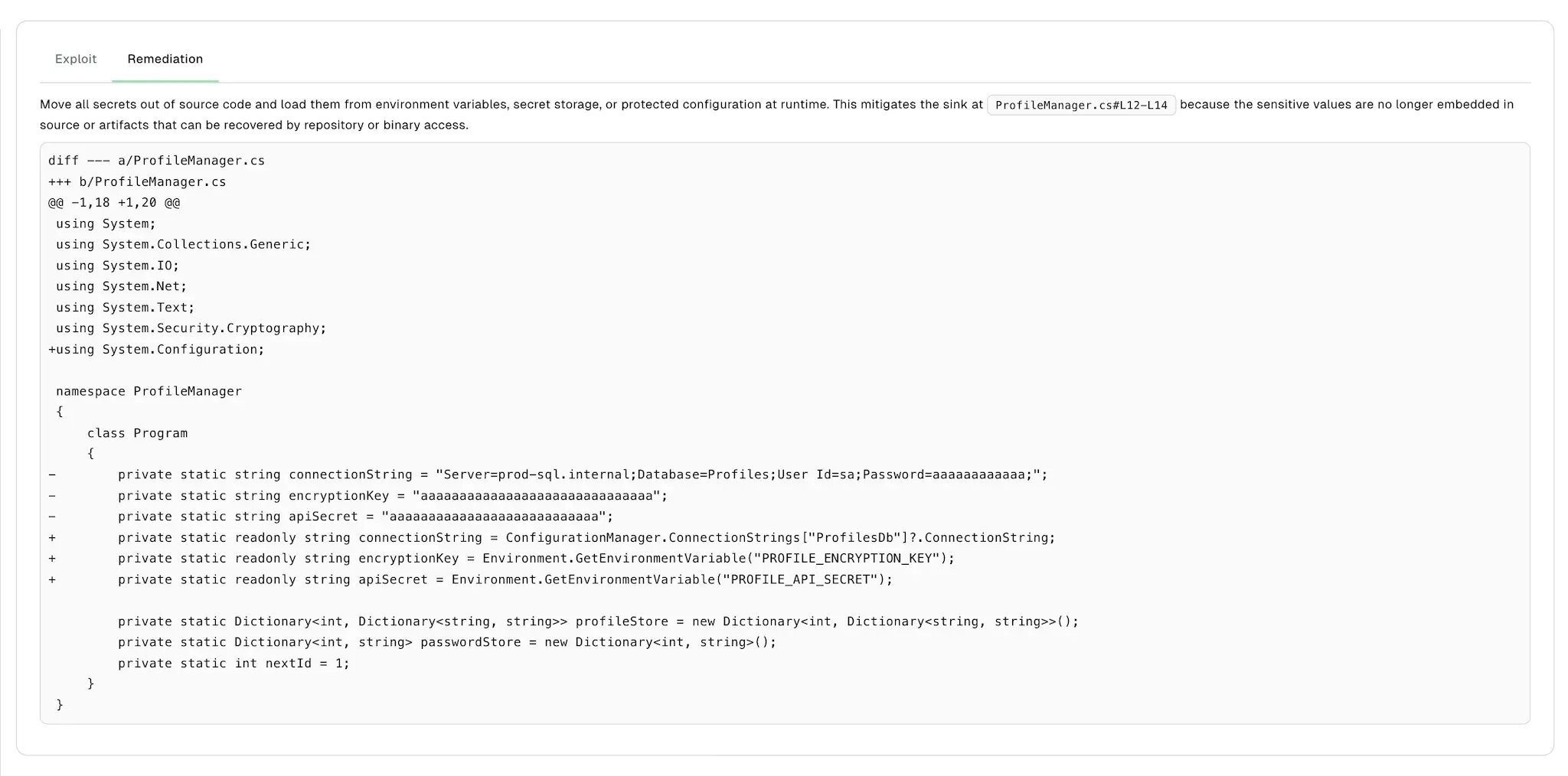
Select Remediation to view a short explanation of the recommended fix and a unified diff that applies it.
Give feedback on AI SAST findings
After you review a finding, tell the detection agent whether its analysis was correct. The agent reads the feedback on a project’s findings during later scans, together with your AI context rules. It uses the feedback to confirm similar vulnerabilities and dismiss similar false positives. To give feedback on an AI SAST finding:- Select Findings > SAST from the left sidebar.
- Select an AI SAST finding to open the finding details panel.
-
Select a feedback button at the top of the panel.
- Give positive feedback (thumbs up): Confirms that the analysis is correct. Endor Labs saves the feedback immediately.
- Give negative feedback (thumbs down): Reports that the analysis is wrong. Endor Labs opens the Report an Incorrect Result dialog.

- If you selected thumbs down, enter a comment of up to 1,024 characters that explains what the analysis got wrong, and select Save.
The feedback buttons appear only in the finding details panel. They do not appear on the full finding page that opens when you select View Details.
Refresh of findings
By default, a stored finding keeps its verdict until a scan re-evaluates the function that produced it. The refresh re-evaluates stored findings on the default branch during default branch scans. This keeps them aligned with your current code and guidance. The refresh is on by default and runs on every scan of the default branch. This includes scheduled scans, scans that you start yourself, and scans that run when a pull request merges. It does not run on PR scans,--diff-scope scans, or dry runs. To turn it off for a project, add ENDOR_SCAN_AI_SAST_REFRESH=false to the additional environment variables of the project’s scan profile.
On each default branch scan, the agent re-evaluates a finding when any of the following is true:
- The code the finding depends on has changed. This covers the vulnerable function, its data flow regions, and the functions it calls.
- Your AI context rules or reviewer feedback has changed since the agent last evaluated the finding.
- The agent last evaluated the finding more than 30 days ago. Set
ENDOR_SCAN_AI_SAST_REFRESH_INTERVALto change this interval, for example168hfor seven days.