

This page covers dependencies your manifest or lockfile references directly by their Git repository URL. If your dependencies come from a private package registry, such as GitHub Packages, Artifactory, or Nexus, see Package manager integrations.
- Resolve private Git-based dependencies during dependency resolution.
- Generate comprehensive security analysis including private dependencies.
- Maintain complete visibility into your software supply chain.
- Same-namespace dependencies: Dependencies your manifest or lockfile references by a Git repository URL, where that repository is already covered by an SCM integration in your namespace, such as GitHub, GitLab, or Bitbucket. Endor Labs automatically reuses credentials from every SCM integration in your namespace to resolve them, even when the integration is for a different SCM platform than the project being scanned. Select the private repositories during app installation to improve dependency resolution. This automatic credential reuse applies only to dependencies referenced by a Git repository URL. Packages hosted in a registry, including GitHub Packages, are resolved through package manager integrations. You can add repositories to your existing GitHub Cloud App Pro installation. See Manage GitHub Cloud App Pro to learn more.
-
Cross-organization dependencies: Dependencies on private repositories in another project, workspace, or organization where your SCM credentials do not apply. Configure cross-organization dependencies and supply credentials to resolve these dependencies. They are supported across GitHub, GitLab, and Bitbucket for the following ecosystems:
- Go
- npm
- Python
- Ruby
- Rust (Cargo)
- Swift
Configure cross-organization dependencies
Configure this integration to provide additional credentials for repositories not covered by your SCM integrations, such as in a different project, workspace, or organization. Use the Git-based dependencies integration in the following scenarios:- When authentication for private repositories is not defined in standard manifest or configuration files.
- When your existing SCM integration does not have access to the repositories on which your project depends.
- Select User menu > Integrations from the left sidebar.
- Click Add next to Git-based Dependencies.
- Click Create Git Configuration.
- Enter a name for the credential.
- Select the Source Code Manager Type where your private repository is hosted.
- Enter the organization, group, or repository URL that hosts the private dependencies in Host URL.
-
Enter a token with the required permissions for the target repositories in Access token.
See Supported SCM platforms and access tokens for host URL formats and required permissions for each SCM.
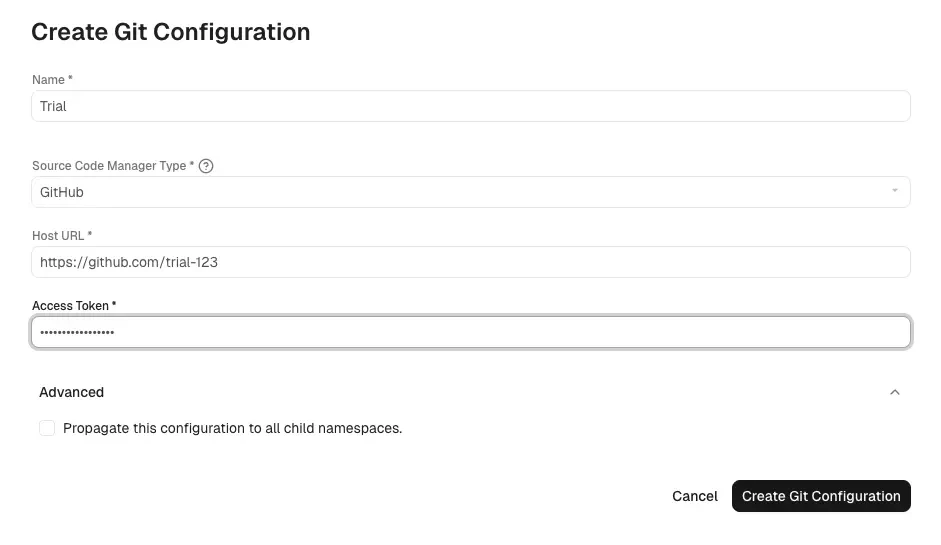
- Optionally, click Advanced and select Propagate this configuration to all child namespaces to apply this configuration to all child namespaces.
- Click Create Git Configuration.
Supported SCM platforms and access tokens
Here are the supported SCM platforms and their corresponding URL formats. Ensure that the access tokens have the following permissions.Test Git-based dependency integration
You can test the connection for a configured Git-based dependency integration to verify that Endor Labs can reach the repository. To test the connection:- Select User menu > Integrations from the left sidebar.
- Click Manage next to the Git-based Dependencies integration.
- Click the vertical three dots on the integration you want to test and select Test Connection.
The test checks basic connectivity to the configured host. It does not verify full authentication or authorization with your Git host or across all repositories your scan may require.
Edit Git-based dependency integration
Edit an existing Git-based dependency integration to update the name, host URL, or access token. To edit the integration:- Select User menu > Integrations from the left sidebar.
- Click Manage next to the Git-based Dependencies integration.
- Click the vertical three dots on the integration you want to edit and select Edit.
- You can modify the name, host URL, or access token as needed.
- Optionally, click Advanced and select Propagate this configuration to all child namespaces to apply the dependency configuration to all child namespaces.
- Click Save Changes.
Delete Git-based dependency integration
Delete a Git-based dependency integration when you no longer require that credential or access to that repository. Scans will no longer resolve dependencies from that source. To delete the integration:- Select User menu > Integrations from the left sidebar.
- Click Manage next to the Git-based Dependencies integration.
- Click the vertical three dots on the integration you want to delete and select Delete.
- Click Delete this Dependency? to confirm the deletion when prompted.
Configure Git-based dependency integration using API
Use the Endor Labs API to create, fetch, update, and delete SCM credentials for Git-based dependencies. Provide access tokens for the SCM platforms that host your private dependencies so Endor Labs can authenticate and resolve them during scans.Create an SCM credential
Run the following command to create an SCM credential resource. Replace:<namespace>with your namespace.<credential-name>with a unique name for this credential in your namespace.PLATFORM_SOURCE_SCMwith the SCM platform constant for your host:PLATFORM_SOURCE_GITHUB,PLATFORM_SOURCE_GITLAB, orPLATFORM_SOURCE_BITBUCKET.<repository-or-org-url>with the organization or repository URL that hosts the private dependencies.<access-token>with a valid access token for the target SCM platform.<credential-description>with a description for the credential.
propagate to true to ensure the credential is available in child namespaces.
List SCM credentials using API
Run the following command to list all SCM credentials in a namespace.Fetch an SCM credential using API
Run the following command to fetch a specific SCM credential using the UUID.Update an SCM credential
Run the following command to update the access token or the host URL. Replace:<namespace>with your namespace.<uuid>with the credential’s UUID.PLATFORM_SOURCE_SCMwith the SCM platform:PLATFORM_SOURCE_GITHUB,PLATFORM_SOURCE_GITLAB, orPLATFORM_SOURCE_BITBUCKET.https://platform.orgwith the configured organization or repository URL for this credential.abcdef12345with the new access token.
--field-mask to only the fields you are updating, such as spec.access_token to update the token or spec.access_token,spec.target_url when updating both the access token and host URL.