

- Conan package manager scan resolves dependencies declared in
conanfile.txtorconanfile.pyagainst the Conan registry. - Segment-based scan analyzes source code directly using code signatures and embeddings, without requiring a package manager.
- Scan their software for potential security issues and violations of organizational policy.
- Prioritize vulnerabilities in the context of their applications.
- Understand the relationships between software components in their applications.
Scan C/C++ projects with Conan
Conan is a decentralized C/C++ package manager that usesconanfile.txt or conanfile.py to declare project dependencies. Endor Labs resolves the full transitive dependency graph from these manifest files and maps packages to vulnerability data from OSV, NVD, and other sources.
Prerequisites
Verify the following prerequisites before running a Conan scan:-
Set the
ENDOR_SCAN_ENABLE_CONANenvironment variable totrue. Conan package manager scanning is disabled by default, and there is noendorctlflag to enable it. Without this variable,endorctl scandoes not report an error, but it silently skips Conan dependency resolution. -
Python 3.6 or higher is installed on the machine running
endorctl scan. Runpython3 --versionto verify. -
Conan 2.x is installed. Run
conan --versionto verify. To install or upgrade, run: -
Your repository includes a
conanfile.txtorconanfile.py.
Run a Conan scan
Endor Labs invokes the Conan plugin to resolve dependencies whenever it detects aconanfile.txt or conanfile.py file in your repository. If only a conan.lock file is present, Endor Labs parses it directly without invoking the Conan CLI, producing a flat list of dependencies rather than the full transitive dependency graph.
To enable Conan scanning, set ENDOR_SCAN_ENABLE_CONAN=true and then run the endorctl scan:
If you are using a scan profile, make sure C/C++ is selected under Languages and included in your profile.
If you use Endor Labs with an EU tenant, use
https://app.eu.endorlabs.com instead of https://app.endorlabs.com.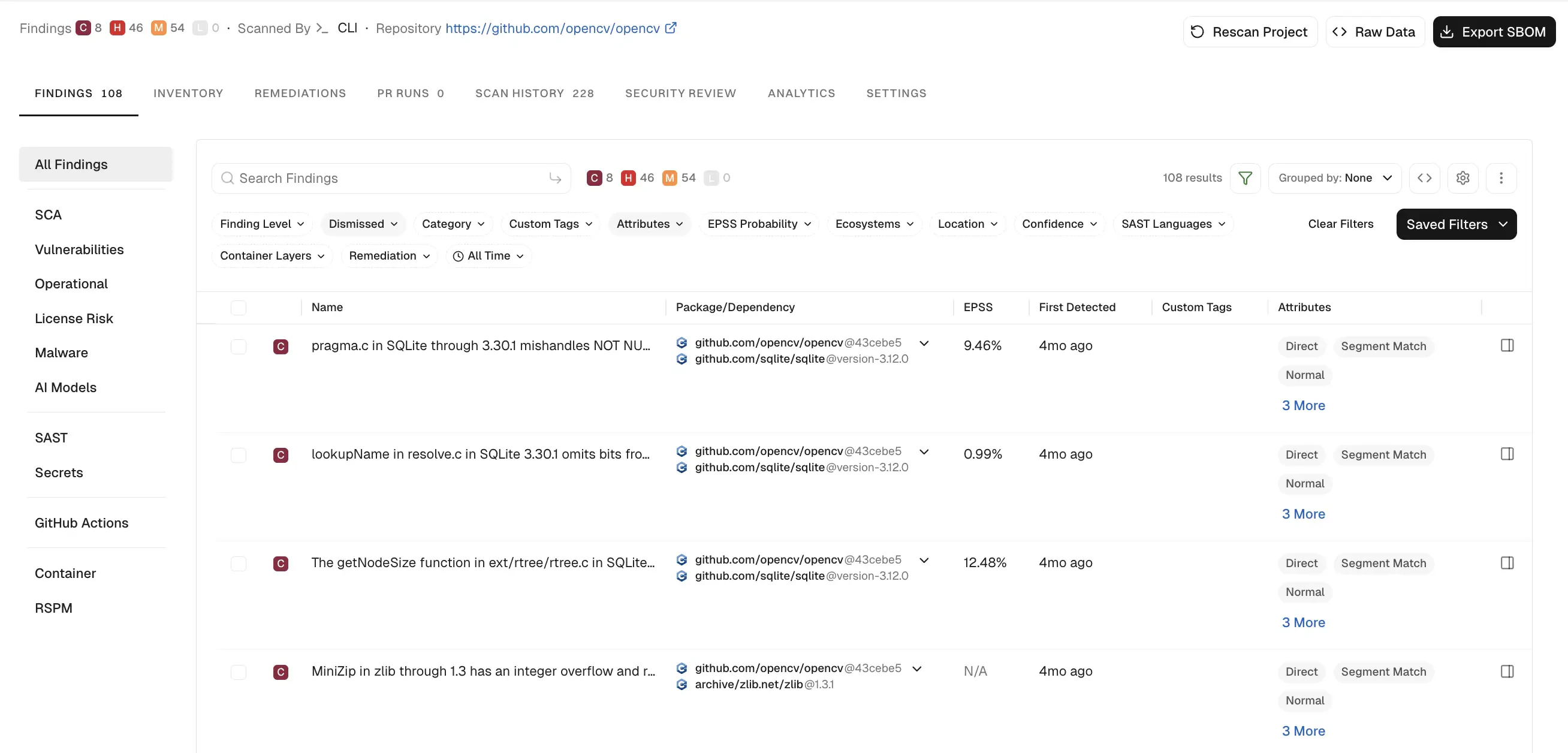
Dependency resolution using manifest files
Endor Labs analyzes the manifest files present in a project to detect and resolve dependencies, using the following priority: When aconanfile.txt or conanfile.py file is present, Endor Labs runs conan graph info --format=json to resolve the full transitive dependency graph, including conditional dependencies evaluated against the active Conan profile. If a conan.lock file is also present, Endor Labs uses it to pin dependency versions during resolution.
If no conanfile is present, Endor Labs parses conan.lock directly without invoking the Conan CLI, producing a flat list of dependencies rather than the full transitive dependency graph.
Configure a private Conan registry
Endor Labs supports fetching and scanning dependencies from private Conan package registries. Endor Labs fetches resources from authenticated endpoints and performs the scan, allowing you to view the resolved dependencies and findings. See Conan package manager integrations for more information on configuring private registries.Scan C/C++ projects with segment-based analysis
Endor Labs can analyze C/C++ source code directly using code signatures and embeddings. You can run segment-based analysis on its own or alongside a Conan scan for the same project. All dependencies and vendor code must be present in the scanned directory.Run a segment-based scan
You can enable segment-based analysis for C/C++ using any of the following methods:endorctl
endorctl
To scan a C/C++ project using segment-based analysis, use the You can also set the To save results to a file:
--segment-match-languages flag.ENDOR_SCAN_SEGMENT_MATCH_LANGUAGES environment variable instead of passing the flag directly.Using
--segment-match-languages=c scans only C and C++ projects. For a multi-language repository, include all other languages with the --languages flag.Scan profile through user interface
Scan profile through user interface
In your scan profile, select C/C++ under Segment Match Languages. See Configure scan profile settings for more information.Adding a language to Segment Match Languages scans it with segment-based analysis and does not affect any other selected languages. You can select any combination of languages across all three fields.
Scan profile through Endor Labs API
Scan profile through Endor Labs API
Set
segment_match_languages under spec.automated_scan_parameters when creating a ScanProfile object. See Configure scan profile through Endor Labs API.Scan profile through scanprofile.yaml
Scan profile through scanprofile.yaml
Set
segment_match_languages under spec in your scanprofile.yaml. See Configure scan profile through scanprofile.yaml.View dependency file locations
You can view a visualization of dependency file locations of C/C++ packages in your repository. These locations reflect the source file paths associated with how the dependency was identified in your codebase. To view the dependency file path of your package version:- Select Projects from the left sidebar.
- Go to Packages under Inventory.
- Select C/C++ in the Ecosystem filter.
- Select the package version you want to review.
- Select View Details on the right sidebar.
- Select Overview.
- Expand the tree under Dependency File Locations to explore the file paths where the dependency was identified.

Understand the scan process
Endor Labs detects vulnerabilities by testing your code against its proprietary database, which is regularly updated. Endor Labs does not build your code, so all dependencies and vendor code must be included within the source. If the build process pulls in additional packages, they must also be present in the scanned directory. Endor Labs analyzes source code using a combination of code signatures and embeddings. The system extracts source code from multiple data sources and applies language-specific segmentation to break the code into functions and segments. This method facilitates efficient similarity searches, helping to detect duplicated code across repositories and supporting comprehensive software composition analysis. By comparing file hashes, segment hashes, and embeddings, Endor Labs queries data to identify matches with code segments. This capability streamlines the detection of copied code and dependency relationships between repositories. It provides insights into code components from multiple sources, including Git repositories, online archives, and other package distributions. Endor Labs scans headers and code files regardless of their file extension. To optimize performance, Endor Labs caches embeddings and signatures, making subsequent scans faster than the first scan. Only newly added or modified files require computation, reducing subsequent scan times.Enable code segment embeddings
Endor Labs disables embeddings by default. You need an Endor Labs AI license to use them. To enable embeddings, select Settings near the bottom of the left sidebar, select SYSTEM SETTINGS > Data Privacy, select Code Segment Embeddings and LLM Processing, and click Save Data Privacy Settings.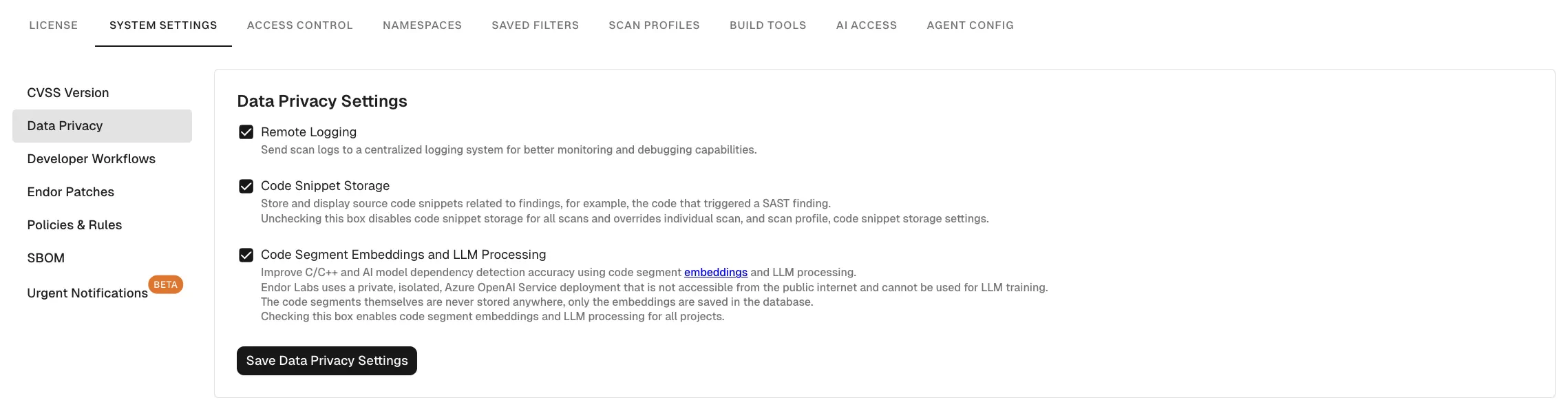
ENDOR_SCAN_EMBEDDINGS to true to enable embeddings or false to disable them. This setting takes precedence over the system configuration.
Known limitations
- Conan 1.x is not supported. Endor Labs requires Conan 2.x or later.
- Call graph analysis is not supported for Conan packages.
- Vendored dependencies are not supported. Endor Labs resolves dependencies from manifest files only.
- Scanning binary library files such as
.soand.afiles is not supported.