

- A malware check for the packages an agent installs or adds to a manifest.
- A dependency risk check for dependencies with known vulnerabilities.
- A secrets check for the content an agent writes and reads.
Malware check
The malware check fires when a governed agent installs a package or edits a manifest or lockfile to add one. The check looks up the package in the Endor Labs malware feed, the same intelligence that powers malicious package detection and Package Firewall. Only confirmed malware triggers the policy. Contested records and records under review do not. The check parses the packages out of the install command the agent runs. It recognizes the following package managers:- npm:
npm,pnpm,yarn,bun,npx, andbunx. - PyPI:
pip,python -m pip,poetry,pipenv,uv, anduvx. - Go:
go install. - NuGet:
dotnet add package,nuget, andpaket. - Packagist:
composer. - Crates:
cargo. - RubyGems:
gemandbundle. - OS package managers:
apk,apt,yum,dnf, andzypper.
sudo and env, and inline shells such as bash -c "npm install …".
The check also runs when the agent writes or edits a manifest or lockfile. It compares the file before and after the edit and checks only the packages the edit adds. See Supported manifests and lockfiles to review the files it reads. The check looks up a lockfile entry at its exact version. It looks up a manifest entry at its pinned version, or against every version of the package when the entry is a range. It skips npm dependencies that point to a local path, a workspace, a git source, or a URL.
A malware violation carries the evidence your team needs to respond:
- The package name, version, and ecosystem from the install or edit. An unpinned install or a manifest range shows an empty version.
- A summary of the malware report and the reasons the feed flagged the package.
- The feed source that flagged the package.
ecosystems list through the REST API. The valid tokens are npm, pypi, go, mvn, nuget, packagist, cargo, gem, apk, debian, and rpm, and Endor Labs rejects a policy that carries any other value. Maven has no install command, so mvn applies only to manifest and lockfile edits. The form doesn’t offer Maven, so set mvn through the REST API.
The out-of-the-box policy Malware: block installs of known-malicious packages is disabled by default. Enable it, or create your own malware policy, to turn the check on.
Create a malware policy
To create a malware policy in the Endor Labs user interface:- Select User menu > Policies & Rules from the left sidebar.
- Select Agent Governance.
- Click Create Agent Governance Policy.
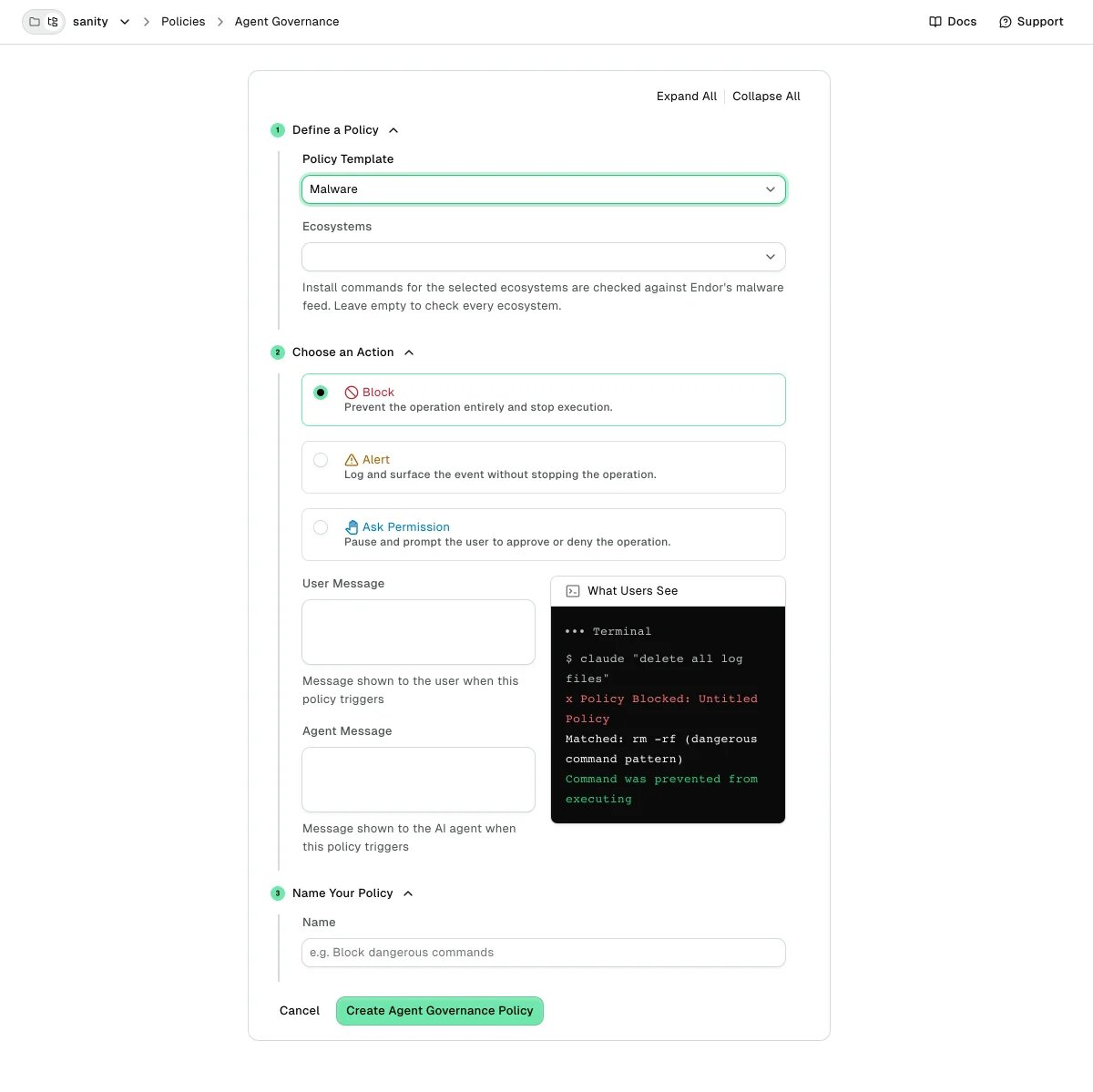
- Under Policy Template, choose Malware under Secure Coding.
- Optional: Under Ecosystems, select the ecosystems to check. Leave it empty to check every ecosystem.
- Under Choose an Action, select Block, Alert, or Ask Permission.
- Under Name Your Policy, enter a Name, then click Create Agent Governance Policy.
<namespace> with the namespace that owns your Coding Agent Governance policies. Leave ecosystems empty to check every ecosystem.
Secrets check
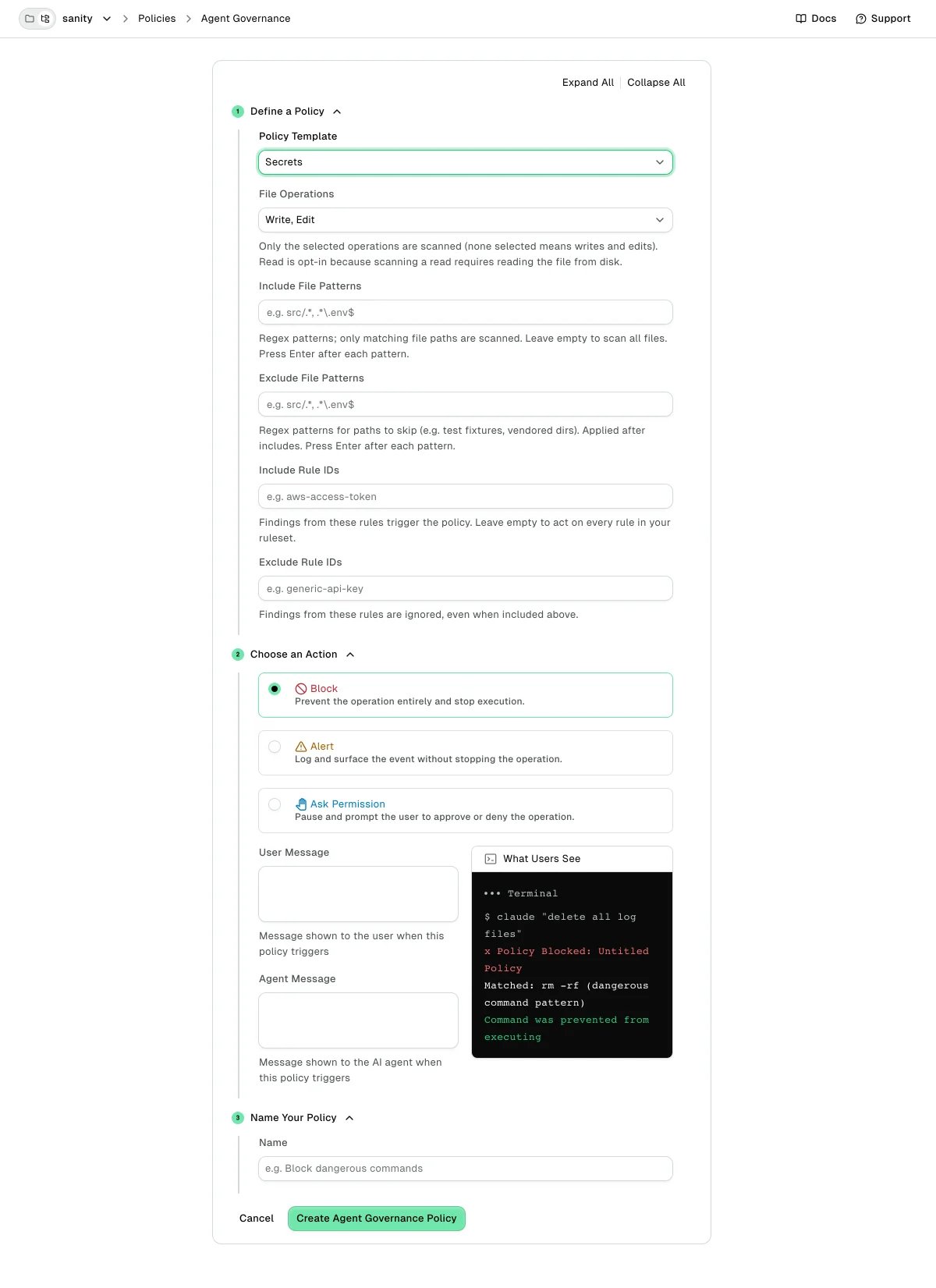
The secrets check scans content the agent touches for secrets, such as cloud access keys, provider tokens, and private keys. By default a policy scans the content of file writes and edits. To also scan the files the agent reads, select Read under File Operations, or listFILE_OPERATION_READ with FILE_OPERATION_WRITE and FILE_OPERATION_EDIT in file_operations. A list of only FILE_OPERATION_READ scans reads only.
Read scanning is opt-in because it reads each file from disk. Detection uses the Endor Labs secret rules library, the same rules as secrets scanning. See Secret detection rules to browse the full library.
The scan runs on the developer’s machine, and the scanned content never leaves it. A secrets violation carries:
- The rule that fired, such as
aws-access-tokenorgithub-pat, with its human-readable name. - The line and column where the secret starts.
- A fingerprint that groups repeat findings of the same secret.
REDACTED. When a permitted operation runs, the follow-up event records that the operation happened without carrying the file content.
Four more policy fields shape the check:
- Include File Patterns (
include_file_patterns) limits scanning to matching paths, and Exclude File Patterns (exclude_file_patterns) skips paths such as test fixtures or vendored directories. Exclusions apply after inclusions. An empty configuration scans every file the event covers. - Include Rule IDs (
include_rule_ids) limits the policy to specific detection rules, and Exclude Rule IDs (exclude_rule_ids) mutes rules whose matches are false positives in your codebase. Both match rule IDs such asaws-access-tokenexactly. Exclusions apply after inclusions.
secrets_check activity in place of malware_check in the malware example. Endor Labs rejects FILE_OPERATION_DELETE, because a delete writes no content to scan.
Dependency risk check
The dependency risk check fires when an agent adds a dependency with a known vulnerability. It looks up each new package in Endor Labs vulnerability data and matches advisories at or above a severity you set. The default severity is high. The check runs at two points:- Install commands: The check parses the packages out of the command, the same way as the malware check.
- Manifest and lockfile edits: The check compares the file before and after the edit and checks only the dependencies the edit adds. See Supported manifests and lockfiles to review the files it reads.
beta, so it lists that package as not checked. In Maven, it can’t check an entry without an exact version, such as a range, a ${property} reference, a -SNAPSHOT version, or a dynamic Gradle version such as 1.+. Pin an exact version to have it checked.
Transitive dependencies
By default,include_transitives is off, and the check looks up only the dependencies an install command or manifest edit names. With it on, the check also looks up the packages each new dependency pulls in, using the dependency data Endor Labs stores for that package. This also applies to go.mod edits. Other lockfiles already list every resolved package, so the check looks up every entry the edit adds, whether or not include_transitives is on.
What a dependency risk violation shows
When the check matches, the agent and developer see the vulnerable package, the advisory, its severity, and the fixed version when one exists. A transitive match names the direct dependency that brings it in and suggests a newer version of it. When no fixed version exists, the message suggests removing or replacing the package. A block also tells the agent not to install the vulnerable version another way, such as with--force. If the check could not cover every package, the first match lists the packages it did not check and the dependencies whose transitive packages it could not fully check.
Create a dependency risk policy
Create and edit dependency risk policies through the REST API. The policy form does not author them yet. The policy takes the following fields on itsdependency_risk activity:
ecosystems: Optional list of ecosystems to check. The supported values arenpm,pypi,go, andmvn, andmavenandgradlealso work for Maven. An empty list checks every supported ecosystem.min_cvss_severity: The lowest advisory severity that matches. ChooseSEVERITY_LOW,SEVERITY_MEDIUM,SEVERITY_HIGH, orSEVERITY_CRITICAL. Unset meansSEVERITY_HIGH.include_transitives: Set totrueto also check the packages each new dependency pulls in. Unset meansfalse.include_file_patternsandexclude_file_patterns: Optional regex lists that limit which manifests and lockfiles the check reads. Exclusions apply after inclusions.
ecosystems values, so a misspelled or uppercase value such as python or NPM matches nothing. Use the lowercase values above.
The following example creates a policy that asks before an agent adds an npm or PyPI dependency with a critical vulnerability.
Supported manifests and lockfiles
The malware and dependency risk checks read the following files when the agent writes or edits them. The checks skipbuild.gradle, because it is code rather than a manifest.
Actions
Secure coding checks use the same actions as every other Coding Agent Governance policy: Block stops the action, Alert records it, and Ask Permission pauses for the developer. Violations appear under Policy Violations next to the rest of your governance activity. See Actions to review what the developer and your security team see for each action.How the checks fit with other Endor Labs protection
Endor Labs catches malicious packages and secrets at more than one layer, and each layer covers a different point in the workflow:- Secure coding checks act in the agent loop, at the moment an agent installs a package, edits a manifest, or touches a secret.
- Package Firewall protects the registry path for every install in your organization, whether an agent or a person runs it.
- Secrets scanning finds secrets already committed to your repositories and pull requests.
Limitations
Be aware of the following limitations:- Checks run for supported agents on machines with hooks deployed.
- The malware and dependency risk checks fail open. If a lookup fails or times out, or a file can’t be read or is larger than 10 MB, the action proceeds.
- In Claude Code, the manifest and lockfile checks cover the
WriteandEdittools, notMultiEdit. - The dependency risk check ignores advisories without a CVSS score, disputed or withdrawn advisories, and malware advisories, which the malware check covers.
- The secrets check inspects content the agent touches in a session. It is not a repository-wide scan. Use secrets scanning for full-repository coverage.
- Like all Coding Agent Governance controls, these checks are guardrails for agent behavior, not a security boundary. See What Coding Agent Governance is (and isn’t) to review what these guardrails can’t stop.