

- File Access: Control reads, writes, edits, and deletes in the workspace.
- Command Execution: Control the shell commands an agent runs.
- Auto Mode: Let an AI judge review shell commands, with context about your deployment.
- MCP Server Access: Control which MCP servers and tools an agent calls.
- MCP Server Posture: Match MCP servers by name or by Endor Labs score.
- Skill Access: Control which skills run, by name or by Endor Labs score.
- Session Posture: Match sessions by user, sandbox, and models.
- Malware: Check the packages an agent installs against the Endor Labs malware feed.
- Secrets: Scan content the agent writes or reads for leaked secrets.
- Dependency Risk: Check the dependencies an agent adds for known vulnerabilities. Create it through the REST API, because the policy form doesn’t offer it yet.
Manage Coding Agent Governance policies
To open Coding Agent Governance policies:- Select User menu > Policies & Rules from the left sidebar.
- Select Agent Governance.
View Coding Agent Governance policies
On the Agent Governance listing, you can view policies grouped by what they govern:- All Policies for every policy in scope.
- Coding Agents for command execution and auto mode policies.
- MCP Servers for MCP server and tool access policies.
- File Access for file-operation policies.
- Skills for skill policies.
- MCP Server Posture for policies that match MCP servers by Endor Labs score.
- Sessions for session posture policies.
- Malware for malware check policies.
- Secrets for secrets check policies.
Create a Coding Agent Governance policy
- Click Create Agent Governance Policy.
- Under Define a Policy, choose a template under Policy Template:
- File Access under Coding Agents: Control reads, writes, deletes, and edits in the workspace.
- Command Execution under Coding Agents: Control the shell commands the agent runs.
- Auto Mode under Coding Agents: Let an AI judge review shell commands. This template has no list type or action steps. See Create an auto mode policy to fill in its fields.
- MCP Server Access under MCP Servers: Control which MCP servers and tools the agent can call.
- MCP Server Posture under MCP Servers: Match MCP servers by name or by Endor Labs score.
- Skill Access under Skills: Control which skills can run, by name or by Endor Labs score.
- Session Posture under Sessions: Match sessions by user identity, sandbox, and models.
- Malware under Secure Coding: Block installs of known-malicious packages, verified against the Endor Labs malware feed.
- Secrets under Secure Coding: Scan file content the agent writes or reads for exposed secrets.
- Under List Type, choose Allowlist to permit only matching items, or Blocklist to block matching items. The Malware and Secrets templates don’t show List Type.
- Fill in the fields the template exposes. See Templates and patterns to look up the field names and pattern syntax for each template.
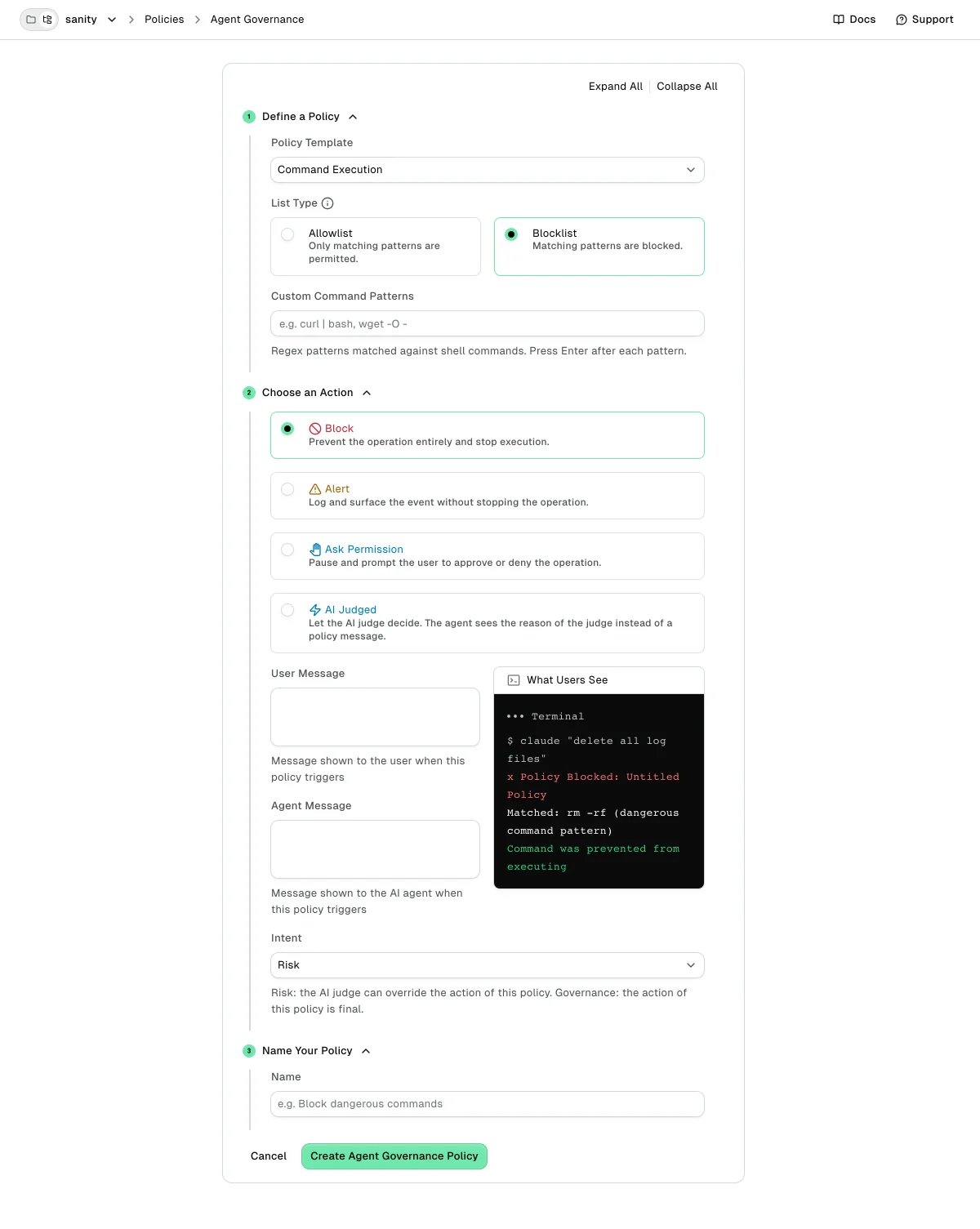
- Under Choose an Action, select the action your hook should take when an event matches:
- Block stops the action and returns a deny response to the agent.
- Alert lets the action proceed and records the event under Policy Violations.
- Ask Permission pauses the agent until the developer approves or denies, where the agent supports it.
- AI Judged hands the matched command to the AI judge, which decides the action. It appears for Command Execution policies and is unavailable when Intent is Governance. See AI Judged action to review how it behaves.
- Optional: Fill in User Message. The developer sees it when the policy fires, if the agent hook response can carry the message. A Block policy also sends it to the agent inside a deny response that names the policy category and warns against working around the block. An AI Judged policy has no message fields, because the agent sees the judge’s reason instead.
- Optional: For a Command Execution policy, choose Risk or Governance under Intent. Risk is the default. See Policy intent to choose between them.
- Optional: Under Inventory Classification, choose Allow or Block to tag the MCP servers or skills the policy matches. None, the default, applies no tag. The selector appears for the MCP Server Posture and Skill Access templates. See Inventory classification to review how each tag affects inventory.
- Under Name Your Policy, enter a Name that describes what the policy does.
- Click Create Agent Governance Policy.
Coding Agent Governance templates and patterns
Each template targets one activity type and exposes the fields that activity uses. All pattern fields use regular expressions, not globs. Anchor with^ and $ to match the full string, and escape literal characters such as . and /.
File Access
Use this template to govern reads, writes, deletes, and edits in the workspace.- File Operation: Choose Any, Read, Write, Delete, or Edit.
- File Name Patterns: Regex patterns matched against file paths. Add one pattern per row with + Add file pattern.
- Example blocklist patterns:
.*\.env$,.*\.pem$,.*/secrets/.*.
Command Execution
Use this template to govern shell commands the agent runs.- Custom Command Patterns: Regex patterns matched against shell commands. Add one pattern per row with + Add command.
- Example blocklist patterns:
^rm\s+-rf\s+/,^curl\s+.*\|\s*(sh|bash)\b.
Auto Mode
Use this template to turn on the AI judge for shell commands. The policy carries no patterns, list type, or action.- Judge Scope: Choose which commands the judge reviews: Off, Matched commands only, or All commands.
- Deployment Context: Optional facts about your environment, such as which hosts and registries are yours. Separate entries with a blank line.
MCP Server Access
Use this template to govern which MCP servers and tools your agents can call.- Server Name Patterns: Regex patterns matched against MCP server names. Add one pattern per row with + Add server pattern.
- Tool Name Patterns: Regex patterns matched against MCP tool names. Add one pattern per row with + Add tool pattern.
- Example blocklist patterns:
.*-prod$for any production server, or.*delete.*for tool names that includedelete.
MCP Server Posture
Use this template to match MCP servers by name, by Endor Labs score, or both. It scores server-level posture rather than individual tool calls, so reach for it when you want to gate on how risky a server is.- Server Name Patterns: Regex patterns matched against MCP server names.
- Overall score at or below: Match when the server’s Endor Score (
1-10, higher is safer) is at or below this value. Leave blank to ignore the overall score. - Per-dimension thresholds: Optionally match on one dimension instead of the overall score: Supply Chain & Provenance, Authentication & Authorization, Operational Hygiene, or Input Validation & Injection.
Skill Access
Use this template to control which agent skills can run, by name, by Endor Labs skill score, or both.- Skill Name Patterns: Regex patterns matched against skill names.
- Overall score at or below: Match when the skill’s Endor Score (
1-10, higher is safer) is at or below this value. Leave blank to ignore the overall score. - Per-dimension thresholds: Optionally match on one dimension: Instruction Integrity, Data Protection, Permission Boundaries, or External Dependencies.
Session Posture
Use this template to match agent sessions by posture: who runs the session, whether it is sandboxed, and which models it uses. Each group is optional, so leave a group empty to ignore it.- User name patterns: Regex patterns matched against the session user, such as
svc-.*or.*@example\.com. - Sandbox enabled: Choose Yes or No to match sessions whose configuration turns the sandbox on or off at any level. Any ignores the setting.
- Default model patterns: Regex patterns matched against the session’s default model, such as
gpt-.*. - Available model patterns: Regex patterns matched against the models offered to the session, such as
claude-.*.
Match on more session configuration through the REST API
The policy form exposes the four criteria above. Through the REST API, a session policy can match on more of the session’s configuration, read from the agent’s config at any level (repository, user, or enterprise). Every group you set must match, and Endor Labs ignores an empty group. Set these fields on the session activity.composer_mode_matchers: Regex matched against the composer mode, such asagent,ask, oredit.source_matchers: Regex matched against how the session started, such asstartup,resume, orclear.is_background_agent: Match sessions by whether they run as a background agent.sandbox.fail_if_unavailable: Match sessions by whether they require the sandbox to be available.sandbox.allowed_host_matchers: Regex matched against the sandbox’s allowed network hosts, to catch overly permissive rules such as.*.permissions.default_mode_matchers: Regex matched against the permission default mode, such asbypassPermissions.permissions.bypass_disabled: Match sessions by whether permission bypass is disabled.permissions.allowed_command_matchersandpermissions.denied_command_matchers: Regex matched against the session’s allowed and denied command lists.hook.event_name_matchers: Regex matched against configured hook event names, such asPostToolUse.hook.command_matchers: Regex matched against configured hook command strings, such ascurl .* | bash.
Match on sandbox posture
A session policy can match the session’s resolved sandbox posture, the same posture the Sandboxing tab reports. Sandbox enabled reads only the raw configuration. The posture reflects the agent’s own rules, such as defaults, precedence, and whether the sandbox can start on the host. Setsandbox.postures on the session activity through the REST API to one or more of the following values. The policy form cannot set it.
SESSION_SANDBOX_POSTURE_DISABLED: The configuration turns the sandbox off for the session.SESSION_SANDBOX_POSTURE_ENABLED: The configuration turns the sandbox on for the session.SESSION_SANDBOX_POSTURE_UNKNOWN: The agent evaluated its configuration but could not determine the posture.
sandbox.postures must be its only session criterion. Endor Labs rejects other combinations because an older hook can’t read postures and would enforce the remaining criteria alone.
The form keeps the posture when you edit the policy, and the policy’s detail drawer shows it as Sandbox posture. If you switch the policy to an allowlist or add other session criteria, the form shows an error instead of saving. See Session sandbox policies for two ready-made posture policies.
Match on developer identity
When you connect the Anthropic Compliance API, session policies can also match the developer’s organization identity. Endor Labs resolves each Claude Code session to a synced directory entry by the developer’s Claude account email and attaches the roles and groups it finds. Set these criteria on the session activity’stop_level group through the REST API. The policy form does not expose them yet.
role_matchers: Regex patterns matched against the developer’s Anthropic organization role, such asadminorclaude_code_user. Any match counts.group_matchers: Regex patterns matched against the developer’s organization groups, such asplatformorsecurity. Any match counts.
Malware
Use this template to check the packages an agent installs, or adds to a manifest or lockfile, against the Endor Labs malware feed. The policy carries no patterns to author. Matching the activity means running the check, and the block or allow verdict comes from the feed.- Ecosystems: Optional list that narrows the check to specific ecosystems. An empty list checks every ecosystem. The valid values are
npm,pypi,go,mvn,nuget,packagist,cargo,gem,apk,debian, andrpm, and Endor Labs rejects any other value when you save the policy. The form doesn’t offer Maven, so setmvnthrough the REST API.
Secrets
Use this template to scan content the agent writes or reads for secrets, using the Endor Labs secret detection rules. The policy carries no patterns to author. Matching the activity means running the scan, and the verdict comes from the detection rules.- File Operations: Optional list of the operations to scan: Write, Edit, or Read. The form selects Write and Edit by default. Read scanning is opt-in because it reads each file from disk. Through the REST API, an empty
file_operationslist scans writes and edits, and a non-empty list replaces that default. - Include File Patterns: Optional regex list that limits scanning to matching paths. An empty list scans every file the event covers.
- Exclude File Patterns: Optional regex list that skips paths such as test fixtures or vendored directories. Exclusions apply after inclusions.
- Include Rule IDs: Optional list that limits the policy to specific detection rules, matched exactly against rule IDs such as
aws-access-token. An empty list acts on every rule in your effective ruleset. - Exclude Rule IDs: Optional list that mutes rules whose matches are false positives in your codebase. Exclusions apply after inclusions.
Dependency Risk
Use this template to check the dependencies an agent adds against Endor Labs vulnerability data. The policy carries no patterns to author, and the verdict comes from the advisories that match.ecosystems: Optional list of ecosystems to check:npm,pypi,go, ormvn. An empty list checks every supported ecosystem.min_cvss_severity: The lowest advisory severity that matches. Unset meansSEVERITY_HIGH.include_transitives: Set totrueto also check the packages each new dependency pulls in. Unset meansfalse.include_file_patternsandexclude_file_patterns: Optional regex lists that limit which manifests and lockfiles the check reads.
Allowlist or blocklist
Choose Allowlist when you want to permit a small, known set of items and block everything else. Use it for sensitive areas, such as production credentials or a curated set of approved MCP servers. Choose Blocklist when you want to permit most activity and block known-dangerous items. Use it for destructive commands, leaked-secret paths, and unapproved MCP servers.Actions
Each policy except an auto mode policy applies one of the following actions on a match. AI Judged applies to Command Execution policies only. See AI Judged action to review how each label maps to an outcome. Agents differ in where they can pause for an Ask Permission policy. See Enforcement behavior to review the per-agent behavior.Auto mode and the AI judge
The AI judge is a large language model (LLM) that reviews a shell command and labels it benign, review, or suspicious. Command patterns catch what you anticipated, and the judge weighs what the command actually does in context. Judging is off by default. Turn it on with an auto mode policy whose Judge Scope is not Off, or with a Command Execution policy that uses the AI Judged action. See How the AI judge reviews commands to review what the hook sends and how judging affects latency.How the judge’s label decides the outcome
What the judge reviews, and what its label does, depends on how you turned it on. A released match contributes no action, so the command runs unless another policy matches it. Under All commands, an ask or block from the judge replaces every Risk command match and appears under Policy Violations against the auto mode policy. When a review or suspicious label comes back, the agent sees the judge’s reason in the ask or block message. The judge never overrides a Governance policy, under any scope. A Governance match keeps its own action next to whatever the judge decides. See Policy intent to mark a policy as Governance. The judge reviews shell commands only. File access, MCP, session, malware, and secrets policies keep their own actions. When audit-only mode is on (ENDOR_AI_AUDIT_NO_BLOCKING=true), a suspicious label records an alert instead of blocking. A review label still asks.
Create an auto mode policy
An auto mode policy chooses which commands the judge reviews and gives it context about your environment.- Click Create Agent Governance Policy.
- Under Define a Policy, choose Auto Mode under Policy Template.
- Under Judge Scope, choose which commands the judge reviews:
- Off: The judge rules on nothing by itself. The policy only supplies deployment context to AI Judged command policies.
- Matched commands only: The judge rules on commands that a command policy flagged, and its label replaces that policy’s action. Governance policies keep their action.
- All commands: The judge rules on every command, and command policies no longer decide, except Governance policies.
- Optional: Under Deployment Context, enter facts about your environment, such as your internal hosts and registries. Separate the entries with a blank line.
- Under Name Your Policy, enter a Name.
- Click Create Agent Governance Policy.
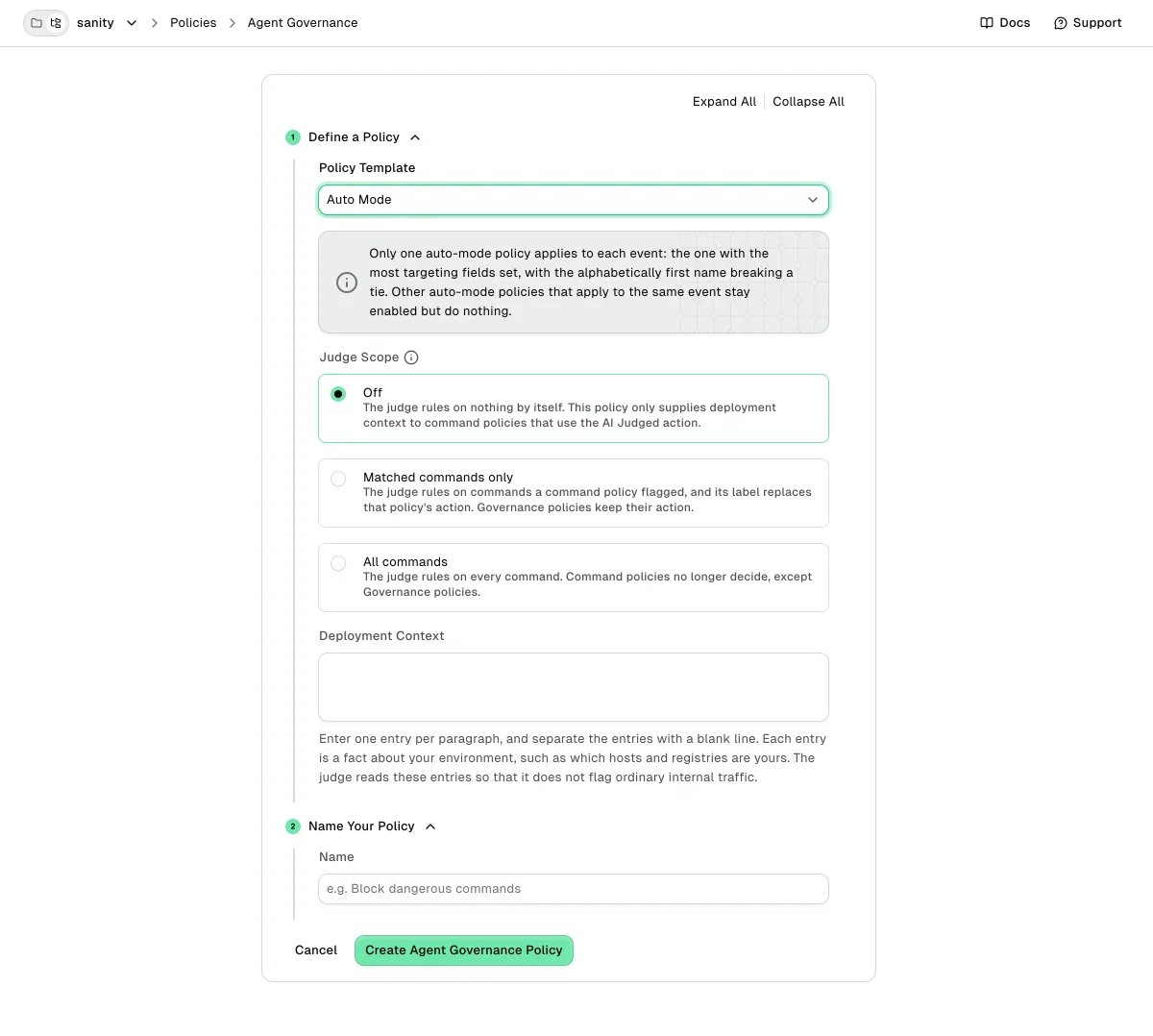
- Only one auto mode policy applies to each event: the one with the most scope fields set, with the alphabetically first name breaking a tie. Other matching auto mode policies stay enabled but do nothing.
- Endor Labs rejects an unscoped auto mode policy with Judge Scope set to Off and no deployment context, because it does nothing. A scoped policy with the same settings is valid, and it turns judging off for the repositories or users it matches.
- Deployment Context holds at most 64 entries, each 4,096 bytes or fewer, and 8,192 bytes in total. In the form, an entry that contains a blank line splits into two entries.
AI Judged action
The AI Judged action hands a command policy’s own matches to the judge, which picks the outcome. Use it for patterns that are too broad to block outright, such as remote access commands, where the context decides whether the command is safe. The action has the following constraints:- It applies only to Command Execution policies with Risk intent. Endor Labs rejects it on a Governance policy.
- The form offers AI Judged when you create a policy, and when you edit a policy that already uses it. To move an existing policy to AI Judged, create a new policy with that action.
- If the judge returns no answer, the hook releases the match, because an AI Judged policy has no action of its own to fall back to.
- The judge reads the deployment context of the auto mode policy that applies to the event, if any.
- endorctl versions earlier than v1.7.1173 do not recognize the action and let the matched command run.
Policy intent
Each Command Execution policy has an intent that controls whether the AI judge can override it:- Risk: The policy flags commands that might be dangerous, and the AI judge can override its action. Risk is the default.
- Governance: The policy enforces an organizational rule, and its action is final. The judge never releases a Governance match.
main or no package publishing from a developer machine. Intent changes nothing until you turn on the judge.
Set the intent under Intent when you create or edit a Command Execution policy. Through the REST API, set the intent field to POLICY_INTENT_RISK or POLICY_INTENT_GOVERNANCE. Endor Labs rejects an intent on an auto mode policy.
Inventory classification
Besides taking an action, a policy can tag the MCP servers and skills it matches in your inventory. Choose a value under Inventory Classification when you create a policy from the MCP Server Posture or Skill Access template. The tag is independent of the action, so a policy can block and tag, tag only, or act only. The tag sets the item’s review status in your inventory. Allow marks the item Approved. Block marks it Blocked (skills show Unapproved). When more than one policy matches the same item, Block beats Allow. The inventory record keeps the name of the policy that set each tag as evidence. Classification follows your current policy set, so turning a policy off lets the next event reclassify the item. Items no classification policy has matched show Unreviewed. These tags feed the Blocked summary cards on the MCP Servers and Skills inventory tabs. See Review your agent inventory to read them.Scope a policy by repository or user
Through the REST API, a policy can carry a scope that limits which events it applies to. A scope holds two regex lists:scope.repository_matchers: The event’s repository must match at least one pattern.scope.user_matchers: The event’s user must match at least one pattern.
Out-of-the-box policies
Every namespace inherits these system policies. Most are enabled by default and appear in the Agent Governance policy list next to the policies you create, under the exact names shown below. The tables mark the exceptions, which are disabled by default. These are the auto mode, malware, secrets, dependency risk, and session sandbox policies, plus the environment variable export and recursive-grep policies. Enable a disabled policy to turn it on for a namespace. An override matches on the policy name, so use these names verbatim when you override one. To change a policy for a namespace, override it instead of deleting it. See Policy propagation across namespaces to scope an override.MCP server policies
These policies govern MCP server and tool calls.Command execution policies
These policies govern the shell commands an agent runs. Blocked commands stop outright, and Endor Labs records alerted commands as they proceed. Asked commands wait for the developer to confirm, where the agent supports it. The Intent column shows whether the AI judge can override the policy. See Policy intent to review what each intent means.File access policies
These policies guard sensitive paths. Each blocks on a match and covers reads, writes, edits, and deletes, unless noted.Package Firewall bypass protection
These policies stop an agent from bypassing the Endor Labs Package Firewall by changing where a package manager fetches packages. They are enabled by default and block on a match. Every command policy in this group has Governance intent, so the AI judge never overrides it. The table groups the protection by theme. The Agent Governance policy list shows the 10 underlying system policies under their own names, each prefixed withPackage Firewall.
Auto mode policy
When enabled, this policy turns on the AI judge for commands that a Risk command policy matched.Malware protection
This policy runs the malware check instead of matching authored patterns.Secrets protection
These policies run the secrets check instead of matching authored patterns.Dependency risk protection
This policy runs the dependency risk check instead of matching authored patterns.Session sandbox policies
These policies match sessions whose sandbox posture is disabled. Both are disabled by default. Enable the alert policy first to see which sessions would match before you enable the block policy. Don’t enable the block policy for Claude Code developers whose sandbox turns on only through MDM, managed settings, server-managed settings, or the--settings flag. Endor Labs doesn’t read those sources yet, so it resolves those sessions as disabled and blocks them.
GitHub Copilot can’t stop a session at session start, so a match on a Copilot session only records the violation.
View, edit, or delete a policy
- Select User menu > Policies & Rules from the left sidebar, then select Agent Governance.
- Select the policy name to open its full configuration.
- To change the policy, edit any field and click Update Agent Governance Policy.
- To remove the policy, confirm in the Delete this Policy? prompt. Hooks pick up the deletion at the next session start.
Local policy cache
When the agent starts a session, endorctl ai-audit pulls a snapshot of your policies and writes it to~/.endorctl/aigovernance/endor-policies-<namespace>.jsonl. The hook evaluates every event in that session against the cached snapshot, so pattern-based enforcement happens without a network round-trip. Malware and dependency risk policies are the exception: a matching install or manifest edit triggers a live lookup, and the check fails open if the lookup fails. The AI judge also calls Endor Labs for each command it reviews.
The cache file uses one JSON object per line, each representing a single policy. You do not need to edit it. If the policy download fails at session start, the hook keeps the last snapshot it fetched, so your overrides stay in effect.
Policy edits take effect at the next session start. New and edited policies take effect on a developer’s machine the next time the agent starts a session and refreshes the local policy cache. Tell developers to restart the agent (or open a new session) to pick up policy edits.
Policy propagation across namespaces
Policies you create in a namespace automatically propagate to its sub-namespaces. The policy form always saves with propagation on, so any policy you save inacme shows up for acme.team-a, acme.team-a.proj-1, and every other descendant. Through the REST API, set the propagate field to false to keep a policy out of sub-namespaces.
When the Agent Governance policy list loads for a namespace, it returns:
- Policies authored in that exact namespace.
- Policies authored in any ancestor namespace.
- Built-in system policies from Endor Labs.
acme.team-a.proj-1, a policy named block-rm-rf saved in acme.team-a overrides the same name in acme or the system catalog. A copy saved in acme.team-a.proj-1 itself overrides all three.
Use the closest-match rule to scope a change narrowly:
- To turn a system or inherited policy off in one namespace, toggle it off from the Agent Governance policy list. This creates a local override in that namespace and leaves the policy unchanged in ancestors and siblings.
- To change a system or inherited policy, override it: save a policy with the same name in the namespace where you want the change. Use a team’s namespace to scope it to that team, or the tenant root to apply it tenant-wide.
- Toggle a system policy off rather than trying to delete it.
Next steps
Continue with the following pages:- See Deploy hooks for Cursor, Claude Code, Codex, or GitHub Copilot to put your policies in front of agent activity.
- See Triage policy violations to set your daily review workflow.
- See Connect the Anthropic Compliance API to match session policies on your developers’ organization roles and groups.