

- Skills discovered on developer machines at session start
- MCP servers your governed agents call
Score scale
Every Endor Score runs from1 to 10 on a single dimension: higher is safer. A score of 1 means the evaluator found severe risk. A score of 10 means it found none.
For MCP servers, the headline score is the minimum across the four scored categories that actually executed a check. The categories are Supply Chain and Provenance, Authentication and Authorization, Operational Hygiene, and Input Validation and Injection. A category with no applicable checks does not pull the score down.
Bands and risk levels
For at-a-glance triage, the Coding Agent Governance overview and inventory show the numeric score. Skills fall into four bands based on their score:The Skills pie chart on the Overview page currently labels the Caution and Safe bands as Suspicious and Approved.
How MCP servers are scored
The MCP evaluator runs a set of static checks against each server’s configuration and published source across seven dimensions. The first four dimensions carry their own scores. The other three contribute findings and evidence without a per-dimension score. Each scored dimension reports its own1-10 score and a short evidence string that lists the checks that fired in that category. Checks that need a live connection to the server never run, so dimensions score from source and configuration alone.
Endor Labs re-scores a server when its configuration changes, for example a new command, endpoint, transport, or environment variable name.
OWASP LLM Top 10 coverage
The evaluator tags every MCP finding with the OWASP LLM Top 10 category it represents, so a low score traces back to a recognized risk class. The MCP evaluator covers these categories:How skills are scored
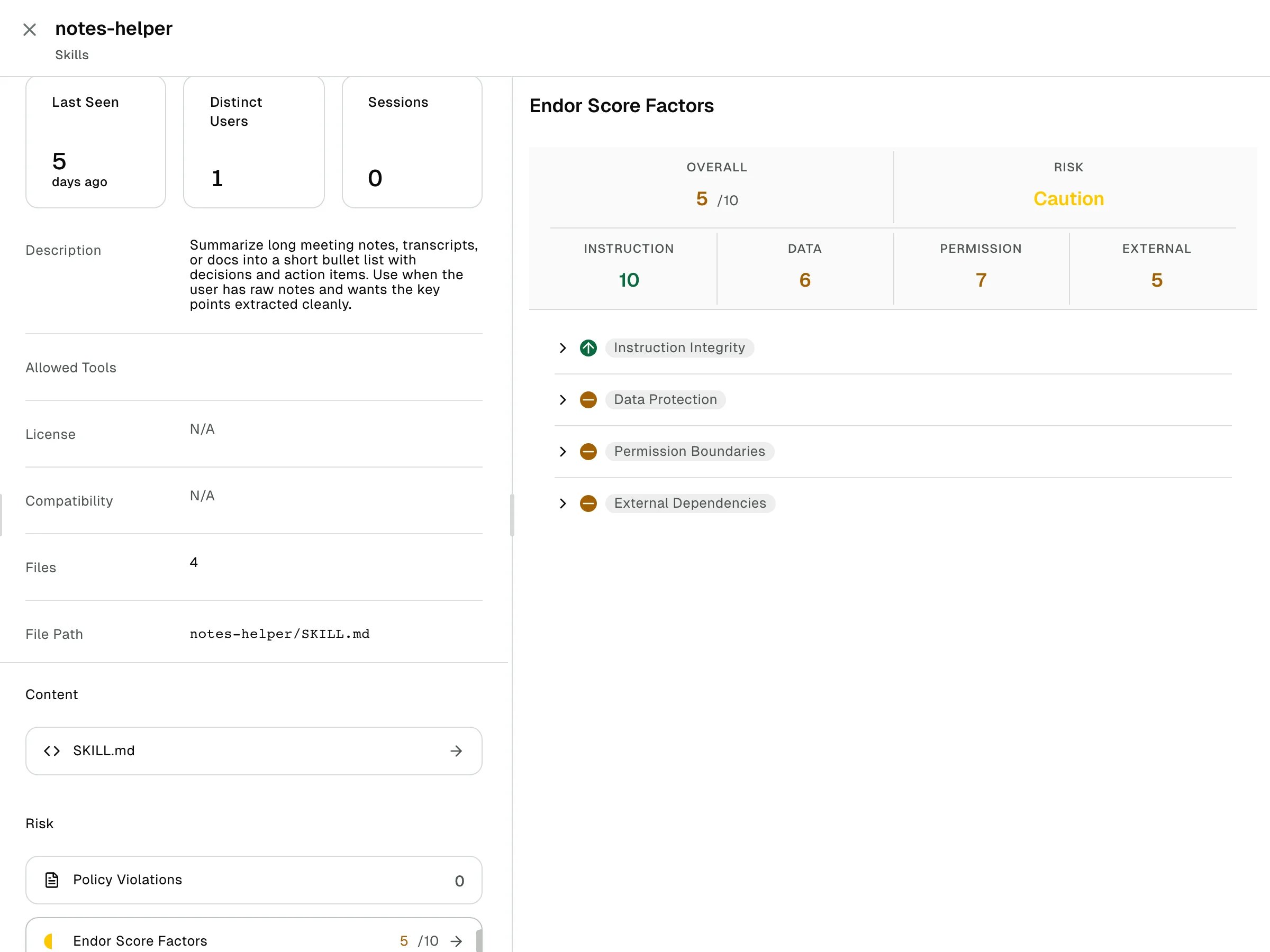
An Endor Labs backend large-language-model workflow scores skills by reading theSKILL.md content the hook discovers. The workflow produces a 1-10 score on four dimensions.
The overall skill score is the minimum of the four dimension scores. Each dimension carries its own evidence string explaining the score. Scoring re-runs when the SKILL.md content hash changes, so Endor Labs re-evaluates an edit to a previously approved skill automatically.
The Endor Score Factors side panel on a skill’s detail drawer shows the verdict. It lists the overall score and risk band, the four dimension scores, and an expandable evidence row per dimension. In this example, a skill that presents as a harmless notes summarizer lands in Caution because its bundle carries scripts the evaluator cannot confirm are inert.
What is not evaluated
The Endor Score is source-only. The evaluator never runs an MCP server or executes a skill to probe it. MCP scoring uses deterministic static checks. Skill scoring uses a large language model workflow, so it is not strictly deterministic.- MCP servers are evaluated from configuration and published source. Live runtime probes are disabled in the Coding Agent Governance context.
- Skills are evaluated from
SKILL.mdcontent captured at session start. They are not exercised. - Tool name collisions between MCP servers active in the same session, and periodic re-evaluation of MCP configuration drift, are not yet flagged.
Where you see the score
You can see the score in the following locations:- Skills inventory: The Endor Score column shows the score. Select a row, then select Endor Score Factors under Risk to open the per-dimension breakdown in a side panel.
- MCP Servers inventory: Select a server, then select Endor Score Factors under Risk to open the score and per-dimension findings in a side panel.
- Overview: The Skills pie chart groups loaded skills by band across the selected time range.
Next steps
Continue with the following pages:- See Write a policy to block or alert on items above a risk threshold.
- See Review your agent inventory for the tables where the score appears.