

- Select Package Firewall from the left sidebar.
-
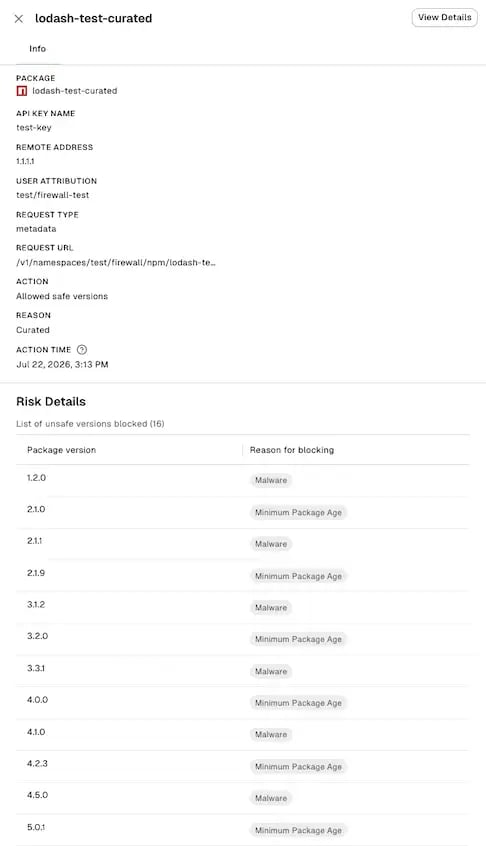
Select an event to view the following details:
- Info: Package name, package version, API key, remote address, user attribution, request type, request URL, action taken, the reason the event was flagged, and when the event occurred.
<user>@<machine>by default. The label is free-form, so a machine running a customized script reports whatever value that script sets. See User attribution to learn more. For malware events, you can also view the following details:- Risk Details: Explanation of why the package was flagged and remediation guidance.
- Metadata: Ecosystem, package release date, advisory published date, CWE ID, and OSV ID when available.
- Malware Info: Malware detection record in raw JSON format.
For VS Code extensions, the Package Firewall records only malware and minimum package age events.
Filter Package Firewall logs
Use filters to narrow Package Firewall logs by ecosystem, action, rule reason, or time.- Select Package Firewall from the left sidebar.
- Toggle the filter panel to show the filters.
-
Set any of the following filters to narrow the log list.
- Ecosystem - Filter logs by their package ecosystem.
- Action: Filter logs by the action taken on the package installation, either Warning, Blocked, or Allowed safe versions.
- Reason: Filter logs by why the package was flagged, which can be Malware detected, Minimum package age not met, Restricted license, or Curated.
- All Time - Filter logs by when the event was recorded. You can select All Time, Last Day, Last Week, Last Month, Last 60 Days, Last 90 Days, or a custom range.
endorctl. See Query Package Firewall logs using endorctl.
Query Package Firewall logs using endorctl
The Package Firewall logs record every action the firewall takes on package installation requests. You can view them by querying theendorctl API.
-
To list all Package Firewall logs in your namespace, run the following command. Replace
<namespace>with your namespace. -
To list logs only for a specific ecosystem, add a filter.
Replace:
<ecosystem_variable>withECOSYSTEM_NPMfor npm,ECOSYSTEM_PYPIfor PyPI,ECOSYSTEM_GOfor Go,ECOSYSTEM_MAVENfor Maven, andECOSYSTEM_VSCODEfor VS Code.<namespace>with your namespace.
-
To list logs for a specific package in an ecosystem, use a filter with
spec.ecosystem,spec.package_name, andspec.package_version.Replace:<namespace>with your namespace.<ecosystem_variable>withECOSYSTEM_NPMfor npm,ECOSYSTEM_PYPIfor PyPI,ECOSYSTEM_GOfor Go,ECOSYSTEM_MAVENfor Maven, andECOSYSTEM_VSCODEfor VS Code.<package_name>with the package name you want to query.<package_version>with the package version you want to query.
-
To list logs attributed to a specific developer and machine, use a filter with
spec.user.Replace:<namespace>with your namespace.<attributed-user>with the attribution label you want to query, in the form<user>@<machine>.
-
To count events for each attributed user, group logs by
spec.user. Replace<namespace>with your namespace.
The API key created with
SYSTEM_ROLE_PACKAGE_FIREWALL routes traffic through the Package Firewall. It does not grant access to the Package Firewall Log API.To query logs, create an API key with at least the Read-only role. For more information about roles and permissions, see Authorization roles.