

-
Block the installation and Artifactory returns
HTTP 404if the package is found in the Endor Labs malware database, or if a policy condition matches with Block. The Package Firewall records a log with the package, version, and reason. - Allow the installation if a policy condition matches with Warn. The Package Firewall records a warning log with the package, version, and reason.
- Allow the installation if the package passes all checks. No log is recorded.
HTTP 404 when it blocks a request without surfacing the specific reason. To see why a package was blocked, review the Package Firewall logs.
JFrog Artifactory requirementYou must have a JFrog Artifactory instance with permission to create remote repositories and configure credentials.
Configure the Package Firewall
Complete the following steps to integrate JFrog Artifactory with the Endor Labs Package Firewall:- Create an API key for the Package Firewall.
- Configure JFrog Artifactory.
- Local setup for developers.
- Verify your setup.
Create an API key for the Package Firewall
Create an API key dedicated to the Package Firewall so that can authenticate to it. You can create it through one of the following methods:- Using the Endor Labs user interface, with the Package Firewall User role. See API keys to learn more.
- Using endorctl, with the
SYSTEM_ROLE_PACKAGE_FIREWALLrole. Make sure to install and configure endorctl before you create the key.
<namespace>with your namespace.<API key name>with the name of the API key for the Package Firewall use case.<YYYY-MM-DDTHH:MM:SSZ>with the API key expiration in ISO 8601 UTC format, for example2026-12-31T23:59:59Z.
- API key:
spec.key - API secret:
spec.secret
Configure JFrog Artifactory
Configure a remote repository in JFrog Artifactory for each package type you want to route through the Package Firewall. Use the steps below for npm, PyPI, or Go packages.Configure JFrog Artifactory for an npm remote repository
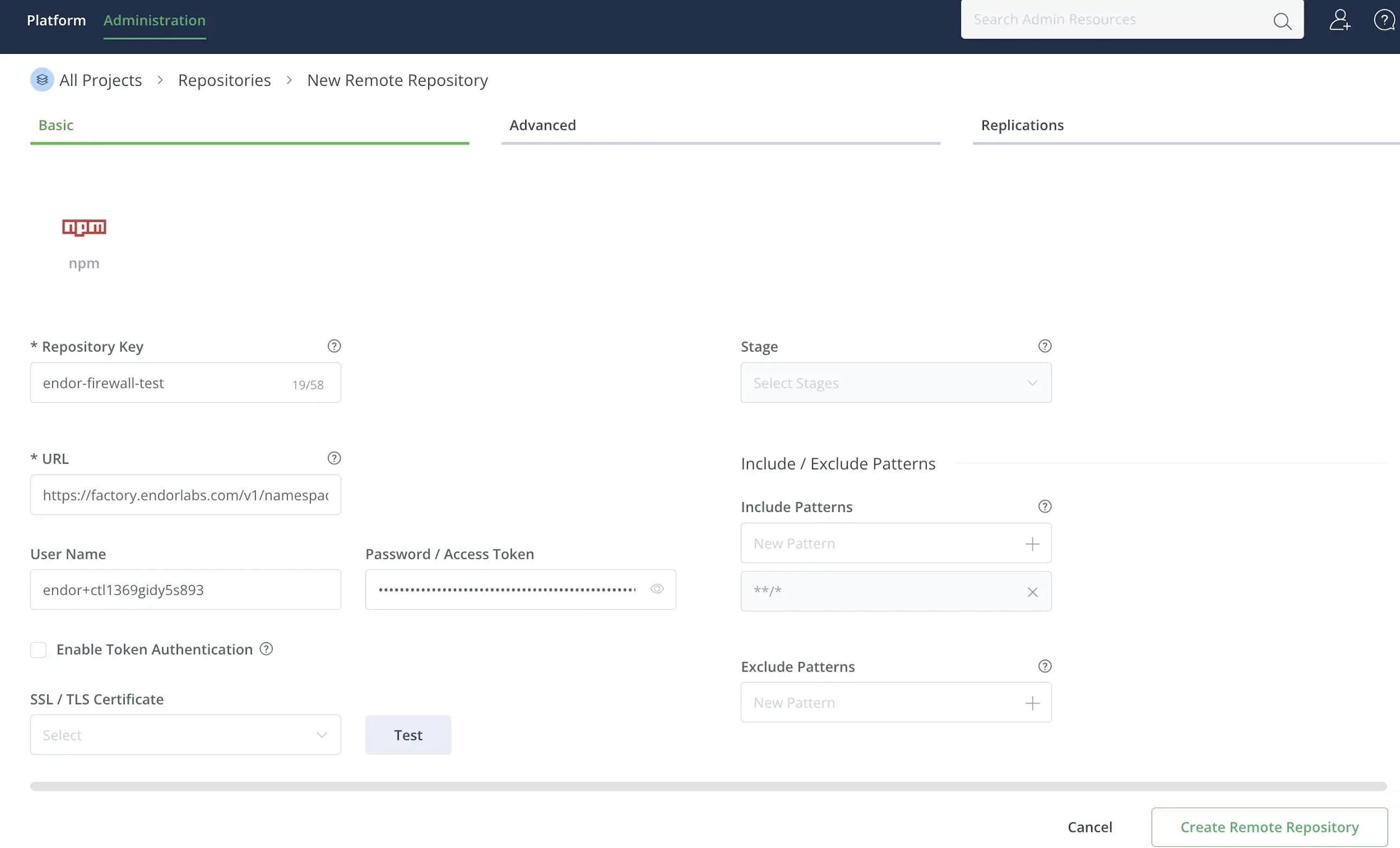
Configure JFrog Artifactory for an npm remote repository
- Log in to JFrog Artifactory.
- Select Administration > Repositories from the left sidebar.
- Click Create a Repository and select Remote.
- Select npm as the package type.
-
Enter a Repository Key, for example
endor-firewall-npm. -
Enter the repository URL:
https://factory.endorlabs.com/v1/namespaces/<namespace>/firewall/npm/. Replace<namespace>with your Endor Labs namespace. - Enter the User Name and Password you saved when creating the API key.
-
Click Create Remote Repository.
Configure JFrog Artifactory for a PyPI remote repository
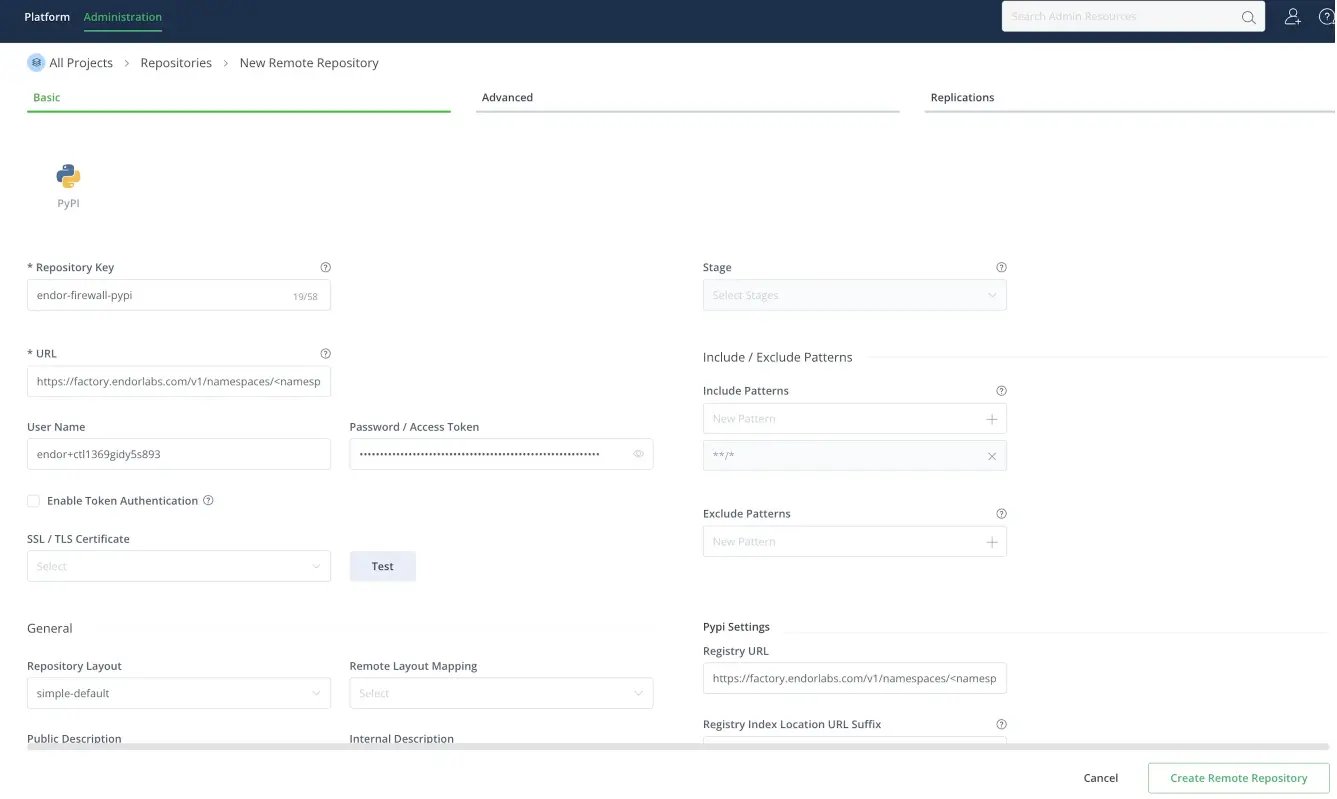
Configure JFrog Artifactory for a PyPI remote repository
- Log in to JFrog Artifactory.
- Select Administration > Repositories from the left sidebar.
- Click Create a Repository and select Remote.
- Select PyPI as the package type.
-
Enter a Repository Key, for example
endor-firewall-pypi. -
Enter the repository URL:
https://factory.endorlabs.com/v1/namespaces/<namespace>/firewall/pypi/. Replace<namespace>with your Endor Labs namespace. - Enter the User Name and Password you saved when creating the API key.
- In PyPI Settings, set Registry URL to the same URL you entered in step 6.
-
Click Create Remote Repository.
Configure JFrog Artifactory for a Go virtual repository
Configure JFrog Artifactory for a Go virtual repository
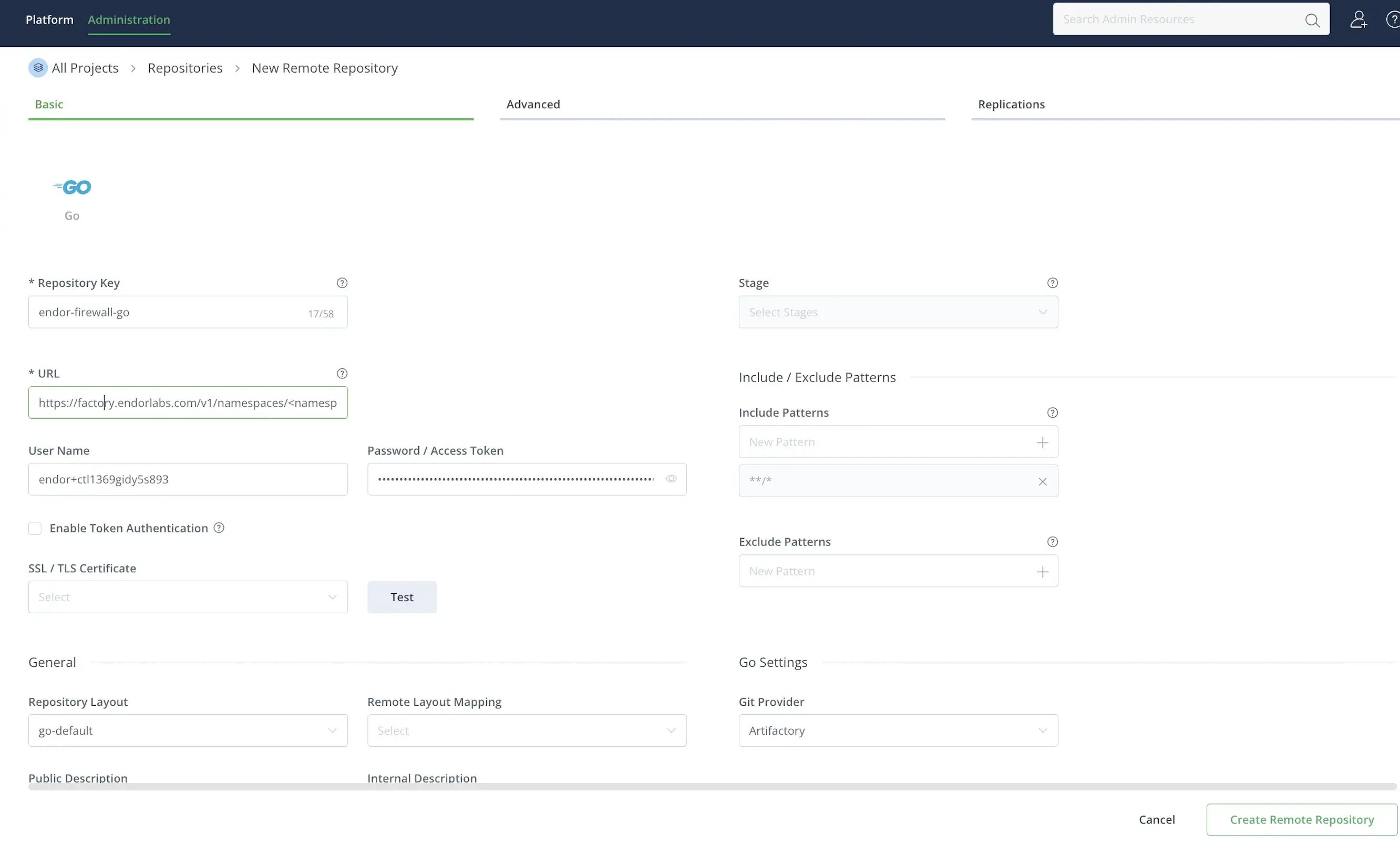
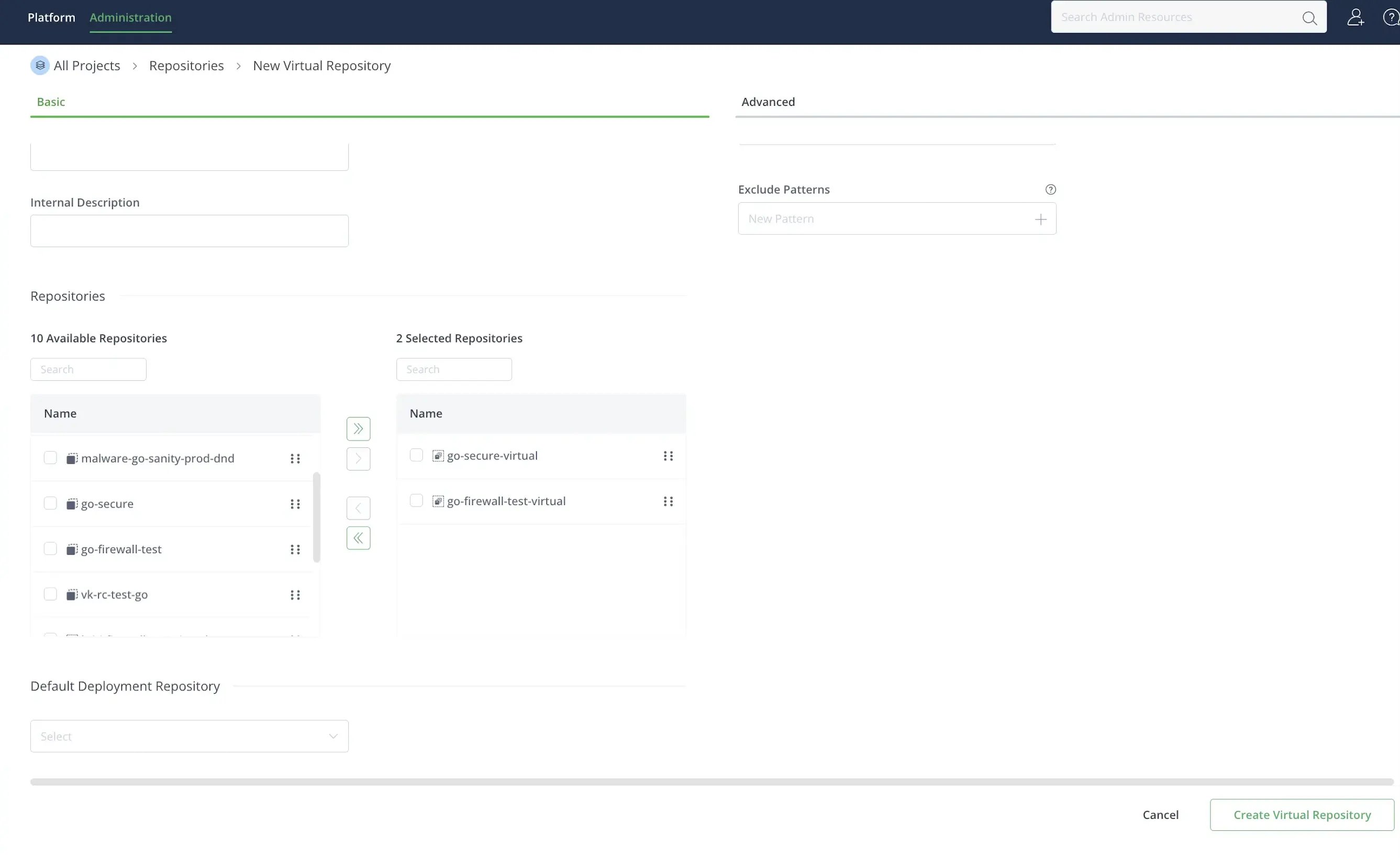
The Package Firewall uses a virtual repository URL that aggregates one or more Go remote repositories. Each remote repository routes Go module requests through the Package Firewall. The virtual repository gives clients a single endpoint that forwards each request to the matching remote repository. You can use a single virtual repository to link all Go remote repositories.To create a Go remote repository:
- Log in to JFrog Artifactory.
- Select Administration > Repositories from the left sidebar.
- Click Create a Repository and select Remote.
- Select Go as the package type.
-
Enter a Repository Key, for example
endor-firewall-go. -
Enter the repository URL:
https://factory.endorlabs.com/v1/namespaces/<namespace>/firewall/go/. Replace<namespace>with your Endor Labs namespace. - Enter the User Name and Password you saved when creating the API key.
-
Click Create Remote Repository.
- Select Administration > Repositories from the left sidebar.
- Click Create a Repository and select Virtual.
- Select Go as the package type.
-
Enter a Repository Key, for example
endor-firewall-go-virtual. - Under Repositories, select the remote repositories you want to add and click >.
-
Click Create Virtual Repository.
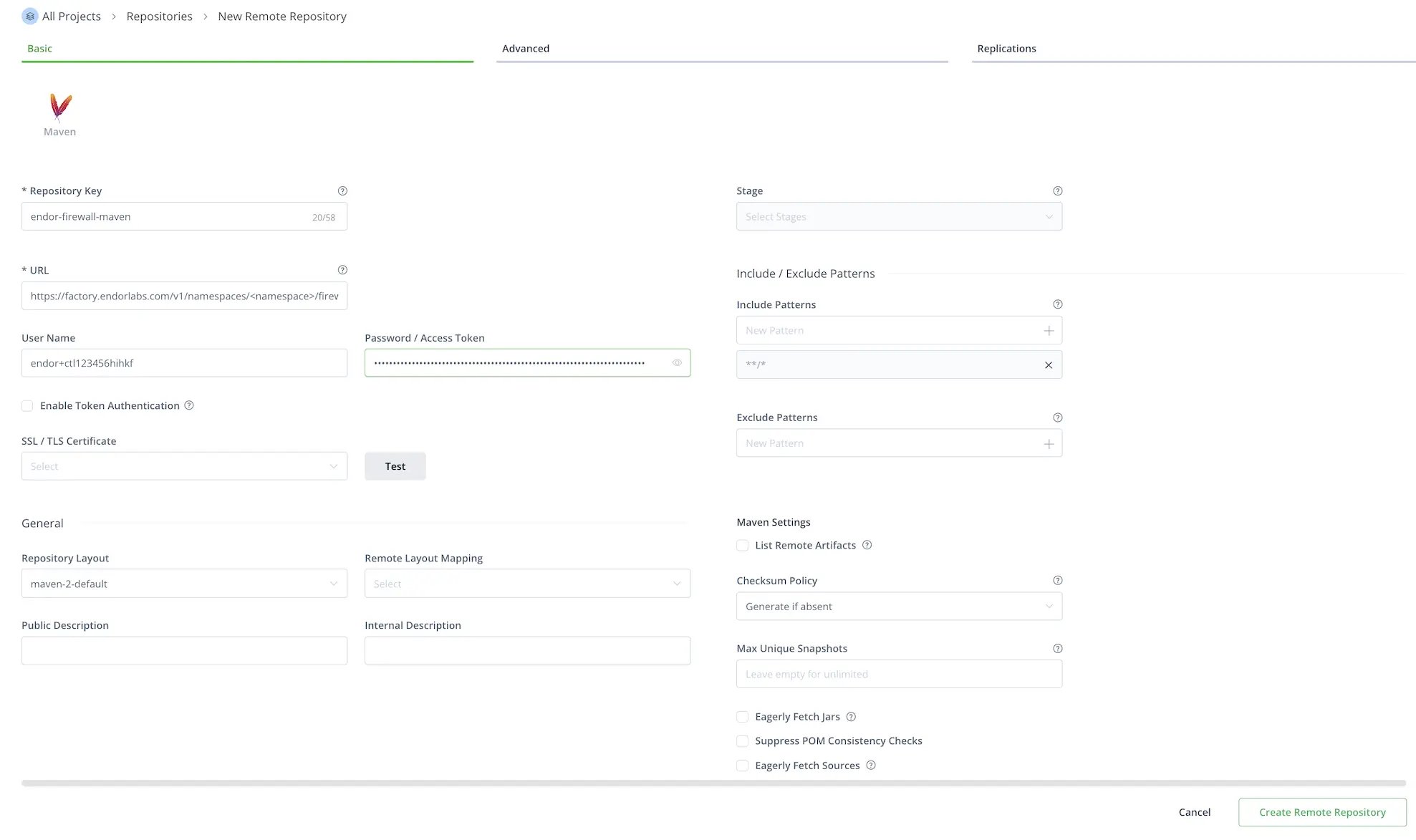
Configure JFrog Artifactory for a Maven remote repository
Configure JFrog Artifactory for a Maven remote repository
- Log in to JFrog Artifactory.
- Select Administration > Repositories from the left sidebar.
- Click Create a Repository and select Remote.
- Select Maven as the package type.
-
Enter a Repository Key, for example
endor-firewall-maven. -
Enter the repository URL:
https://factory.endorlabs.com/v1/namespaces/<namespace>/firewall/maven/. Replace<namespace>with your Endor Labs namespace. - Enter the User Name and Password you saved when creating the API key.
- Disable Offline to allow Artifactory to fetch remote artifacts.
- Select Advanced and enable Store Artifacts Locally. Optionally, enable Priority Resolution to prioritize this repository over other repositories.
-
Click Create Remote Repository.
Local setup for developers
Update your package manager to use Artifactory as its source, routing all installs through the Package Firewall instead of the public registry. Once you create the Artifactory remote:- Navigate to Administration > Repositories.
- Click the vertical three dots next to the repository you configured and select Set Me Up. For Go, select the virtual repository you created.
- Enter Your JFrog account password if prompted.
- Click Generate Token & Create Instructions.
-
Follow the instructions to configure your local machine based on your package type. Edit
.npmrcfor npm,pip.conffor pip, orsettings.xmlfor Maven. For Go modules, select Resolve, copy the URL it provides, and run the following command. Replace<virtual-repository-url>with the copied URL. Ensure to URL-encode any@in the username as%40.Refer to JFrog Artifactory documentation for more information.
- Run the following command to verify that your local client is pointing to the Artifactory repository. Ensure the output matches the Artifactory remote URL you configured, or the virtual repository URL for Go modules.
- For npm packages, run
npm config get registry. - For PyPI packages, run
pip3 config list | grep index-url. - For Go modules, run
go env GOPROXY. - For Maven packages, run
mvn dependency:resolve -s settings.xml.
- For npm packages, run
Verify your setup
To verify your setup, install a package that Endor Labs has classified as malware. The Package Firewall should block the installation and return anHTTP 404.
The following are examples of packages classified as malware by Endor Labs.
npm
npm
Run the following command to test the Package Firewall with npm.When the Package Firewall blocks the package, the output looks similar to the following. The
E404 error code and 404 Not Found response confirm that the firewall blocked the package.pip
pip
Run the following command to test the Package Firewall with pip.When the Package Firewall blocks the package, the output looks similar to the following. The
404 response confirms that the firewall blocked the package.Go
Go
Run the following command to test the Package Firewall with Go.When the Package Firewall blocks the package, the output looks similar to the following. The
404 response confirms that the firewall blocked the package.Maven
Maven
Add When the Package Firewall blocks the package, the output looks similar to the following. JFrog Artifactory does not serve the artifact, so resolution fails with a missing POM warning and a
io.github.endorlabs:endor-java-webapp-demo:4.1 as a dependency in your pom.xml, then run the following command to test the Package Firewall with Maven.Could not find artifact error.Troubleshooting and FAQ
What if Artifactory has already cached a package that is declared malicious later?
What if Artifactory has already cached a package that is declared malicious later?
If Endor Labs flags a package as malware after Artifactory cached it, Artifactory continues to serve it until the cache expires. Use a short cache duration to reduce that window.
How do I troubleshoot connection issues?
How do I troubleshoot connection issues?
- Verify that the Package Firewall URL in Artifactory is correct.
- Ensure network connectivity from Artifactory to the Package Firewall.
- Ensure the firewall rules allow outbound connections from Artifactory.
How do I troubleshoot authentication issues?
How do I troubleshoot authentication issues?
- Verify the API key and secret are correct and that the key has the Package Firewall User role.
- Ensure that the credentials are in the format Artifactory expects.
- Check the Artifactory logs for authentication errors.
How do I troubleshoot cache issues?
How do I troubleshoot cache issues?
- Verify that Artifactory has sufficient storage for the cache.
- Set cache expiration to short durations so that more requests hit the Package Firewall.
- Check the cache hit and miss rates. Clear the cache if you need to test with a fresh request.