> ## Documentation Index
> Fetch the complete documentation index at: https://docs.endorlabs.com/llms.txt
> Use this file to discover all available pages before exploring further.

# Browse agents in the Agents Hub

> <Badge color="green">Beta</Badge> <br /> Find an agent in the catalog, read what it does, and install it in your AI coding assistant.

export const YamlTable = ({children, data: propData, content}) => {
  const KV_RE = /^([A-Za-z][A-Za-z0-9_()/#\s-]+?):\s*(.+)$/;
  const INLINE_MD_RE = /(\[([^\]]+)\]\(([^)]+)\))|(`([^`]+)`)|(\*\*([^*]+)\*\*)|(\*([^*]+)\*)/g;
  const YES_RE = /^-yes-$/i;
  const NO_RE = /^-no-$/i;
  const LIMITED_RE = /^-(limited|partial)-$/i;
  const NA_RE = /^-(na|none)-$/i;
  const NA2_RE = /^-na2-$/i;
  const SIMPLE_TAG_RE = /(<br\s*\/?>)|(<p\s*\/?>)|(-note-)|(-warning-)/gi;
  const tryParseKV = trimmed => {
    const m = KV_RE.exec(trimmed);
    return m ? {
      key: m[1],
      value: m[2].trim()
    } : null;
  };
  const registerKey = (key, seenKeys, orderedKeys) => {
    if (!seenKeys.has(key)) {
      orderedKeys.push(key);
      seenKeys.add(key);
    }
  };
  const flushEntry = (currentEntry, entries) => {
    if (Object.keys(currentEntry).length > 0) entries.push(currentEntry);
  };
  const parseDashPrefixed = (lines, entries, orderedKeys, seenKeys) => {
    let currentEntry = {};
    let inEntry = false;
    for (const line of lines) {
      const trimmed = line.trim();
      if (trimmed.startsWith('- ')) {
        if (inEntry) entries.push(currentEntry);
        currentEntry = {};
        inEntry = true;
        const kv = tryParseKV(trimmed.substring(2).trim());
        if (kv) {
          registerKey(kv.key, seenKeys, orderedKeys);
          currentEntry[kv.key] = kv.value;
        }
      } else if (inEntry && trimmed !== '') {
        const kv = tryParseKV(trimmed);
        if (kv) {
          registerKey(kv.key, seenKeys, orderedKeys);
          currentEntry[kv.key] = kv.value;
        }
      }
    }
    flushEntry(currentEntry, entries);
  };
  const parseBlankSeparated = (lines, entries, orderedKeys, seenKeys) => {
    let currentEntry = {};
    let inEntry = false;
    for (const line of lines) {
      const trimmed = line.trim();
      if (trimmed === '') {
        if (inEntry) {
          flushEntry(currentEntry, entries);
          currentEntry = {};
          inEntry = false;
        }
        continue;
      }
      const kv = tryParseKV(trimmed);
      if (!kv) continue;
      const isNewEntry = !line.startsWith(' ') && !line.startsWith('\t');
      if (isNewEntry && inEntry && Object.keys(currentEntry).length > 0) {
        entries.push(currentEntry);
        currentEntry = {};
      }
      registerKey(kv.key, seenKeys, orderedKeys);
      currentEntry[kv.key] = kv.value;
      inEntry = true;
    }
    flushEntry(currentEntry, entries);
  };
  const normalizeEntries = (entries, orderedKeys) => entries.map(entry => {
    const filled = {};
    for (const key of orderedKeys) filled[key] = entry[key] || '';
    return filled;
  });
  const parseYamlTableContent = contentStr => {
    if (!contentStr) return [];
    const entries = [];
    const orderedKeys = [];
    const seenKeys = new Set();
    const lines = contentStr.split('\n');
    if (lines.some(line => line.trim().startsWith('- '))) {
      parseDashPrefixed(lines, entries, orderedKeys, seenKeys);
    } else {
      parseBlankSeparated(lines, entries, orderedKeys, seenKeys);
    }
    return normalizeEntries(entries, orderedKeys);
  };
  const processText = text => {
    if (!text) return text;
    const parts = [];
    let keyIndex = 0;
    let lastIndex = 0;
    let match;
    while ((match = INLINE_MD_RE.exec(text)) !== null) {
      if (match.index > lastIndex) parts.push(text.slice(lastIndex, match.index));
      if (match[1]) {
        parts.push(<a key={keyIndex++} href={match[3]}>{match[2]}</a>);
      } else if (match[4]) {
        parts.push(<code key={keyIndex++}>{match[5]}</code>);
      } else if (match[6]) {
        parts.push(<strong key={keyIndex++}>{match[7]}</strong>);
      } else if (match[8]) {
        parts.push(<em key={keyIndex++}>{match[9]}</em>);
      }
      lastIndex = match.index + match[0].length;
    }
    if (lastIndex < text.length) parts.push(text.slice(lastIndex));
    if (parts.length === 0) return text;
    const keyRef = {
      current: keyIndex
    };
    return expandHtmlTags(parts, keyRef);
  };
  const processBadges = text => {
    if (!text || typeof text !== 'string') return text;
    if (YES_RE.test(text)) return <span className="yt-badge-yes" role="img" aria-label="Supported" title="Supported">✓</span>;
    if (NO_RE.test(text)) return <span className="yt-badge-no" role="img" aria-label="Not supported" title="Not supported">✗</span>;
    if (LIMITED_RE.test(text)) return <span className="yt-badge-limited" role="img" aria-label="Partially supported" title="Partially supported">◐</span>;
    if (NA_RE.test(text) || NA2_RE.test(text)) return <span className="yt-sr-only" title="Not applicable">Not applicable</span>;
    return processText(text);
  };
  const cellClassName = text => {
    if (!text || typeof text !== 'string') return undefined;
    if (NA_RE.test(text)) return 'yt-cell-na';
    if (NA2_RE.test(text)) return 'yt-cell-na2';
    return undefined;
  };
  const expandSimpleTags = (str, keyRef) => {
    const result = [];
    let last = 0;
    SIMPLE_TAG_RE.lastIndex = 0;
    let m;
    while ((m = SIMPLE_TAG_RE.exec(str)) !== null) {
      if (m.index > last) result.push(str.slice(last, m.index));
      if (m[1]) {
        result.push(<br key={keyRef.current++} />);
      } else if (m[2]) {
        result.push(<br key={keyRef.current++} />, <br key={keyRef.current++} />);
      } else if (m[3]) {
        result.push(<span key={keyRef.current++} className="yt-badge-note" style={{
          fontWeight: 600
        }}>Note: </span>);
      } else if (m[4]) {
        result.push(<span key={keyRef.current++} className="yt-badge-warning" style={{
          fontWeight: 600
        }}>Warning: </span>);
      }
      last = m.index + m[0].length;
    }
    if (last < str.length) result.push(str.slice(last));
    return result;
  };
  const expandHtmlTags = (chunks, keyRef) => {
    const out = [];
    for (const chunk of chunks) {
      if (typeof chunk === 'string') {
        out.push(...expandSimpleTags(chunk, keyRef));
      } else {
        out.push(chunk);
      }
    }
    return out;
  };
  const extractText = node => {
    if (node === null || node === undefined) return '';
    if (typeof node === 'string') return node;
    if (typeof node === 'number') return String(node);
    if (typeof node === 'boolean') return '';
    if (Array.isArray(node)) return node.map(extractText).join('');
    if (node && typeof node === 'object' && node.type) {
      const props = node.props || ({});
      if (typeof props.children === 'string') return props.children;
      if (props.children) return extractText(props.children);
      return '';
    }
    return String(node || '');
  };
  const [mounted, setMounted] = useState(false);
  useEffect(() => {
    setMounted(true);
  }, []);
  const data = useMemo(() => {
    if (propData) return propData;
    if (content && typeof content === 'string') return parseYamlTableContent(content);
    if (!children) return [];
    if (typeof children === 'string') return parseYamlTableContent(children);
    const childrenArray = Array.isArray(children) ? children : [children];
    return parseYamlTableContent(childrenArray.map(extractText).join('').trim());
  }, [children, propData, content]);
  const columns = useMemo(() => {
    if (!data || data.length === 0) return [];
    const firstRow = data[0];
    if (!firstRow || typeof firstRow !== 'object') return [];
    return Object.keys(firstRow);
  }, [data]);
  if (!mounted) return null;
  if (!data || data.length === 0) return null;
  const rowKey = row => columns.map(c => row[c] || '').join('|');
  return <table>
      <thead>
        <tr>
          {columns.map(col => <th key={col}>{col.replaceAll('_', ' ')}</th>)}
        </tr>
      </thead>
      <tbody>
        {data.map(row => <tr key={rowKey(row)}>
            {columns.map(col => <td key={col} className={cellClassName(row[col])}>{processBadges(row[col])}</td>)}
          </tr>)}
      </tbody>
    </table>;
};

The Agents Hub catalog lists every agent Endor Labs publishes for your tenant. This page shows you how to find an agent, read what it does, and install it in your AI coding assistant.

## Open the catalog

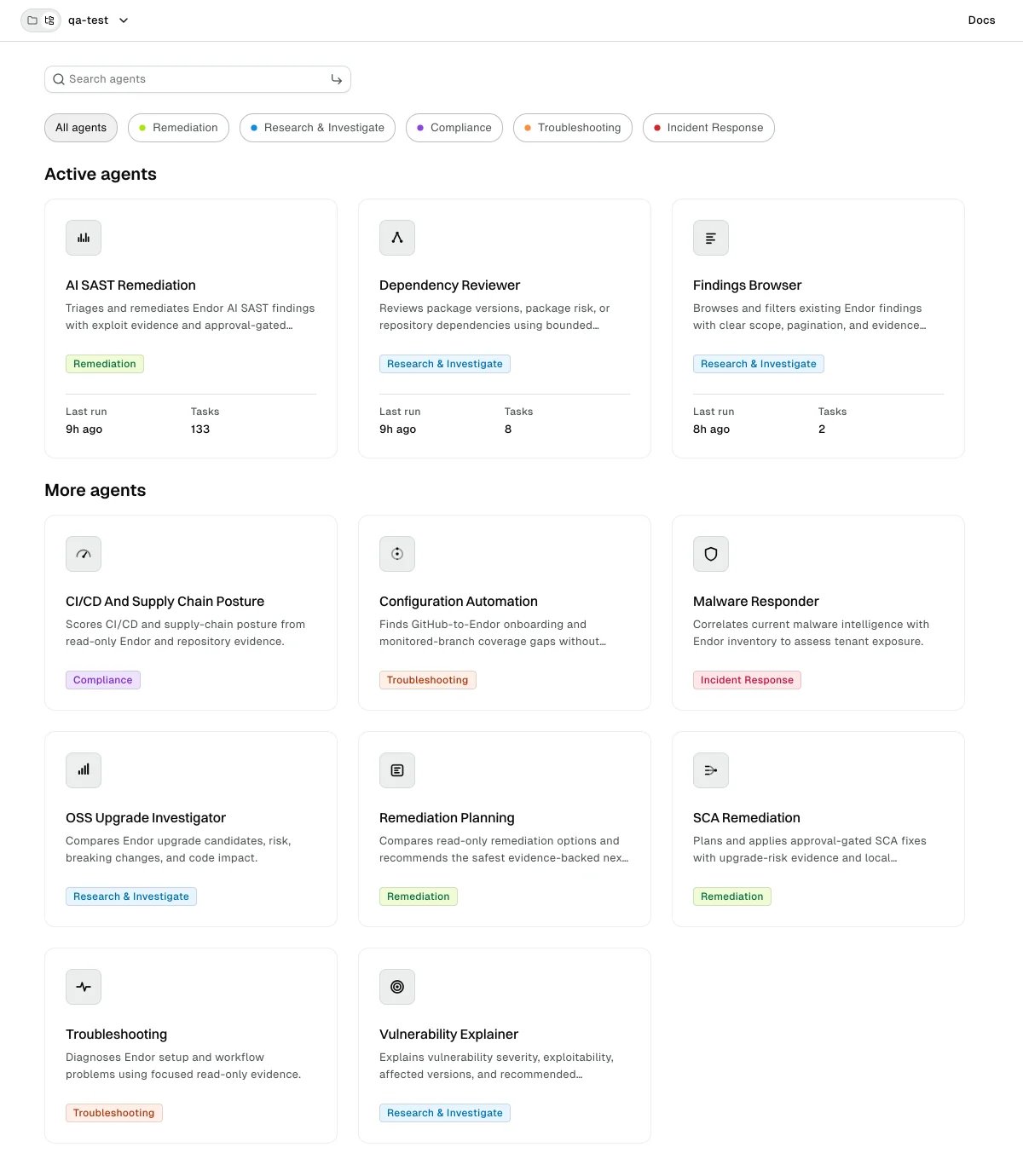
Select **Agents Hub** from the left sidebar. The catalog groups agents into up to two sections.

* **Active agents**: Agents that ran recently in your tenant. This section appears only when at least one agent has recent activity.
* **More agents**: The rest of the catalog. When no agent has recent activity, the catalog shows a single unlabeled grid instead.

<img src="https://mintcdn.com/endorlabs-b4795f4f/a6Zam66a5U4JfAtk/images/secure-ai-coding/agents-hub/agents-hub-catalog.webp?fit=max&auto=format&n=a6Zam66a5U4JfAtk&q=85&s=ef973531d804c65e022975a6076fdbf5" alt="Agents Hub catalog with Active agents and More agents sections" width="1200" height="1380" data-path="images/secure-ai-coding/agents-hub/agents-hub-catalog.webp" />

Each agent appears as a card with an icon, its name, and a short description. A card under **Active agents** also shows a **Last run** time and a **Tasks** count. See [Agent activity](/secure-ai-coding/agents-hub/activity) for what those numbers mean.

## Find an agent

You can narrow the catalog by category, by search term, or both.

### Filter by category

Above the grid, the catalog shows a chip for **All agents** and a chip for each category present in the catalog. Select a category to show only its agents, and select it again to return to **All agents**. You can select one category at a time.

Categories describe the kind of work an agent does.
<YamlTable>
  {`
    - Category: Remediation
    What_these_agents_do: Fix findings, such as planning and applying dependency upgrades or code fixes.
    - Category: Research & Investigate
    What_these_agents_do: Gather and explain evidence, such as browsing findings or reviewing a dependency.
    - Category: Compliance
    What_these_agents_do: Assess posture against expectations, such as CI/CD and supply chain checks.
    - Category: Troubleshooting
    What_these_agents_do: Diagnose problems, such as failing scans or configuration gaps.
    - Category: Incident Response
    What_these_agents_do: Respond to active threats, such as assessing malware exposure.
    `}
</YamlTable>

### Search by name

Enter a term in **Search agents**. The search matches each agent's name and short description as you type, and it applies on top of any category you selected. If nothing matches, the catalog reports **No matching agents**. Clear the search to return to the full catalog.

## Open an agent's details

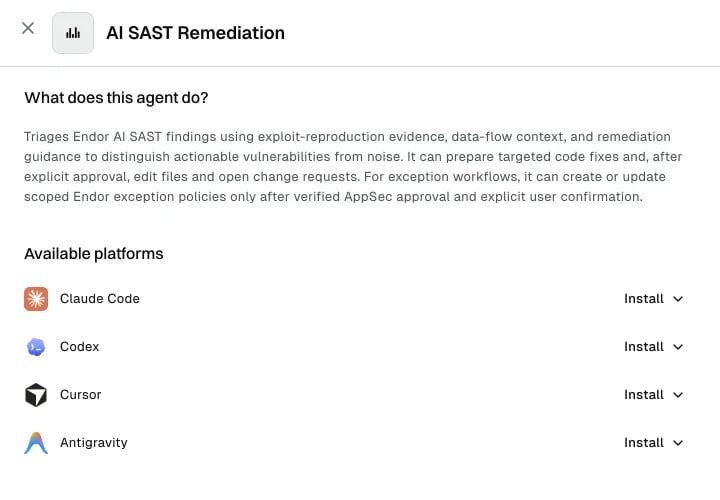
Select an agent card to open its details. The detail view has two sections.

<img src="https://mintcdn.com/endorlabs-b4795f4f/a6Zam66a5U4JfAtk/images/secure-ai-coding/agents-hub/agents-hub-detail.webp?fit=max&auto=format&n=a6Zam66a5U4JfAtk&q=85&s=ce81d537966745a6b3f4cfc9732caee5" alt="Agent detail view showing what the agent does and its available platforms" width="720" height="500" data-path="images/secure-ai-coding/agents-hub/agents-hub-detail.webp" />

### What does this agent do?

The first section describes what the agent does, when to use it, what evidence it works from, and whether it changes anything. Agents that only read your data say so here.

### Available platforms

The second section lists every AI coding assistant the agent supports, one row per platform. Select **Install** on a row to reveal the install command for that platform, then copy it and run it where that assistant is set up.

<video autoPlay muted loop playsInline>
  <source src="https://mintcdn.com/endorlabs-b4795f4f/a6Zam66a5U4JfAtk/images/secure-ai-coding/agents-hub/agents-hub-install.mp4?fit=max&auto=format&n=a6Zam66a5U4JfAtk&q=85&s=d3a2c94c11b77fa6302e7e1e1b65314e" type="video/mp4" data-path="images/secure-ai-coding/agents-hub/agents-hub-install.mp4" />
</video>

<YamlTable>
  {`
    - Platform: Claude Code
    How_you_install: Add the Endor Labs plugin marketplace, then install the Agent Kit plugin.
    - Platform: Codex
    How_you_install: Find and install the Endor Labs Agent Kit from the Codex Plugins Directory.
    - Platform: Cursor
    How_you_install: Add the Endor Labs plugin.
    - Platform: Antigravity
    How_you_install: Clone the plugin repository at the published version, then validate and install it.
    `}
</YamlTable>

The platforms shown depend on what the agent publishes, so an agent can list fewer platforms than another. The agents run inside your AI coding assistant, not in the browser. For a full setup walkthrough per assistant, see the [Agent Kit](/secure-ai-coding/agent-kit). For how an agent authenticates when it reaches Endor Labs data, see [Delegated agent credentials](/secure-ai-coding/agents-hub/delegated-credentials).

## Catalog states

The catalog tells you when it has nothing to show or can't load. These are the states you can encounter.

<YamlTable>
  {`
    - Message: Catalog loading
    What_it_means: The agent catalog is still warming up, for example right after a restart.
    What_to_do: Select Retry after a moment.
    - Message: No agents available
    What_it_means: There are no agents to show in this catalog yet.
    What_to_do: Check back later, or contact Endor Labs if this persists.
    - Message: No matching agents
    What_it_means: No agent matches your search.
    What_to_do: Try a different term, or clear the search.
    - Message: Unable to load agents
    What_it_means: Something went wrong while loading the agent catalog.
    What_to_do: Reload the page. If the error persists, contact Endor Labs support.
    `}
</YamlTable>