> ## Documentation Index
> Fetch the complete documentation index at: https://docs.endorlabs.com/llms.txt
> Use this file to discover all available pages before exploring further.
# Configure PR scans
> Set up automated scanning through SCM apps, CI pipelines, scan profiles, monitored branches, and ignore files.
Configure how and where Endor Labs runs PR scans: through SCM app integrations, CI pipelines, scan profiles, non-default monitored branches, and ignore files.
## Configure PR scans in SCM apps
The Endor Labs SCM integrations let you scan pull requests or merge requests when they are opened or updated. In the integration settings, enable PR or MR scans to run them automatically and, optionally, enable pull request comments to post findings as review comments. Action policies apply to PR scans the same way as to other scan types.
The following describe platform-specific setup and configuration options:
* [Endor Labs GitHub App PR scans](/setup-deployment/scm-integrations/github-app/github-app#configure-pr-scans-during-github-app-pro-installation)
* [GitLab App MR scans](/setup-deployment/scm-integrations/gitlab-app/gitlab-mr-scan)
* [Bitbucket Cloud App](/setup-deployment/scm-integrations/bitbucket-cloud/bitbucket-cloud-pr-scans)
* [Bitbucket Data Center App](/setup-deployment/scm-integrations/bitbucket-datacenter-app/bitbucket-datacenter-pr-scans)
* [Azure DevOps App](/setup-deployment/scm-integrations/azure-app/azure-pr-scans)
## Run PR scans from CI
PR scans can be run from a continuous integration pipeline by invoking `endorctl scan` with pull request flags in jobs triggered by pull request or merge request events. This approach provides control over when scans run, supports posting findings as PR or MR comments, and allows policies to be enforced, such as failing builds or blocking merges. The scan profile assigned to the project determines the toolchains and environment used for the scan.
* See [CI scans](/setup-deployment/ci-cd) for platform-specific pipeline configuration.
* See [Pull request flags](/developers-api/cli/commands/scan#pull-request-ci-flags) for available flags.
## Scan profiles for PR scans
A scan profile defines the configuration applied to PR scans for a project, including languages, toolchains, path filters, and parameters such as `enable_automated_pr_scans` and `enable_pr_comments`. For CI-initiated PR scans, the scan profile determines the toolchains and environment configuration used to execute the scan.
App-triggered PR scans run only when both of the following are true.
* Pull Request scans or Merge Request scans are enabled during SCM app installation so the app receives PR or MR events.
* **Pull request scans** or `enable_automated_pr_scans` is enabled in the scan profile assigned to the project.
To scope app-triggered PR scans to selected projects, enable **Pull request scans** only in the scan profiles assigned to those projects. In GitLab, MR scans can alternatively be scoped by configuring merge request webhooks for selected projects. See [Configure scan profile through the UI](/scan/scan-profiles/configure-scanprofile-ui#configure-general-scan-profile-settings) for more information on scan profile settings.
## Enable PR scans on monitored non-default branches
By default, Endor Labs scopes automated PR scans to pull requests into the project's default branch. You can extend that scope to any other branch that is already a monitored version of the project, such as `release` or `develop`. Pull requests into a monitored branch that isn't allowed as a PR scan target are not scanned.
The following conditions are required before you can allow a branch as a PR scan target branch:
* The branch is already a monitored version of the project. See [Testing and monitoring different versions of your code](/scan/sca/scanning-strategies#testing-and-monitoring-different-versions-of-your-code) to add a branch as a monitored version.
* A baseline scan already exists on the branch.
* PR scans are enabled for the project through the SCM app installation, scan profile, or scan workflow. See [Scan profiles for PR scans](#scan-profiles-for-pr-scans).
To allow a monitored branch as a PR scan target:
1. Select **Projects** from the left sidebar.
2. Search for and select your project from the list.
3. Select **Settings**.
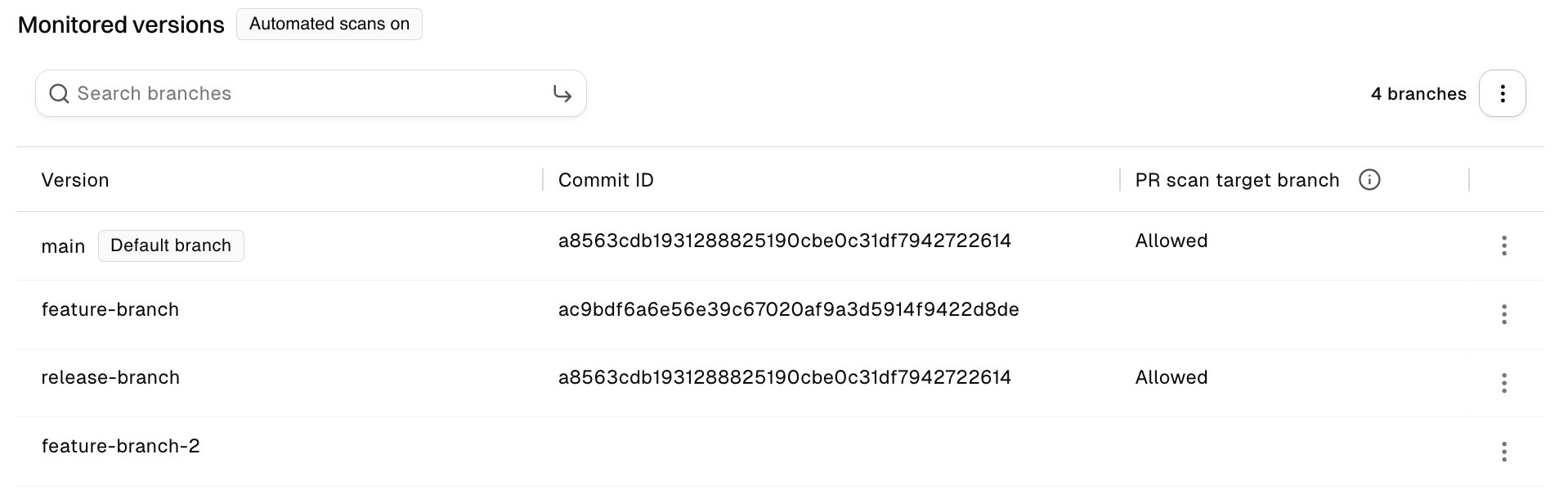
4. Under **Monitored versions**, find the branch you want to scan.
5. Select the vertical three dots for that branch, and select **Allow as PR scan target branch**.
Enabling PR scans on a non-default monitored branch consumes additional scan credits. See [Endor Labs licenses](/introduction/licenses) for more information.
6. In the confirmation dialog, click **Allow**.
7. Optionally, select the vertical three dots next to the branch count, and select **Add another repository branch** to add another branch or reference.
**PR scan target branch** shows **Allowed** for branches where PR scans are enabled. To stop scanning pull requests into a branch, select the vertical three dots for that branch, select **Disallow as PR scan target branch**, and click **Disallow** in the confirmation dialog.
 A change to the PR scan target branch setting can take up to 10 minutes to apply. During that window, PR actions continue to behave according to the previous setting.
**Direct pushes and merges on GitHub**
For a branch allowed as a PR scan target:
* We recommend enabling [branch protection](https://docs.github.com/en/repositories/configuring-branches-and-merges-in-your-repository/managing-protected-branches/managing-a-branch-protection-rule) with **Require a pull request before merging** rule. Without it, direct pushes that aren't associated with an open PR trigger baseline update scans and may consume **additional scan credits**.
* **Post-merge scans** are skipped when that branch is the source of another open pull request. For example, if `dev-branch` is allowed as a PR scan target and has an open pull request into `main`, merging another branch into `dev-branch` does not trigger a post-merge scan on `dev-branch`.
## Ignore files in PR scans
Ignore files let you dismiss findings by committing a file in your repository as part of a pull or merge request. During a PR scan, Endor Labs applies the ignore file from the repository version being scanned. Findings that match entries in the ignore file are excluded from PR Runs, do not appear in [Pull Request comments](#pull-request-comments), and do not trigger action policies.
**Tenant setting required for ignore files**
You must [allow ignore files to dismiss findings](/platform-administration/configure-system-settings#allow-ignore-files-to-dismiss-findings) in **Settings** > **SYSTEM SETTINGS** > **Developer Workflows** for scans to process ignore files.
To add or update entries, use [`endorctl ignore`](/developers-api/cli/commands/ignore) and validate the file with [`endorctl validate ignore`](/developers-api/cli/commands/validate/ignore). See [Dismiss findings using an ignore file](/inventory-insights/findings/dismiss-findings#dismiss-findings-using-an-ignore-file) for more details on ignore file format and structure.
## Pull Request comments
PR comments are automated comments posted on pull or merge requests when Endor Labs detects policy violations during a PR scan. Enable them in your SCM integration or using `--enable-pr-comments` in CI, then configure an action policy with Branch Type **Pull Request**. See [Pull Request comments](/scan/pr-scans/pr-comments) and [Action policies](/platform-administration/policies/action-policies) for setup and configuration.
A change to the PR scan target branch setting can take up to 10 minutes to apply. During that window, PR actions continue to behave according to the previous setting.
**Direct pushes and merges on GitHub**
For a branch allowed as a PR scan target:
* We recommend enabling [branch protection](https://docs.github.com/en/repositories/configuring-branches-and-merges-in-your-repository/managing-protected-branches/managing-a-branch-protection-rule) with **Require a pull request before merging** rule. Without it, direct pushes that aren't associated with an open PR trigger baseline update scans and may consume **additional scan credits**.
* **Post-merge scans** are skipped when that branch is the source of another open pull request. For example, if `dev-branch` is allowed as a PR scan target and has an open pull request into `main`, merging another branch into `dev-branch` does not trigger a post-merge scan on `dev-branch`.
## Ignore files in PR scans
Ignore files let you dismiss findings by committing a file in your repository as part of a pull or merge request. During a PR scan, Endor Labs applies the ignore file from the repository version being scanned. Findings that match entries in the ignore file are excluded from PR Runs, do not appear in [Pull Request comments](#pull-request-comments), and do not trigger action policies.
**Tenant setting required for ignore files**
You must [allow ignore files to dismiss findings](/platform-administration/configure-system-settings#allow-ignore-files-to-dismiss-findings) in **Settings** > **SYSTEM SETTINGS** > **Developer Workflows** for scans to process ignore files.
To add or update entries, use [`endorctl ignore`](/developers-api/cli/commands/ignore) and validate the file with [`endorctl validate ignore`](/developers-api/cli/commands/validate/ignore). See [Dismiss findings using an ignore file](/inventory-insights/findings/dismiss-findings#dismiss-findings-using-an-ignore-file) for more details on ignore file format and structure.
## Pull Request comments
PR comments are automated comments posted on pull or merge requests when Endor Labs detects policy violations during a PR scan. Enable them in your SCM integration or using `--enable-pr-comments` in CI, then configure an action policy with Branch Type **Pull Request**. See [Pull Request comments](/scan/pr-scans/pr-comments) and [Action policies](/platform-administration/policies/action-policies) for setup and configuration.