PR comments are automated comments added to pull requests when Endor Labs detects policy violations or security issues during scans. When a PR is raised or updated, Endor Labs runs scans on the proposed changes and adds a comment if any violations are detected based on the configured action policies.
Types of PR comments
Enable PR comments
After enabling PR comments, you must Configure an action policy to allow comments to be posted on pull requests or merge requests.
GitHub PR comments
You can enable PR comments for GitHub through one of the following methods.
GitHub App
You can enable PR comments during the initial setup of the GitHub App or GitHub App (Pro), or by editing an existing integration. Once enabled, Endor Labs automatically adds comments to pull requests when policy violations are detected.
GitHub Actions
You can configure GitHub Actions to comment on PRs if there are any policy violations. Make sure that your GitHub Actions workflow includes the following configuration.
- The workflow must have a
withclause including:enable_pr_commentstotrueto publish new findings as review comments andgithub_token: ${{ secrets.GITHUB_TOKEN }}. This token is automatically provisioned by GitHub when using GitHub Actions. See GitHub configuration parameters for more information. - To grant Endor Labs the ability to comment on PRs you must include the permission
pull-requests: write.
The following example configuration comments on PRs if a policy violation is detected.
      - name: Endor Labs Scan PR to Default Branch
        if: github.event_name == 'pull_request'
        uses: endorlabs/github-action@v1 # Replace v1 with the commit SHA of the latest version of the GitHub Action for enhanced security
        with:
          namespace: 'example' # Update with your Endor Labs namespace
          scan_summary_output_type: 'table'
          scan_dependencies: true
          scan_secrets: true
          pr: true
          enable_pr_comments: true
          github_token: ${{ secrets.GITHUB_TOKEN }}
PR comments example
The main.yaml file in this sample repository contains the following configuration to enable PR comments.
name: Build Release
on:
  pull_request:
    branches: [main]
  workflow_dispatch:
  push:
    branches: [main]
  schedule:
    - cron: "23 23 * * 0"
jobs:
  build:
    permissions:
      pull-requests: write
      security-events: write
      contents: read
      id-token: write
      actions: read
    runs-on: ubuntu-latest
    env:
      ENDOR_NAMESPACE: "endorlabs-hearts-github"
    steps:
      - name: Endor Labs Scan PR to Default Branch
        if: github.event_name == 'pull_request'
        uses: endorlabs/github-action@v1 # Replace v1 with the commit SHA of the latest version of the GitHub Action for enhanced security
        with:
          namespace: ${{ env.ENDOR_NAMESPACE }}
          pr: true
          enable_pr_comments: true
          github_token: ${{ secrets.GITHUB_TOKEN }}
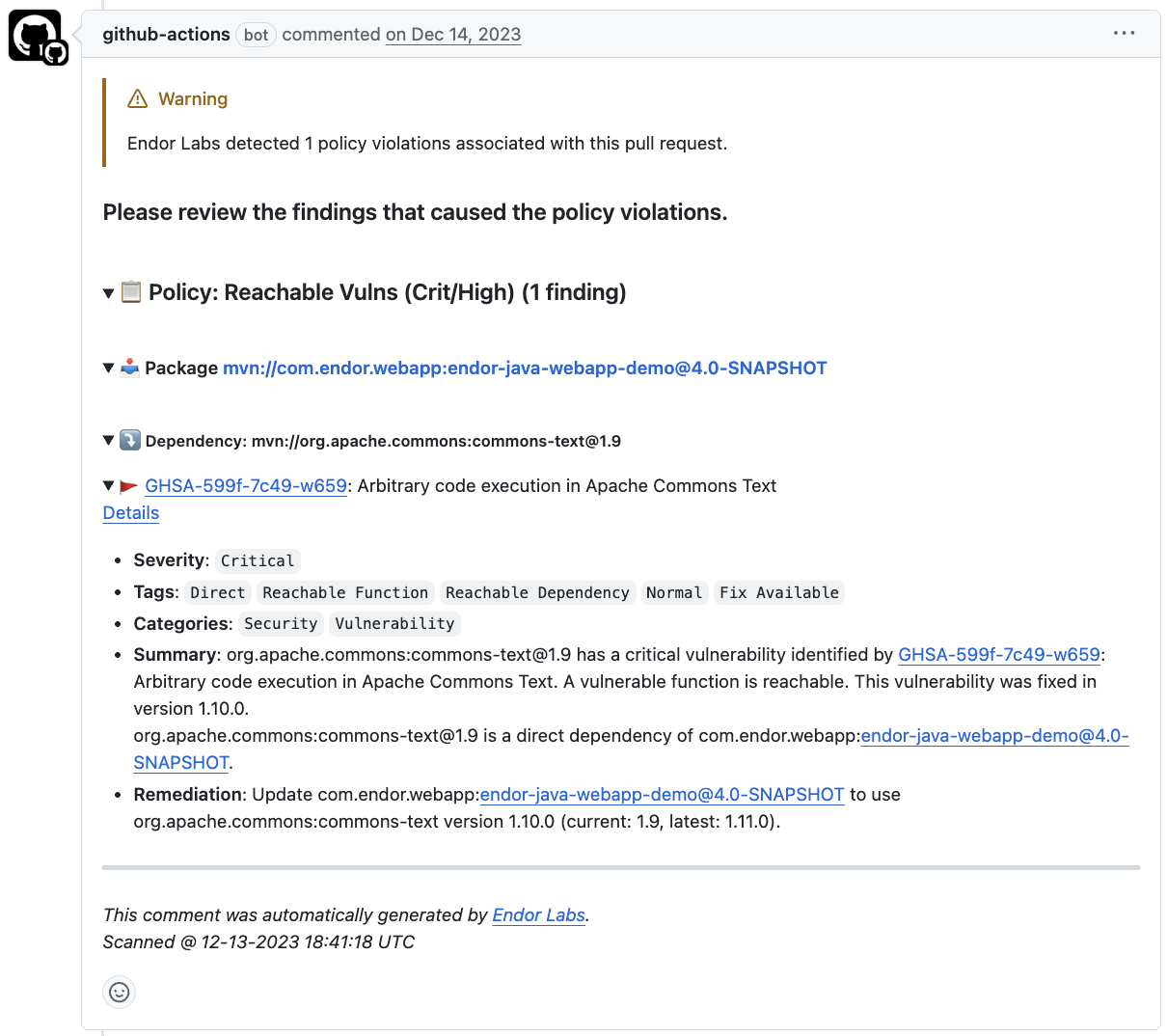
The PR #10 introduced a reachable vulnerability. Since the workflow has enable_pr_comments set as true, a comment is added to the PR on the policy violation.
You can expand the comment to view the following details:
- Issue type: Describes the category of the security or policy violation
- Severity: Indicates how critical the issue is.
- Impacted files or dependencies: Specifies the files and packages affected by the issue.
- Remediation steps: Specifies the required fix to resolve the detected issue.
GitHub PR comments with Endor Labs CLI
You can generate PR comments using the CLI by including the following flags in the endorctl scan command.
endorctl scan \
  --pr \
  --enable-pr-comments \
  --scm-token <your-token> \
  --scm-pr-id <pull-request-id> \
  --namespace <your-namespace>
Ensure that you set the following parameters:
- Set
--enable-pr-commentsto activate PR comment generation. - Use
--scm-pr-idto specify the pull request to comment on. - Use
--scm-token(or set theENDOR_SCAN_SCM_TOKENenvironment variable) and set thepull-requestspermission towritefor the token.
--github-pr-id flag, but it will be deprecated and removed in the future.
GitLab MR comments
You can enable MR comments for GitLab through one of the following methods.
GitLab App
You can enable MR comments during the initial setup of the GitLab App or by editing an existing integration. Once enabled, Endor Labs automatically adds comments to merge requests when policy violations are detected. See GitLab MR comments for more information.
GitLab CI pipelines
You can configure GitLab CI pipelines to comment on merge requests when policy violations are detected. Add --enable-pr-comments, --scm-pr-id=$CI_MERGE_REQUEST_IID, and --scm-token=$ENDOR_SCAN_SCM_TOKEN to your scan command. Configure a GitLab CI/CD variable ENDOR_SCAN_SCM_TOKEN with your GitLab personal access token with the api scope. See Enable MR comments for complete configuration examples.
GitLab MR comments with endorctl
You can generate MR comments with endorctl by including the following flags in the endorctl scan command.
endorctl scan \
  --pr \
  --enable-pr-comments \
  --scm-token <your-token> \
  --scm-pr-id <merge-request-id> \
  --namespace <your-namespace>
Ensure that you set the following parameters:
- Set
--enable-pr-commentsto activate MR comment generation. - Use
--scm-pr-idto specify the merge request to comment on. - Use
--scm-token. The token takes priority over installation PATs.
Configure Action policy for PR comments
You must create an Action policy to receive comments on your pull request after enabling PR comments.
- Create an Action policy.
- Set the Branch Type to
Pull Requestso the policy applies specifically to pull request scans. - Under Action, select Enforce Policy, then choose:
- Warn to post a comment without breaking the build.
- Break the Build to fail the build and block the pull request.
- Define the scope of the policy using tags. Only projects that match the specified tags will receive PR comments.
Customize PR comments templates
Endor Labs provides a default template with standard information that will be included in your pull requests as comments. You can use the default template, or you can choose to edit and customize this template to fit your organization’s specific requirements. You can also create custom templates using Go Templates.
- Select Integrations from the left sidebar.
- Click Edit Template next to GitHub PR comments under Notifications.
- Make the required changes and click Save Template.
PR comments data model
To create custom templates for PR comments, you must understand the data supplied to the template.
See the following protobuf specification for the GithubCommentData message that this template uses.
syntax = "proto3";

package internal.endor.ai.endor.v1;

import "google/protobuf/wrappers.proto";
import "protoc-gen-openapiv2/options/annotations.proto";
import "spec/internal/endor/v1/common.proto";
import "spec/internal/endor/v1/finding.proto";
import "spec/internal/endor/v1/package_version.proto";
import "spec/internal/endor/v1/security_review_pull_request.proto";

option go_package = "github.com/endorlabs/monorepo/src/golang/spec/internal.endor.ai/endor/v1";
option java_package = "ai.endor.internal.spec";

// The list of finding UUIDs.
message FindingUuids {
  repeated string uuids = 1;
}

// The map of dependency name to findings.
message DependencyToFindings {
  map<string, FindingUuids> dependency_to_findings = 1;
}

// The map of PackageVersion UUID to DependencyToFindings.
message PackageToDependencies {
  map<string, DependencyToFindings> package_to_dependencies = 1;
}

message GithubCommentData {
  // The header of the PR comment. Identifies the PR comment published by Endor Labs.
  // It should always be at top of the template.
  google.protobuf.StringValue comment_header = 1;

  // The footer of the PR comment.
  google.protobuf.StringValue comment_footer = 2;

  // The map of finding UUID to finding object.
  map<string, internal.endor.ai.endor.v1.Finding> findings_map = 3;

  // The map of policy UUID to policy name.
  // This will contain only the policies that are triggered or violated.
  map<string, string> policies_map = 4;

  // The map of policy UUID to the list of finding UUIDs.
  map<string, FindingUuids> policy_findings_map = 5;

  // The map of PackageVersion UUID to PackageVersion object.
  map<string, internal.endor.ai.endor.v1.PackageVersion> package_versions_map = 6;

  // The data needs to be grouped as follows:
  //
  // - Policy 1
  // 		- Package 1
  //			- Dependency Package 1
  //				- Finding 1
  //				- Finding 2
  //			- Dependency Package 2
  //				- Finding 3
  //				- Finding 4
  // 		- Package 2
  //			- Dependency Package 1
  //				- Finding 1
  //				- Finding 5
  // - Policy 2
  //		....
  //
  //		Map 0[PolicyUUID]/Map 1[PkgVerUUID]/Map 2 [Dep Names]/Finding UUID
  map<string, PackageToDependencies> data_map = 7;

  google.protobuf.StringValue api_endpoint = 8;
}

// Data structure for security review comments on pull requests.
message SecurityReviewCommentData {
  option (internal.endor.ai.endor.v1.parent_kinds) = {};
  option (grpc.gateway.protoc_gen_openapiv2.options.openapiv2_schema) = {
    json_schema: {
      extensions: {
        key: "x-internal";
        value {bool_value: true}
      }
    }
  };

  // Represents a specific security risk identified in the code review.
  message SecurityRisk {
    // Icon representing the severity level of the risk.
    google.protobuf.StringValue severity_icon = 1;

    // The category or type of the security risk.
    google.protobuf.StringValue category = 2;

    // The title or name of the security risk.
    google.protobuf.StringValue title = 3;

    // Link to the specific code location where the risk was identified.
    google.protobuf.StringValue code_link = 4;

    // Detailed description of the security risk and potential impact.
    google.protobuf.StringValue description = 5;

    // The level of the security risk.
    google.protobuf.StringValue level = 6;

    // The type of impact (improvement or regression).
    google.protobuf.StringValue impact_type = 7;
  }

  // Represents an issue that occurred during the security analysis.
  message AnalysisIssue {
    // The type of the issue.
    SecurityReviewPullRequest.Spec.IssueType type = 1;

    // A descriptive message about the issue.
    google.protobuf.StringValue message = 2;

    // List of error messages encountered during analysis.
    repeated string errors = 3;

    // List of files that were skipped during analysis.
    repeated string skipped_files = 4;

    // List of files that were summarized instead of fully analyzed.
    repeated string summarized_files = 5;
  }

  // The header of the security review comment.
  // It should always be at the top of the template.
  google.protobuf.StringValue comment_header = 1;

  // The footer of the security review comment.
  google.protobuf.StringValue comment_footer = 2;

  // A description of the changes made in the pull request.
  google.protobuf.StringValue changes_description = 3;

  // A general security assessment description.
  google.protobuf.StringValue security_description = 4;

  // The list of identified security risks in the pull request.
  repeated SecurityRisk security_risks = 5;

  // The list of issues encountered during analysis.
  repeated AnalysisIssue analysis_issues = 6;
}
See the following sections to understand the Finding and PackageVersion definitions that are used in this protobuf specification:
See the following specification to understand the additional functions that are also available. You can access these functions by using their corresponding keys.
// FuncMap contains the additional functions that are available to CommentTemplate.
var FuncMap = template.FuncMap{
	"now": utils.ToTime, // 'now' gives the current time

	// 'enumToString' coverts the enums for finding level, finding category and finding tags to string
	"enumToString": utils.EnumToString,

	// 'getPackageVersionURL' returns the URL for a given PackageVersion
	"getPackageVersionURL": utils.GetPackageVersionURL,

	// 'getFindingURL' returns the URL for a given Finding
	"getFindingURL": utils.GetFindingURL,

	// 'add' returns the sum of two integers
	"add": func(n int, incr int) int {
		return n + incr
	},

	// 'getOtherFindingsPackageMarker' returns the key for _findingsWithNoPackages for lookup in DataMap
	// Not all findings are associated with a PackageVersion, such findings are grouped under this key
	// in the DataMap
	"getOtherFindingsPackageMarker": func() string { return _findingsWithNoPackages },

	// 'getOtherFindingsDependencyMarker' returns the key for _findingsWithNoDeps for lookup in DataMap
	// Not all findings are associated with a dependency, such findings are grouped under this key
	// in the DataMap
	"getOtherFindingsDependencyMarker": func() string { return _findingsWithNoDeps },

	// 'getFindingsCountString' returns a string with number of findings, example - "5 findings"
	"getFindingsCountString": utils.GetFindingsCountString,

	// 'hasFindingCategory' checks if a finding has a specific category
	"hasFindingCategory": utils.HasFindingCategory,

	// 'isNotEmptyString' checks if a string is not empty
	"isNotEmptyString": utils.IsNotEmptyString,

	// 'getCustomLocation' extracts the location from Custom field
	"getCustomLocation": func(finding *endorpb.Finding) string {
		return utils.GetCustomFieldValue(finding, "location")
	},

	// 'getCustomCodeSnippet' extracts the code snippet from Custom field
	"getCustomCodeSnippet": func(finding *endorpb.Finding) string {
		return utils.GetCustomFieldValue(finding, "code_snippet")
	},

	"fixBackticks": utils.FixUnclosedBackticks,

	// 'getFirstPartyReachableFunctions' extracts first-party functions from reachable paths
	"getFirstPartyReachableFunctions": utils.GetFirstPartyReachableFunctions,

	// 'groupFindingsByRemediation' groups findings by their remediation value
	// Returns a slice of GroupedRemediation where findings with the same remediation are grouped together
	"groupFindingsByRemediation": utils.GroupFindingsByRemediation,

	"consolidateRemediations": utils.ConsolidateRemediations,
}
Endor Labs generates the following types of PR comments based on the nature of the findings in a scan:
FINDING_CATEGORY_SECRETS, Endor Labs adds a comment directly on the specific line where the secret is detected, using the line number provided in the finding object. These comments remain visible even if the secret is removed in a later scan.FINDING_CATEGORY_SAST, Endor Labs adds a single comment that applies to the entire PR. It summarizes all SAST-related policy violations detected during the scan. The comment is updated with each run and reflects only the latest findings.