> ## Documentation Index
> Fetch the complete documentation index at: https://docs.endorlabs.com/llms.txt
> Use this file to discover all available pages before exploring further.
# AI SAST triage agent
> Use an AI agent to automatically triage rule-based SAST findings as true positives or false positives and reduce manual review effort.
export const Draft = ({children}) => {
const SHOW_PARAM = 'show';
const SHOW_VALUE = 'hidden';
const BORDER_RGB = '220, 38, 38';
const BORDER_COLOR = '#dc2626';
const BG_LIGHT = 'rgba(254, 226, 226, 0.65)';
const BG_DARK = 'rgba(127, 29, 29, 0.35)';
const HEADER_TEXT_LIGHT = '#111111';
const HEADER_TEXT_DARK = '#f5f5f5';
const CARD_MARGIN = '1rem 0';
const CARD_BORDER_RADIUS = '8px';
const HEADER_PADDING = '0.75rem 1rem';
const HEADER_FONT_SIZE = '1.25rem';
const BODY_PADDING = '0 1rem 0.75rem';
const ref = useRef(null);
const [isDark, setIsDark] = useState(false);
useEffect(() => {
const checkTheme = () => {
const root = document.documentElement;
setIsDark(root.dataset.theme === 'dark' || root.classList.contains('dark'));
};
checkTheme();
const observer = new MutationObserver(checkTheme);
observer.observe(document.documentElement, {
attributes: true,
attributeFilter: ['data-theme', 'class']
});
return () => observer.disconnect();
}, []);
useEffect(() => {
if (!ref.current) return;
const params = new URLSearchParams(globalThis.location.search);
if (params.get(SHOW_PARAM) === SHOW_VALUE) {
ref.current.style.display = 'block';
}
}, []);
return
Do not use! Draft content. Development in progress.
{children}
;
};
export const LicenseBadge = ({sku, skus, relation = 'any'}) => {
const DATA_URL = '/snippets/license-sku-data.json';
const CACHE_KEY = 'license-sku-data';
const CACHE_TTL_MS = 60 * 60 * 1000;
const REGISTRY_KEY = '__licenseSkuRegistry';
const FALLBACK_LICENSES_URL = '/introduction/licenses';
const ACCENT = '#26D07C';
const CONJUNCTION = {
any: 'or',
all: 'and'
};
const FONT_STACK = '-apple-system, BlinkMacSystemFont, "Segoe UI", Helvetica, Arial, sans-serif';
const [isDark, setIsDark] = useState(false);
const [data, setData] = useState(null);
const [hasFetchError, setHasFetchError] = useState(false);
const skuList = useMemo(() => {
if (Array.isArray(skus) && skus.length > 0) {
return skus.filter(code => typeof code === 'string' && code.trim()).map(c => c.trim());
}
if (typeof sku === 'string' && sku.trim()) {
return [sku.trim()];
}
return [];
}, [sku, skus]);
useEffect(() => {
const check = () => {
const root = document.documentElement;
setIsDark(root.dataset.theme === 'dark' || root.classList.contains('dark'));
};
check();
const observer = new MutationObserver(check);
observer.observe(document.documentElement, {
attributes: true,
attributeFilter: ['data-theme', 'class']
});
return () => observer.disconnect();
}, []);
useEffect(() => {
let cancelled = false;
const readCache = () => {
try {
const raw = sessionStorage.getItem(CACHE_KEY);
if (!raw) return null;
const parsed = JSON.parse(raw);
if (Date.now() - parsed.ts > CACHE_TTL_MS) {
sessionStorage.removeItem(CACHE_KEY);
return null;
}
return parsed.data;
} catch (e) {
return null;
}
};
const writeCache = value => {
try {
sessionStorage.setItem(CACHE_KEY, JSON.stringify({
ts: Date.now(),
data: value
}));
} catch (e) {}
};
const fetchSkuData = async () => {
const cached = readCache();
if (cached) return cached;
if (!globalThis[REGISTRY_KEY]) {
globalThis[REGISTRY_KEY] = {};
}
const registry = globalThis[REGISTRY_KEY];
if (registry[CACHE_KEY]) return registry[CACHE_KEY];
const promise = (async () => {
const resp = await fetch(DATA_URL);
if (!resp.ok) throw new Error(`HTTP ${resp.status}`);
const json = await resp.json();
writeCache(json);
return json;
})();
registry[CACHE_KEY] = promise;
promise.finally(() => {
delete registry[CACHE_KEY];
});
return promise;
};
fetchSkuData().then(d => {
if (!cancelled) setData(d);
}).catch(() => {
if (!cancelled) setHasFetchError(true);
});
return () => {
cancelled = true;
};
}, []);
const textColor = isDark ? '#e6edf3' : '#1f2937';
const textMuted = isDark ? 'rgba(230,237,243,0.65)' : 'rgba(31,41,55,0.65)';
const bannerBackground = isDark ? '#161b22' : '#f6f8fa';
const borderColor = isDark ? 'rgba(38,208,124,0.35)' : 'rgba(38,208,124,0.45)';
const linkColor = isDark ? '#4ade80' : '#047857';
const errorBackground = isDark ? '#3b1111' : '#fef2f2';
const errorBorder = isDark ? '#7f1d1d' : '#fecaca';
const errorText = isDark ? '#fecaca' : '#7f1d1d';
const licensesUrl = data?.licensesPageUrl || FALLBACK_LICENSES_URL;
const resolveSkuName = code => {
const entry = data?.skus?.[code];
if (entry?.name) return entry.name;
return null;
};
const formatSkuLabel = code => {
const name = resolveSkuName(code);
if (name) return name;
return code;
};
const joinWithConjunction = (codes, conjunction) => {
const labels = codes.map(formatSkuLabel);
if (labels.length === 0) return '';
if (labels.length === 1) return labels[0];
if (labels.length === 2) return `${labels[0]} ${conjunction} ${labels[1]}`;
const head = labels.slice(0, -1).join(', ');
const tail = labels[labels.length - 1];
return `${head}, ${conjunction} ${tail}`;
};
const buildSkuSentence = codes => {
const conj = CONJUNCTION[relation] || CONJUNCTION.any;
const names = joinWithConjunction(codes, conj);
const noun = codes.length > 1 ? 'licenses' : 'license';
return `${names} ${noun}`;
};
const renderLink = text =>
{text} →
;
const renderBanner = codes =>
Requires
{buildSkuSentence(codes)}
{renderLink('Licenses')}
;
const renderLoading = () =>
Loading license info…
;
const renderInputError = message =>
{message}
;
if (typeof sku === 'string' && Array.isArray(skus)) {
return renderInputError('LicenseBadge: pass either `sku` or `skus`, not both.');
}
if (skuList.length === 0) {
return renderInputError('LicenseBadge: `sku` or `skus` is required.');
}
if (hasFetchError) return renderBanner(skuList);
if (!data) return renderLoading();
return renderBanner(skuList);
};
export const YamlTable = ({children, data: propData, content}) => {
const KV_RE = /^([A-Za-z][A-Za-z0-9_()/#\s-]+?):\s*(.+)$/;
const INLINE_MD_RE = /(\[([^\]]+)\]\(([^)]+)\))|(`([^`]+)`)|(\*\*([^*]+)\*\*)|(\*([^*]+)\*)/g;
const YES_RE = /^-yes-$/i;
const NO_RE = /^-no-$/i;
const LIMITED_RE = /^-(limited|partial)-$/i;
const NA_RE = /^-(na|none)-$/i;
const NA2_RE = /^-na2-$/i;
const SIMPLE_TAG_RE = /()|()|(-note-)|(-warning-)/gi;
const tryParseKV = trimmed => {
const m = KV_RE.exec(trimmed);
return m ? {
key: m[1],
value: m[2].trim()
} : null;
};
const registerKey = (key, seenKeys, orderedKeys) => {
if (!seenKeys.has(key)) {
orderedKeys.push(key);
seenKeys.add(key);
}
};
const flushEntry = (currentEntry, entries) => {
if (Object.keys(currentEntry).length > 0) entries.push(currentEntry);
};
const parseDashPrefixed = (lines, entries, orderedKeys, seenKeys) => {
let currentEntry = {};
let inEntry = false;
for (const line of lines) {
const trimmed = line.trim();
if (trimmed.startsWith('- ')) {
if (inEntry) entries.push(currentEntry);
currentEntry = {};
inEntry = true;
const kv = tryParseKV(trimmed.substring(2).trim());
if (kv) {
registerKey(kv.key, seenKeys, orderedKeys);
currentEntry[kv.key] = kv.value;
}
} else if (inEntry && trimmed !== '') {
const kv = tryParseKV(trimmed);
if (kv) {
registerKey(kv.key, seenKeys, orderedKeys);
currentEntry[kv.key] = kv.value;
}
}
}
flushEntry(currentEntry, entries);
};
const parseBlankSeparated = (lines, entries, orderedKeys, seenKeys) => {
let currentEntry = {};
let inEntry = false;
for (const line of lines) {
const trimmed = line.trim();
if (trimmed === '') {
if (inEntry) {
flushEntry(currentEntry, entries);
currentEntry = {};
inEntry = false;
}
continue;
}
const kv = tryParseKV(trimmed);
if (!kv) continue;
const isNewEntry = !line.startsWith(' ') && !line.startsWith('\t');
if (isNewEntry && inEntry && Object.keys(currentEntry).length > 0) {
entries.push(currentEntry);
currentEntry = {};
}
registerKey(kv.key, seenKeys, orderedKeys);
currentEntry[kv.key] = kv.value;
inEntry = true;
}
flushEntry(currentEntry, entries);
};
const normalizeEntries = (entries, orderedKeys) => entries.map(entry => {
const filled = {};
for (const key of orderedKeys) filled[key] = entry[key] || '';
return filled;
});
const parseYamlTableContent = contentStr => {
if (!contentStr) return [];
const entries = [];
const orderedKeys = [];
const seenKeys = new Set();
const lines = contentStr.split('\n');
if (lines.some(line => line.trim().startsWith('- '))) {
parseDashPrefixed(lines, entries, orderedKeys, seenKeys);
} else {
parseBlankSeparated(lines, entries, orderedKeys, seenKeys);
}
return normalizeEntries(entries, orderedKeys);
};
const processText = text => {
if (!text) return text;
const parts = [];
let keyIndex = 0;
let lastIndex = 0;
let match;
while ((match = INLINE_MD_RE.exec(text)) !== null) {
if (match.index > lastIndex) parts.push(text.slice(lastIndex, match.index));
if (match[1]) {
parts.push({match[2]});
} else if (match[4]) {
parts.push({match[5]});
} else if (match[6]) {
parts.push({match[7]});
} else if (match[8]) {
parts.push({match[9]});
}
lastIndex = match.index + match[0].length;
}
if (lastIndex < text.length) parts.push(text.slice(lastIndex));
if (parts.length === 0) return text;
const keyRef = {
current: keyIndex
};
return expandHtmlTags(parts, keyRef);
};
const processBadges = text => {
if (!text || typeof text !== 'string') return text;
if (YES_RE.test(text)) return ✓;
if (NO_RE.test(text)) return ✗;
if (LIMITED_RE.test(text)) return ◐;
if (NA_RE.test(text) || NA2_RE.test(text)) return Not applicable;
return processText(text);
};
const cellClassName = text => {
if (!text || typeof text !== 'string') return undefined;
if (NA_RE.test(text)) return 'yt-cell-na';
if (NA2_RE.test(text)) return 'yt-cell-na2';
return undefined;
};
const expandSimpleTags = (str, keyRef) => {
const result = [];
let last = 0;
SIMPLE_TAG_RE.lastIndex = 0;
let m;
while ((m = SIMPLE_TAG_RE.exec(str)) !== null) {
if (m.index > last) result.push(str.slice(last, m.index));
if (m[1]) {
result.push(
);
} else if (m[2]) {
result.push(
,
);
} else if (m[3]) {
result.push(Note: );
} else if (m[4]) {
result.push(Warning: );
}
last = m.index + m[0].length;
}
if (last < str.length) result.push(str.slice(last));
return result;
};
const expandHtmlTags = (chunks, keyRef) => {
const out = [];
for (const chunk of chunks) {
if (typeof chunk === 'string') {
out.push(...expandSimpleTags(chunk, keyRef));
} else {
out.push(chunk);
}
}
return out;
};
const extractText = node => {
if (node === null || node === undefined) return '';
if (typeof node === 'string') return node;
if (typeof node === 'number') return String(node);
if (typeof node === 'boolean') return '';
if (Array.isArray(node)) return node.map(extractText).join('');
if (node && typeof node === 'object' && node.type) {
const props = node.props || ({});
if (typeof props.children === 'string') return props.children;
if (props.children) return extractText(props.children);
return '';
}
return String(node || '');
};
const [mounted, setMounted] = useState(false);
useEffect(() => {
setMounted(true);
}, []);
const data = useMemo(() => {
if (propData) return propData;
if (content && typeof content === 'string') return parseYamlTableContent(content);
if (!children) return [];
if (typeof children === 'string') return parseYamlTableContent(children);
const childrenArray = Array.isArray(children) ? children : [children];
return parseYamlTableContent(childrenArray.map(extractText).join('').trim());
}, [children, propData, content]);
const columns = useMemo(() => {
if (!data || data.length === 0) return [];
const firstRow = data[0];
if (!firstRow || typeof firstRow !== 'object') return [];
return Object.keys(firstRow);
}, [data]);
if (!mounted) return null;
if (!data || data.length === 0) return null;
const rowKey = row => columns.map(c => row[c] || '').join('|');
return
{columns.map(col => | {col.replaceAll('_', ' ')} | )}
{data.map(row =>
{columns.map(col => | {processBadges(row[col])} | )}
)}
;
};
Rule-based SAST scans are fast and deterministic, but they generate a high number of false positives that drain developer time. Endor Labs' AI SAST triage agent analyzes and intelligently triages SAST findings when you run a SAST scan. The AI agent leverages a large language model (LLM) to examine code context, trace data flows, and evaluate security controls. It automatically classifies each finding as either a `True Positive`, indicating a genuine security vulnerability, or a `False Positive`. This eliminates the need for manual review of every alert, allowing you to focus on addressing real security threats.
AI analysis starts with the fast agent mode, but automatically falls back to deep analysis mode when a true positive is detected. This provides a balance between speed and accuracy by using detailed analysis only when needed.
To run an AI SAST triage agent scan, use the following command.
```bash theme={null}
endorctl scan --sast --path=/path/to/code -n --ai-sast-analysis=agent-fallback
```
To view the findings generated by this scan, see [View AI SAST triage agent findings](#view-ai-sast-triage-agent-findings).
AI analysis does not process findings from test files such as unit tests and integration tests, or findings with low severity ratings. See [AI triage behavior](#ai-triage-behavior) to learn more.
## AI triage process
The AI triage process uses a large language model (LLM) to systematically evaluate each finding through the following steps:
Locate the exact code line where the SAST rule was triggered and examine the matching code patterns.
Follow the data flow from where it enters the application to where it is used in potentially vulnerable code to determine if user-controlled input reaches vulnerable paths.
Review function calls in the data flow path, including sanitizers, validators, and other security controls that may mitigate risks.
Understand the purpose of functions involved in the rule match, how they are used in the application, and the application context such as web application, test file, or code example.
Evaluate all gathered information including whether inputs are user-controlled or hard-coded, presence of sanitization functions, application context, and existing security controls to classify the finding as a true positive or false positive.
AI triage processes only new findings and existing un-analyzed findings. If findings are not analyzed in the scan, they will be taken up in the next one. The triage process runs for up to 5 minutes by default. To modify the analysis timeout duration, use the `--ai-sast-analysis-timeout` flag:
```bash theme={null}
endorctl scan --sast --path=/path/to/code -n --ai-sast-analysis-timeout=10m
```
## AI triage behavior
Control which findings are analyzed by AI triage and manage re-analysis behavior. By default, AI triage analyzes only new findings and previously un-analyzed findings, skipping any that have already been triaged. When running AI SAST triage agent scans, use the `--ai-sast-rescan` option to remove all existing AI analyses and re-analyze every finding from scratch.
```bash theme={null}
endorctl scan --sast --path=/path/to/code -n --ai-sast-analysis=agent-fallback --ai-sast-rescan
```
The following types of findings are automatically excluded from AI triage. To include them, set the corresponding environment variable to `false`:
{`
- Finding_Type: Test file findings
Environment_Variable: \`ENDOR_SAST_IGNORE_TEST_TRIAGE\`
- Finding_Type: Low severity findings
Environment_Variable: \`ENDOR_SAST_IGNORE_LOW_SEV_TRIAGE\`
- Finding_Type: Low confidence rule findings
Environment_Variable: \`ENDOR_SAST_IGNORE_LOW_CONF_RULE\`
`}
You can generate and match findings based on AI classification by configuring these criteria when creating a [finding policy](/platform-administration/policies/finding-policies/sast-policies) or an [action policy](/platform-administration/policies/action-policies/templates#sast) from a template:
* AI Analysis Status: Select **True Positive** or **False Positive** to match findings by their AI analysis result.
* AI SAST: Select **Yes** to match only findings generated by the AI SAST detection agent in action policies.
## AI SAST triage agent scan options
The `endorctl scan --sast` command supports the following options for AI SAST triage agent scans.
{`
- Option: \`ai-sast-analysis=agent-fallback\`
Description: Enable AI agent to identify and classify false positives in SAST findings. The \`agent-fallback\` mode starts with fast analysis and automatically falls back to deep analysis when needed.
- Option: \`ai-sast-analysis-timeout\`
Description: Set the maximum duration for AI analysis per scan. Default is 5 minutes.
- Option: \`ai-sast-rescan\`
Description: Remove all existing AI analyses and re-analyze every SAST finding from scratch, including findings that have already been triaged.
`}
## View AI SAST triage agent findings
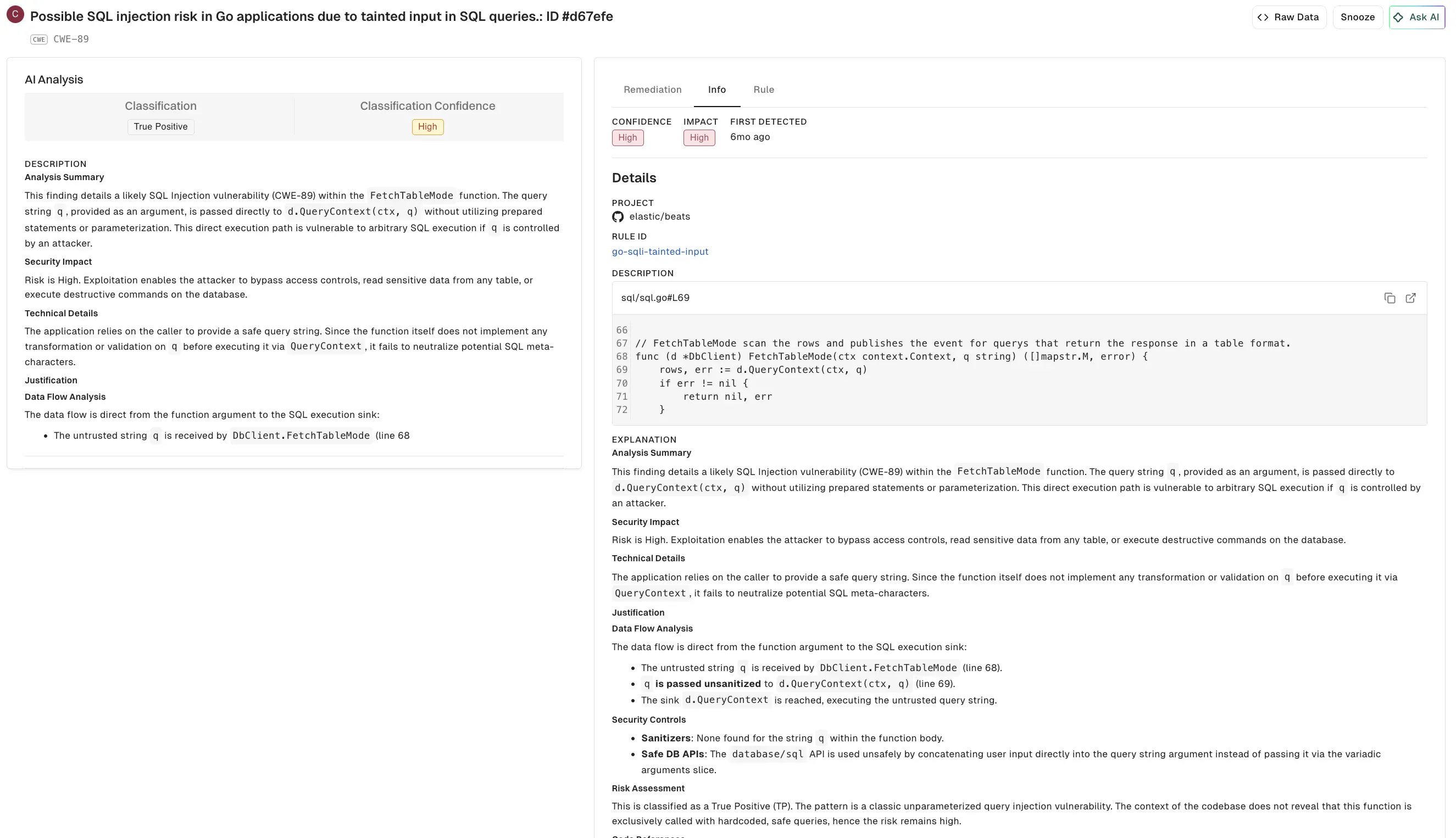
When you run a SAST scan with `--ai-sast-analysis=agent-fallback`, the AI SAST triage agent analyzes the findings to determine if they are true security issues or false positives. The agent automatically tags verified true positives with `True Positive` and false positives with `False Positive` for easy filtering.
To view AI SAST triage agent findings:
1. Select **Findings** > **SAST** from the left sidebar.
2. Use the **Attributes** filter and select **True Positive** or **False Positive** to filter findings.
3. Select a finding to view the details.
* **AI Analysis**: Indicates the AI agent's classification and analysis of the finding.
* **Classification**: Specifies if the finding is categorized as a true positive or false positive, including the associated confidence level.
* **Analysis Summary**: A brief explanation of the security issue identified, including why the finding was triggered and what type of vulnerability it represents.
* **Security Impact**: The risk level and potential consequences if the vulnerability is exploited.
* **Technical Details**: Technical explanation of how the vulnerability can be exploited, including the source and sink points in the code.
* **Data Flow Analysis**: Traces how untrusted data flows through your code from input to the vulnerable point.
* **Security Controls**: Displays what security protections exist or are missing in the code.
* **Risk Assessment**: Detailed reasoning for why the finding is classified as a true positive or false positive, with supporting evidence.
* **AI Remediation**: Suggested code fix to address the vulnerability.
* **Info, Rule, Explanation, and Metadata**: Displays the underlying SAST rule information, detailed explanations of the security issue, remediation guidance, and metadata such as CWE classifications and security tags.
* **Info**: Contains key metadata for the finding, including confidence, impact, first detected time, project, and rule ID.
* **Rule**: The specific SAST rule that detected the finding, including rule description and code examples.
* **Explanation**: Analysis summary, security impact, and technical details about why this is a SAST finding.
* **Remediation**: General remediation guidance for addressing this type of vulnerability.
* **References**: Links to relevant security references such as CWE definitions.
* **Metadata**: Contains classification details such as the CWE ID, affected languages, security tags applied to the finding, and detected rule version.