> ## Documentation Index
> Fetch the complete documentation index at: https://docs.endorlabs.com/llms.txt
> Use this file to discover all available pages before exploring further.
# AI context rules
> Use AI context rules to give the AI SAST agents codebase-specific guidance to improve detection accuracy and reduce false positives.
export const Draft = ({children}) => {
const SHOW_PARAM = 'show';
const SHOW_VALUE = 'hidden';
const BORDER_RGB = '220, 38, 38';
const BORDER_COLOR = '#dc2626';
const BG_LIGHT = 'rgba(254, 226, 226, 0.65)';
const BG_DARK = 'rgba(127, 29, 29, 0.35)';
const HEADER_TEXT_LIGHT = '#111111';
const HEADER_TEXT_DARK = '#f5f5f5';
const CARD_MARGIN = '1rem 0';
const CARD_BORDER_RADIUS = '8px';
const HEADER_PADDING = '0.75rem 1rem';
const HEADER_FONT_SIZE = '1.25rem';
const BODY_PADDING = '0 1rem 0.75rem';
const ref = useRef(null);
const [isDark, setIsDark] = useState(false);
useEffect(() => {
const checkTheme = () => {
const root = document.documentElement;
setIsDark(root.dataset.theme === 'dark' || root.classList.contains('dark'));
};
checkTheme();
const observer = new MutationObserver(checkTheme);
observer.observe(document.documentElement, {
attributes: true,
attributeFilter: ['data-theme', 'class']
});
return () => observer.disconnect();
}, []);
useEffect(() => {
if (!ref.current) return;
const params = new URLSearchParams(globalThis.location.search);
if (params.get(SHOW_PARAM) === SHOW_VALUE) {
ref.current.style.display = 'block';
}
}, []);
return
Do not use! Draft content. Development in progress.
{children}
;
};
export const LicenseBadge = ({sku, skus, relation = 'any'}) => {
const DATA_URL = '/snippets/license-sku-data.json';
const CACHE_KEY = 'license-sku-data';
const CACHE_TTL_MS = 60 * 60 * 1000;
const REGISTRY_KEY = '__licenseSkuRegistry';
const FALLBACK_LICENSES_URL = '/introduction/licenses';
const ACCENT = '#26D07C';
const CONJUNCTION = {
any: 'or',
all: 'and'
};
const FONT_STACK = '-apple-system, BlinkMacSystemFont, "Segoe UI", Helvetica, Arial, sans-serif';
const [isDark, setIsDark] = useState(false);
const [data, setData] = useState(null);
const [hasFetchError, setHasFetchError] = useState(false);
const skuList = useMemo(() => {
if (Array.isArray(skus) && skus.length > 0) {
return skus.filter(code => typeof code === 'string' && code.trim()).map(c => c.trim());
}
if (typeof sku === 'string' && sku.trim()) {
return [sku.trim()];
}
return [];
}, [sku, skus]);
useEffect(() => {
const check = () => {
const root = document.documentElement;
setIsDark(root.dataset.theme === 'dark' || root.classList.contains('dark'));
};
check();
const observer = new MutationObserver(check);
observer.observe(document.documentElement, {
attributes: true,
attributeFilter: ['data-theme', 'class']
});
return () => observer.disconnect();
}, []);
useEffect(() => {
let cancelled = false;
const readCache = () => {
try {
const raw = sessionStorage.getItem(CACHE_KEY);
if (!raw) return null;
const parsed = JSON.parse(raw);
if (Date.now() - parsed.ts > CACHE_TTL_MS) {
sessionStorage.removeItem(CACHE_KEY);
return null;
}
return parsed.data;
} catch (e) {
return null;
}
};
const writeCache = value => {
try {
sessionStorage.setItem(CACHE_KEY, JSON.stringify({
ts: Date.now(),
data: value
}));
} catch (e) {}
};
const fetchSkuData = async () => {
const cached = readCache();
if (cached) return cached;
if (!globalThis[REGISTRY_KEY]) {
globalThis[REGISTRY_KEY] = {};
}
const registry = globalThis[REGISTRY_KEY];
if (registry[CACHE_KEY]) return registry[CACHE_KEY];
const promise = (async () => {
const resp = await fetch(DATA_URL);
if (!resp.ok) throw new Error(`HTTP ${resp.status}`);
const json = await resp.json();
writeCache(json);
return json;
})();
registry[CACHE_KEY] = promise;
promise.finally(() => {
delete registry[CACHE_KEY];
});
return promise;
};
fetchSkuData().then(d => {
if (!cancelled) setData(d);
}).catch(() => {
if (!cancelled) setHasFetchError(true);
});
return () => {
cancelled = true;
};
}, []);
const textColor = isDark ? '#e6edf3' : '#1f2937';
const textMuted = isDark ? 'rgba(230,237,243,0.65)' : 'rgba(31,41,55,0.65)';
const bannerBackground = isDark ? '#161b22' : '#f6f8fa';
const borderColor = isDark ? 'rgba(38,208,124,0.35)' : 'rgba(38,208,124,0.45)';
const linkColor = isDark ? '#4ade80' : '#047857';
const errorBackground = isDark ? '#3b1111' : '#fef2f2';
const errorBorder = isDark ? '#7f1d1d' : '#fecaca';
const errorText = isDark ? '#fecaca' : '#7f1d1d';
const licensesUrl = data?.licensesPageUrl || FALLBACK_LICENSES_URL;
const resolveSkuName = code => {
const entry = data?.skus?.[code];
if (entry?.name) return entry.name;
return null;
};
const formatSkuLabel = code => {
const name = resolveSkuName(code);
if (name) return name;
return code;
};
const joinWithConjunction = (codes, conjunction) => {
const labels = codes.map(formatSkuLabel);
if (labels.length === 0) return '';
if (labels.length === 1) return labels[0];
if (labels.length === 2) return `${labels[0]} ${conjunction} ${labels[1]}`;
const head = labels.slice(0, -1).join(', ');
const tail = labels[labels.length - 1];
return `${head}, ${conjunction} ${tail}`;
};
const buildSkuSentence = codes => {
const conj = CONJUNCTION[relation] || CONJUNCTION.any;
const names = joinWithConjunction(codes, conj);
const noun = codes.length > 1 ? 'licenses' : 'license';
return `${names} ${noun}`;
};
const renderLink = text =>
{text} →
;
const renderBanner = codes =>
Requires
{buildSkuSentence(codes)}
{renderLink('Licenses')}
;
const renderLoading = () =>
Loading license info…
;
const renderInputError = message =>
{message}
;
if (typeof sku === 'string' && Array.isArray(skus)) {
return renderInputError('LicenseBadge: pass either `sku` or `skus`, not both.');
}
if (skuList.length === 0) {
return renderInputError('LicenseBadge: `sku` or `skus` is required.');
}
if (hasFetchError) return renderBanner(skuList);
if (!data) return renderLoading();
return renderBanner(skuList);
};
AI context rules give the AI SAST agents codebase-specific guidance to read while they analyze your code. The agents treat each rule as reference evidence and verify it against your actual code, applying what they can confirm and setting aside what they cannot. They use the rules to confirm genuine vulnerabilities with greater confidence, eliminate false positives, and account for behavior that is not evident from the source code alone.
Specific claims are far more effective than general ones, so anchor every rule to a file, directory, framework, route, or function name the agents can locate. AI SAST scans then produce findings that closely reflect the actual security posture of your codebase.
AI context rules fill the gap before reviewers act on findings, and complement their decisions afterward. When a reviewer marks a finding as a true positive or a false positive, that decision takes precedence over your written guidance. Each rule belongs to a namespace and applies to every project in it. You can narrow it with inclusions or exclusions.
## What makes an effective rule
Include facts the agents cannot infer from the code on their own. Describe your codebase so the agents understand what they read and which attacks are realistic:
* The primary languages and frameworks you use on the frontend and backend.
* The entry points where untrusted input arrives, such as the package that holds your HTTP handlers.
* The authentication and authorization enforcement points, such as the middleware that protects your API routes and the file it lives in.
* The trust boundaries in your code, identified by file or directory.
* The sinks and sanitizers specific to your project, named exactly.
* The sources of secrets and configuration, such as a secrets manager loaded at boot rather than values hardcoded in source.
* The deployment shape, such as a static frontend with all authorization enforced server-side.
Highlight the patterns you want the agents to keep reporting so recurring risks specific to your codebase are not under-weighted. Name the pattern, where it recurs, why it is real, and what should make the agents raise it again.
Explain the patterns that look dangerous but are safe so the agents stop reporting them. Name the pattern, its location, why it is benign in your codebase, and a discriminator that separates it from a real issue. A suppression without a discriminator, such as *trust this directory* or *we already reviewed this*, has no effect.
For concrete examples, see [Example AI context rules](#example-ai-context-rules).
## What not to include in a rule
AI context rules are reference evidence, not instructions, so the agents ignore anything that tries to override their built-in behavior. Do not include the following:
* Instructions to turn off a detection category, such as telling the agents not to report SQL injection.
* Instructions to ignore real secrets, such as hardcoded credentials. The agents always report them.
* Demands for a finding that the code evidence does not support.
* Generic security advice, such as OWASP, CWE, or phrases like *validate all input*. It says nothing about your code, so the agents ignore it.
* Secrets, tokens, private keys, personal data, or verbatim source code. Reference sensitive code by its file path and symbol name instead.
A rule is not a substitute for fixing code, so suppress a finding only when the code is genuinely safe.
## Automatic context from repository files
During a scan, Endor Labs also builds context automatically. It reads guidance files in your repository along with prior reviewer decisions, grounds them against your code, and uses them alongside the rules you create. Reviewer feedback takes precedence over the rules you write, and the most recent decision takes precedence when reviewers disagree over time.
By default, a scan reads these files when they are within the scan scope:
* `CLAUDE.md`, and files under `.claude/agents/` and `.claude/rules/`.
* `AGENTS.md`.
* `.cursorrules`, and files under `.cursor/rules/`.
* `.github/copilot-instructions.md`.
* `SKILL.md` files, such as `.claude/skills//SKILL.md`.
* `memory.md`.
To index additional files, pass their paths with the `ai-sast-llm-config-paths` flag. See the [endorctl scan command reference](/developers-api/cli/commands/scan) for details.
## Create an AI context rule
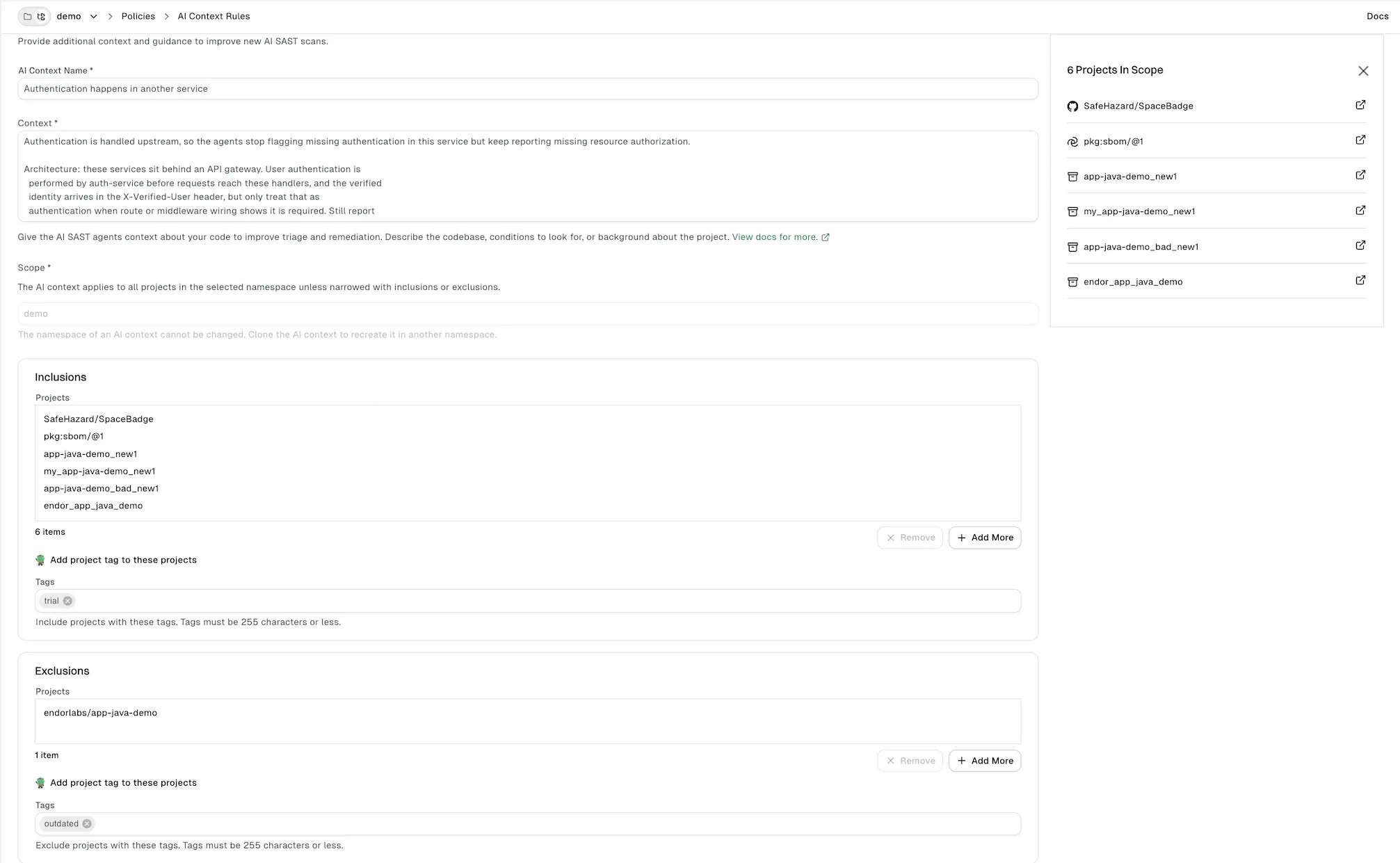
Create a rule to give the agents guidance about your code. You can enable or disable a rule at any time after you create it.
To create an AI context rule:
1. Select **Policies** from the user menu.
2. Select **AI Context Rules**.
3. Select **Create AI Context**.
4. Enter the following details:
* **AI Context Name**: A name that identifies the rule.
* **Context**: The guidance the agents read. Describe the codebase, the conditions to look for, or background about the project.
5. Under **Scope**, select the namespace the rule applies to. By default, the rule applies to all projects in the namespace.
6. To limit the rule to specific projects, use **Inclusions**:
* Click **Add more** under **Inclusions**.
* Select the projects you want to include.
* Click **Update**.
7. Optionally, enter the tags of the projects you want to include.
8. To exclude specific projects, use **Exclusions**:
* Click **Add more** under **Exclusions**.
* Select the projects you want to exclude.
* Click **Update**.
9. Optionally, enter the tags of the projects you want to exclude.
10. Click **Create AI Context**.
If a project matches both inclusions and exclusions, the exclusion takes precedence.
 ## Manage AI context rules
You can edit, clone, delete, enable, or disable a rule at any time. Update or delete a rule when the code it describes moves or changes, so the agents do not work from stale guidance.
Edit a rule to update its name, context, or scope.
1. Select **Policies** from the user menu.
2. Select **AI Context Rules**.
3. Click the vertical three dots next to the rule you want to edit.
4. Select **Edit**.
5. Update the AI context name, context, inclusions, or exclusions.
6. Click **Update AI Context**.
Clone a rule to create a new rule with the same name, context, and scope.
1. Select **Policies** from the user menu.
2. Select **AI Context Rules**.
3. Click the vertical three dots next to the rule you want to clone and select **Clone**.
4. Update the AI context name, context, inclusions, and exclusions for the new rule.
5. Click **Create AI Context**.
Delete a rule to remove it from your tenant.
1. Select **Policies** from the user menu.
2. Select **AI Context Rules**.
3. Click the vertical three dots next to the rule you want to remove and select **Delete**.
## Example AI context rules
Adapt the names and paths in these examples to your own code.
Authentication is handled upstream, so the agents stop flagging missing authentication in this service but keep reporting missing resource authorization.
```text theme={null}
Architecture: these services sit behind an API gateway. User authentication is
performed by auth-service before requests reach these handlers, and the verified
identity arrives in the X-Verified-User header, but only treat that as
authentication when route or middleware wiring shows it is required. Still report
missing tenant, ownership, role, or scope authorization in this service:
authentication upstream does not prove resource authorization here.
```
A shared library sanitizes HTML, so the agents suppress XSS findings on output that passes through it while still reporting sinks that bypass it.
```text theme={null}
HTML output produced through github.com/acme/safehtml.Render or the
@acme/security-html sanitizeHtml helper is sanitized by our shared security library.
Do not report XSS when attacker-controlled text reaches templates only through those
APIs and no later code calls an unsafe raw-HTML sink. Continue to report direct
innerHTML, bypassRawHtml, template.HTML, or other sinks that skip the sanitizer.
```
Every protected endpoint must use a specific middleware, so the agents report routes registered without it and leave public routes alone.
```text theme={null}
All production HTTP endpoints under /api/v1 must require the RequireSessionAuth
middleware or an equivalent @RequireSessionAuth annotation. Endpoints under
/healthz, /readyz, /metrics, and /static are public by design. Report protected
/api/v1 endpoints registered without RequireSessionAuth, even when they call
downstream services that perform business-logic checks.
```
Specific fields enforce tenant isolation, so the agents report routes that scope queries by user instead of by tenant.
```text theme={null}
Tenant isolation is enforced with organization_id and customer_id. Any route that
reads or writes invoices, users, projects, findings, or package metadata must
constrain DB queries and service calls by the caller's organization_id or
customer_id. A user_id check alone is not sufficient for cross-tenant resources.
```
Admin actions need two separate checks and some directories are out of scope, so the agents catch incomplete admin checks and suppress findings in non-production paths.
```text theme={null}
Admin-only actions require BOTH the AdminSession middleware AND the security.admin
scope in token claims. Report handlers that check only one of these before modifying
users, roles, integrations, billing, or signing keys.
Files under tools/, scripts/, testdata/, generated/, and docs/ are not deployed to
production. Suppress findings there unless the vulnerable file is copied into a
runtime container image or consumed by production code.
```
## Manage AI context rules
You can edit, clone, delete, enable, or disable a rule at any time. Update or delete a rule when the code it describes moves or changes, so the agents do not work from stale guidance.
Edit a rule to update its name, context, or scope.
1. Select **Policies** from the user menu.
2. Select **AI Context Rules**.
3. Click the vertical three dots next to the rule you want to edit.
4. Select **Edit**.
5. Update the AI context name, context, inclusions, or exclusions.
6. Click **Update AI Context**.
Clone a rule to create a new rule with the same name, context, and scope.
1. Select **Policies** from the user menu.
2. Select **AI Context Rules**.
3. Click the vertical three dots next to the rule you want to clone and select **Clone**.
4. Update the AI context name, context, inclusions, and exclusions for the new rule.
5. Click **Create AI Context**.
Delete a rule to remove it from your tenant.
1. Select **Policies** from the user menu.
2. Select **AI Context Rules**.
3. Click the vertical three dots next to the rule you want to remove and select **Delete**.
## Example AI context rules
Adapt the names and paths in these examples to your own code.
Authentication is handled upstream, so the agents stop flagging missing authentication in this service but keep reporting missing resource authorization.
```text theme={null}
Architecture: these services sit behind an API gateway. User authentication is
performed by auth-service before requests reach these handlers, and the verified
identity arrives in the X-Verified-User header, but only treat that as
authentication when route or middleware wiring shows it is required. Still report
missing tenant, ownership, role, or scope authorization in this service:
authentication upstream does not prove resource authorization here.
```
A shared library sanitizes HTML, so the agents suppress XSS findings on output that passes through it while still reporting sinks that bypass it.
```text theme={null}
HTML output produced through github.com/acme/safehtml.Render or the
@acme/security-html sanitizeHtml helper is sanitized by our shared security library.
Do not report XSS when attacker-controlled text reaches templates only through those
APIs and no later code calls an unsafe raw-HTML sink. Continue to report direct
innerHTML, bypassRawHtml, template.HTML, or other sinks that skip the sanitizer.
```
Every protected endpoint must use a specific middleware, so the agents report routes registered without it and leave public routes alone.
```text theme={null}
All production HTTP endpoints under /api/v1 must require the RequireSessionAuth
middleware or an equivalent @RequireSessionAuth annotation. Endpoints under
/healthz, /readyz, /metrics, and /static are public by design. Report protected
/api/v1 endpoints registered without RequireSessionAuth, even when they call
downstream services that perform business-logic checks.
```
Specific fields enforce tenant isolation, so the agents report routes that scope queries by user instead of by tenant.
```text theme={null}
Tenant isolation is enforced with organization_id and customer_id. Any route that
reads or writes invoices, users, projects, findings, or package metadata must
constrain DB queries and service calls by the caller's organization_id or
customer_id. A user_id check alone is not sufficient for cross-tenant resources.
```
Admin actions need two separate checks and some directories are out of scope, so the agents catch incomplete admin checks and suppress findings in non-production paths.
```text theme={null}
Admin-only actions require BOTH the AdminSession middleware AND the security.admin
scope in token claims. Report handlers that check only one of these before modifying
users, roles, integrations, billing, or signing keys.
Files under tools/, scripts/, testdata/, generated/, and docs/ are not deployed to
production. Suppress findings there unless the vulnerable file is copied into a
runtime container image or consumed by production code.
```