> ## Documentation Index
> Fetch the complete documentation index at: https://docs.endorlabs.com/llms.txt
> Use this file to discover all available pages before exploring further.
# Configure the Package Firewall with JFrog Artifactory
> Route package installation requests through the Package Firewall by configuring JFrog Artifactory remote repositories.
export const LicenseBadge = ({sku, skus, relation = 'any'}) => {
const DATA_URL = '/snippets/license-sku-data.json';
const CACHE_KEY = 'license-sku-data';
const CACHE_TTL_MS = 60 * 60 * 1000;
const REGISTRY_KEY = '__licenseSkuRegistry';
const FALLBACK_LICENSES_URL = '/introduction/licenses';
const ACCENT = '#26D07C';
const CONJUNCTION = {
any: 'or',
all: 'and'
};
const FONT_STACK = '-apple-system, BlinkMacSystemFont, "Segoe UI", Helvetica, Arial, sans-serif';
const [isDark, setIsDark] = useState(false);
const [data, setData] = useState(null);
const [hasFetchError, setHasFetchError] = useState(false);
const skuList = useMemo(() => {
if (Array.isArray(skus) && skus.length > 0) {
return skus.filter(code => typeof code === 'string' && code.trim()).map(c => c.trim());
}
if (typeof sku === 'string' && sku.trim()) {
return [sku.trim()];
}
return [];
}, [sku, skus]);
useEffect(() => {
const check = () => {
const root = document.documentElement;
setIsDark(root.dataset.theme === 'dark' || root.classList.contains('dark'));
};
check();
const observer = new MutationObserver(check);
observer.observe(document.documentElement, {
attributes: true,
attributeFilter: ['data-theme', 'class']
});
return () => observer.disconnect();
}, []);
useEffect(() => {
let cancelled = false;
const readCache = () => {
try {
const raw = sessionStorage.getItem(CACHE_KEY);
if (!raw) return null;
const parsed = JSON.parse(raw);
if (Date.now() - parsed.ts > CACHE_TTL_MS) {
sessionStorage.removeItem(CACHE_KEY);
return null;
}
return parsed.data;
} catch (e) {
return null;
}
};
const writeCache = value => {
try {
sessionStorage.setItem(CACHE_KEY, JSON.stringify({
ts: Date.now(),
data: value
}));
} catch (e) {}
};
const fetchSkuData = async () => {
const cached = readCache();
if (cached) return cached;
if (!globalThis[REGISTRY_KEY]) {
globalThis[REGISTRY_KEY] = {};
}
const registry = globalThis[REGISTRY_KEY];
if (registry[CACHE_KEY]) return registry[CACHE_KEY];
const promise = (async () => {
const resp = await fetch(DATA_URL);
if (!resp.ok) throw new Error(`HTTP ${resp.status}`);
const json = await resp.json();
writeCache(json);
return json;
})();
registry[CACHE_KEY] = promise;
promise.finally(() => {
delete registry[CACHE_KEY];
});
return promise;
};
fetchSkuData().then(d => {
if (!cancelled) setData(d);
}).catch(() => {
if (!cancelled) setHasFetchError(true);
});
return () => {
cancelled = true;
};
}, []);
const textColor = isDark ? '#e6edf3' : '#1f2937';
const textMuted = isDark ? 'rgba(230,237,243,0.65)' : 'rgba(31,41,55,0.65)';
const bannerBackground = isDark ? '#161b22' : '#f6f8fa';
const borderColor = isDark ? 'rgba(38,208,124,0.35)' : 'rgba(38,208,124,0.45)';
const linkColor = isDark ? '#4ade80' : '#047857';
const errorBackground = isDark ? '#3b1111' : '#fef2f2';
const errorBorder = isDark ? '#7f1d1d' : '#fecaca';
const errorText = isDark ? '#fecaca' : '#7f1d1d';
const licensesUrl = data?.licensesPageUrl || FALLBACK_LICENSES_URL;
const resolveSkuName = code => {
const entry = data?.skus?.[code];
if (entry?.name) return entry.name;
return null;
};
const formatSkuLabel = code => {
const name = resolveSkuName(code);
if (name) return name;
return code;
};
const joinWithConjunction = (codes, conjunction) => {
const labels = codes.map(formatSkuLabel);
if (labels.length === 0) return '';
if (labels.length === 1) return labels[0];
if (labels.length === 2) return `${labels[0]} ${conjunction} ${labels[1]}`;
const head = labels.slice(0, -1).join(', ');
const tail = labels[labels.length - 1];
return `${head}, ${conjunction} ${tail}`;
};
const buildSkuSentence = codes => {
const conj = CONJUNCTION[relation] || CONJUNCTION.any;
const names = joinWithConjunction(codes, conj);
const noun = codes.length > 1 ? 'licenses' : 'license';
return `${names} ${noun}`;
};
const renderLink = text =>
{text} →
;
const renderBanner = codes =>
Requires
{buildSkuSentence(codes)}
{renderLink('Licenses')}
;
const renderLoading = () =>
Loading license info…
;
const renderInputError = message =>
{message}
;
if (typeof sku === 'string' && Array.isArray(skus)) {
return renderInputError('LicenseBadge: pass either `sku` or `skus`, not both.');
}
if (skuList.length === 0) {
return renderInputError('LicenseBadge: `sku` or `skus` is required.');
}
if (hasFetchError) return renderBanner(skuList);
if (!data) return renderLoading();
return renderBanner(skuList);
};
export const authTarget_0 = "JFrog Artifactory"
Configure JFrog Artifactory to use the Package Firewall URL as its remote source instead of upstream package registries. Every package installation request flows through Endor Labs, so the Package Firewall can block known malicious packages before they reach your environment.
The Package Firewall evaluates each package request based on the malware check and the configured [Package Firewall policy](/package-firewall/policy) conditions, and handles each request in one of three ways:
* Block the installation and Artifactory returns `HTTP 404` if the package is found in the Endor Labs malware database, or if a policy condition matches with **Block**. The Package Firewall records a log with the package, version, and reason.
* Allow the installation if a policy condition matches with **Warn**. The Package Firewall records a warning log with the package, version, and reason.
* Allow the installation if no malware is detected. No log is recorded.
Artifactory returns a generic `HTTP 404` on blocking a request without surfacing the specific reason. To return the specific reason to developers, use [direct integration](/package-firewall/direct-integration) instead.
**JFrog Artifactory requirement**
You must have a JFrog Artifactory instance with permission to create remote repositories and configure credentials.
## Configure the Package Firewall
Complete the following steps to integrate JFrog Artifactory with the Endor Labs Package Firewall:
1. [Create an API key for the Package Firewall](#create-an-api-key-for-the-package-firewall).
2. [Configure JFrog Artifactory](#configure-jfrog-artifactory).
3. [Local setup for developers](#local-setup-for-developers).
4. [Verify your setup](#verify-your-setup).
### Create an API key for the Package Firewall
Create an API key dedicated to the Package Firewall so that {authTarget_0} can authenticate to it. You can create it through one of the following methods:
* Using the Endor Labs user interface, with the **Package Firewall User** role. See [API keys](/platform-administration/api-keys#create-an-api-key-through-the-endor-labs-user-interface) to learn more.
* Using endorctl, with the `SYSTEM_ROLE_PACKAGE_FIREWALL` role. Make sure to [install and configure endorctl](/developers-api/cli/install-and-configure) before you create the key.
To create the key using endorctl, run the following command and replace:
* `` with your namespace.
* `` with the name of the API key for the Package Firewall use case.
* `` with the API key expiration in ISO 8601 UTC format, for example `2026-12-31T23:59:59Z`.
```bash theme={null}
export NAMESPACE=""
export KEY_NAME=""
endorctl api create -r APIKey -n "$NAMESPACE" --data '{
"meta": { "name": "'"$KEY_NAME"'" },
"spec": {
"permissions": { "roles": ["SYSTEM_ROLE_PACKAGE_FIREWALL"] },
"expiration_time": ""
},
"propagate": true
}'
```
From the response, save the following values in a secure location. Use them as your Package Firewall credentials when you configure the JFrog Artifactory remote repository.
* **API key:** `spec.key`
* **API secret:** `spec.secret`
### Configure JFrog Artifactory
Configure a remote repository in JFrog Artifactory for each package type you want to route through the Package Firewall.
Use the steps below for npm, PyPI, or Go packages.
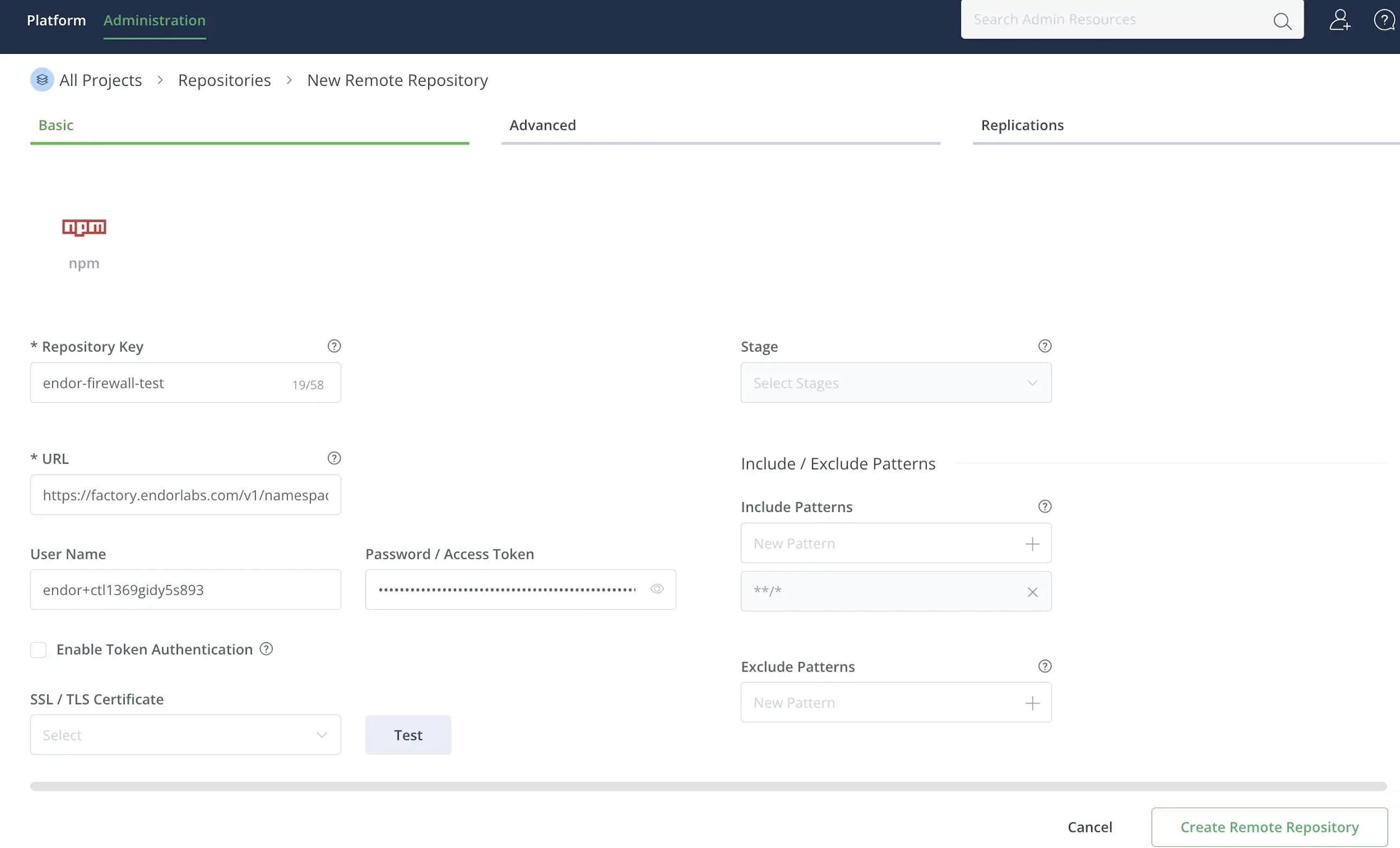
1. [Log in to JFrog Artifactory](https://my.jfrog.com/login/).
2. Select **Administration** > **Repositories** from the left sidebar.
3. Click **Create a Repository** and select **Remote**.
4. Select **npm** as the package type.
5. Enter a **Repository Key**, for example `endor-firewall-npm`.
6. Enter the repository URL: `https://factory.endorlabs.com/v1/namespaces//firewall/npm/`. Replace `` with your Endor Labs namespace.
7. Enter the **User Name** and **Password** you saved when creating the API key.
8. Click **Create Remote Repository**.
 1. [Log in to JFrog Artifactory](https://my.jfrog.com/login/).
2. Select **Administration** > **Repositories** from the left sidebar.
3. Click **Create a Repository** and select **Remote**.
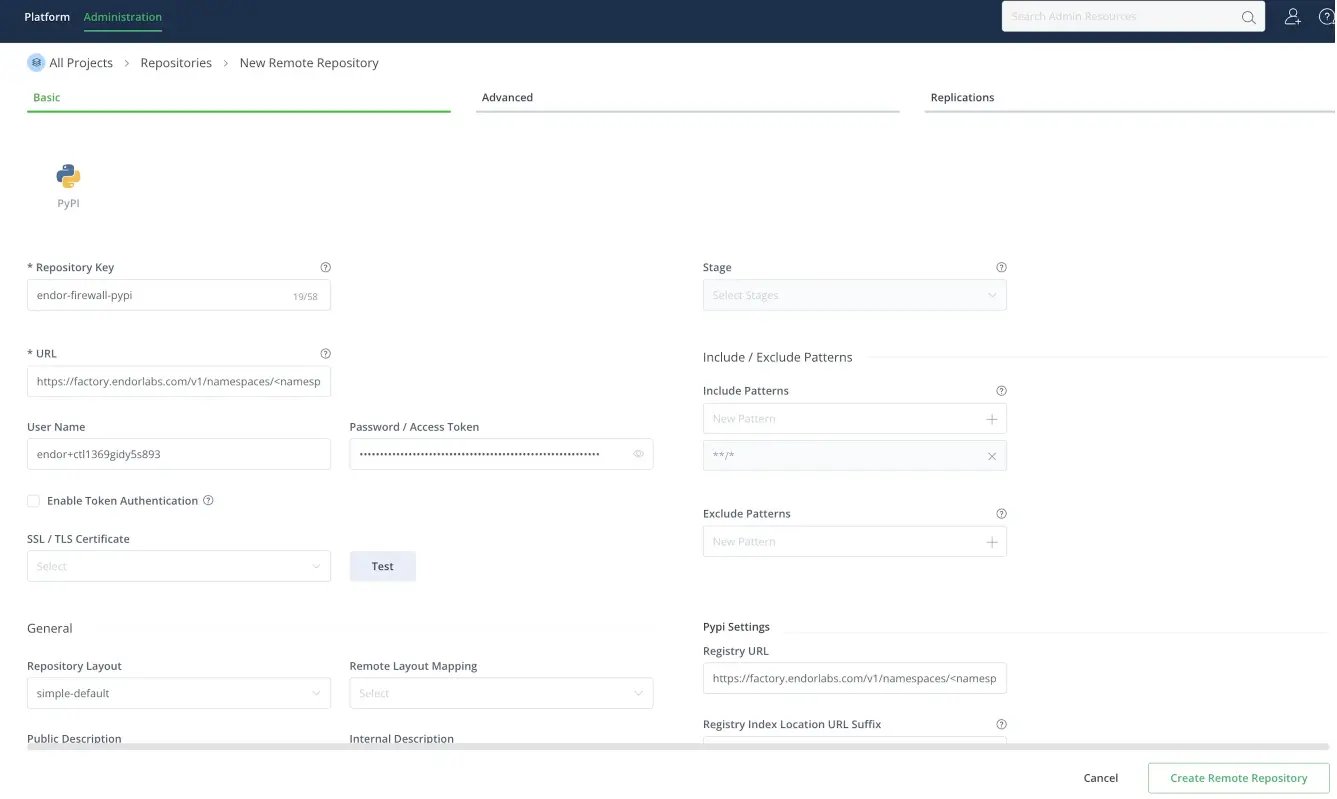
4. Select **PyPI** as the package type.
5. Enter a **Repository Key**, for example `endor-firewall-pypi`.
6. Enter the repository URL: `https://factory.endorlabs.com/v1/namespaces//firewall/pypi/`. Replace `` with your Endor Labs namespace.
7. Enter the **User Name** and **Password** you saved when creating the API key.
8. In **PyPI Settings**, set **Registry URL** to the same URL you entered in step 6.
9. Click **Create Remote Repository**.
1. [Log in to JFrog Artifactory](https://my.jfrog.com/login/).
2. Select **Administration** > **Repositories** from the left sidebar.
3. Click **Create a Repository** and select **Remote**.
4. Select **PyPI** as the package type.
5. Enter a **Repository Key**, for example `endor-firewall-pypi`.
6. Enter the repository URL: `https://factory.endorlabs.com/v1/namespaces//firewall/pypi/`. Replace `` with your Endor Labs namespace.
7. Enter the **User Name** and **Password** you saved when creating the API key.
8. In **PyPI Settings**, set **Registry URL** to the same URL you entered in step 6.
9. Click **Create Remote Repository**.
 The Package Firewall uses a virtual repository URL that aggregates one or more Go remote repositories. Each remote repository routes Go module requests through the Package Firewall. The virtual repository gives clients a single endpoint that forwards each request to the matching remote repository. You can use a single virtual repository to link all Go remote repositories.
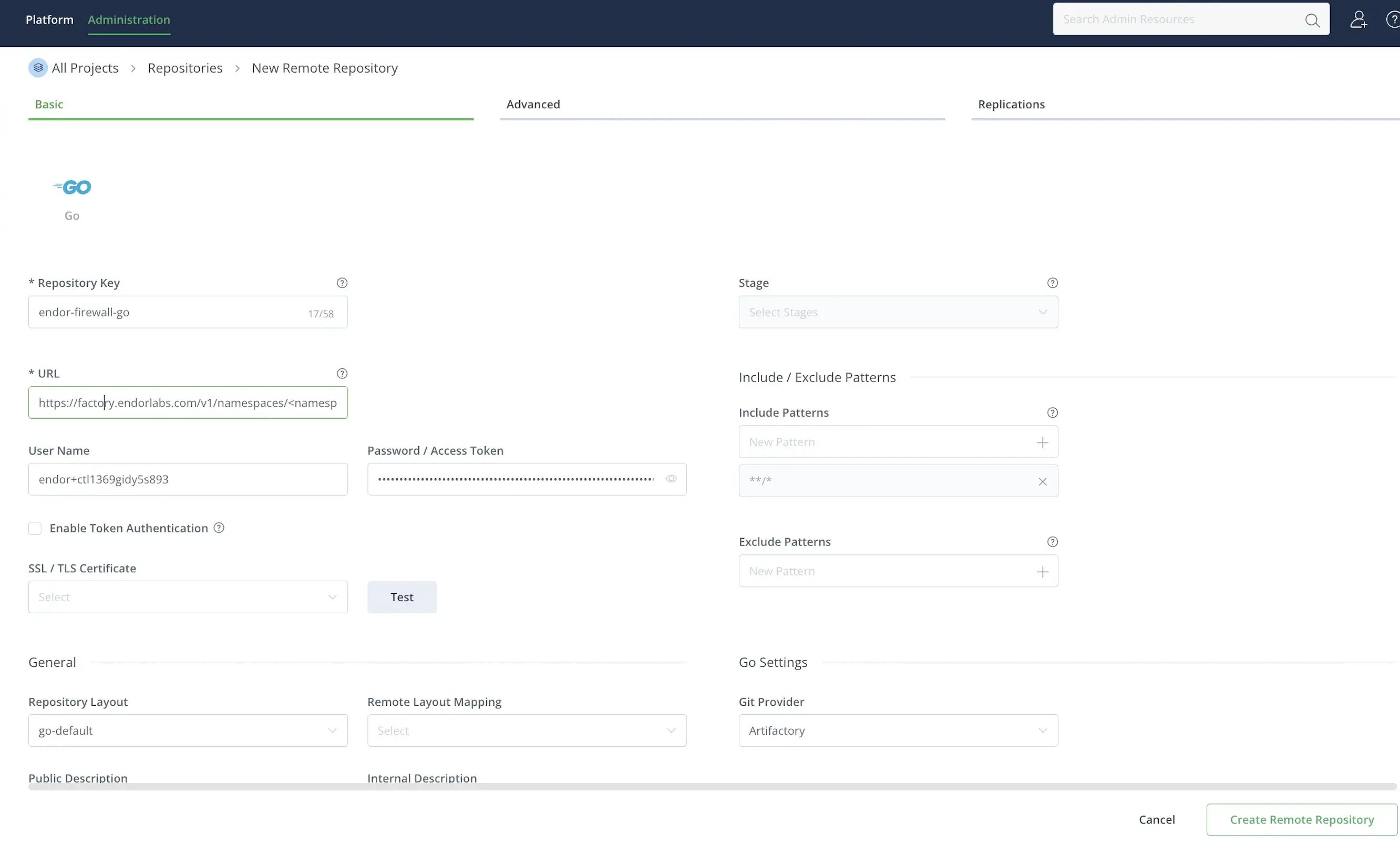
To create a Go remote repository:
1. [Log in to JFrog Artifactory](https://my.jfrog.com/login/).
2. Select **Administration** > **Repositories** from the left sidebar.
3. Click **Create a Repository** and select **Remote**.
4. Select **Go** as the package type.
5. Enter a **Repository Key**, for example `endor-firewall-go`.
6. Enter the repository URL: `https://factory.endorlabs.com/v1/namespaces//firewall/go/`. Replace `` with your Endor Labs namespace.
7. Enter the **User Name** and **Password** you saved when creating the API key.
8. Click **Create Remote Repository**.
The Package Firewall uses a virtual repository URL that aggregates one or more Go remote repositories. Each remote repository routes Go module requests through the Package Firewall. The virtual repository gives clients a single endpoint that forwards each request to the matching remote repository. You can use a single virtual repository to link all Go remote repositories.
To create a Go remote repository:
1. [Log in to JFrog Artifactory](https://my.jfrog.com/login/).
2. Select **Administration** > **Repositories** from the left sidebar.
3. Click **Create a Repository** and select **Remote**.
4. Select **Go** as the package type.
5. Enter a **Repository Key**, for example `endor-firewall-go`.
6. Enter the repository URL: `https://factory.endorlabs.com/v1/namespaces//firewall/go/`. Replace `` with your Endor Labs namespace.
7. Enter the **User Name** and **Password** you saved when creating the API key.
8. Click **Create Remote Repository**.
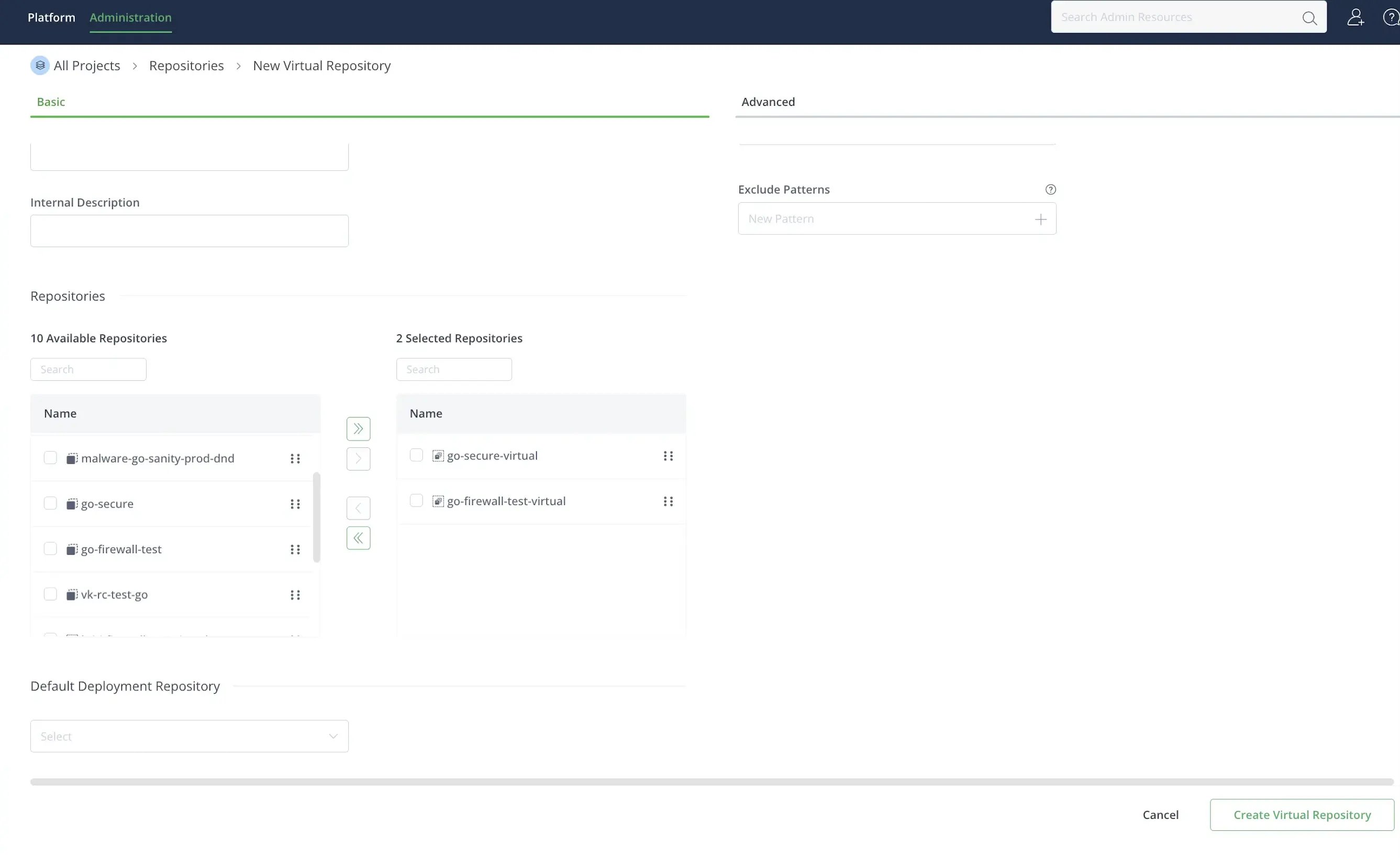
 To create a virtual repository:
1. Select **Administration** > **Repositories** from the left sidebar.
2. Click **Create a Repository** and select **Virtual**.
3. Select **Go** as the package type.
4. Enter a **Repository Key**, for example `endor-firewall-go-virtual`.
5. Under **Repositories**, select the remote repositories you want to add and click **>**.
6. Click **Create Virtual Repository**.
To create a virtual repository:
1. Select **Administration** > **Repositories** from the left sidebar.
2. Click **Create a Repository** and select **Virtual**.
3. Select **Go** as the package type.
4. Enter a **Repository Key**, for example `endor-firewall-go-virtual`.
5. Under **Repositories**, select the remote repositories you want to add and click **>**.
6. Click **Create Virtual Repository**.
 Your Go remote and virtual repositories are now configured to route module requests through the Package Firewall.
1. [Log in to JFrog Artifactory](https://my.jfrog.com/login/).
2. Select **Administration** > **Repositories** from the left sidebar.
3. Click **Create a Repository** and select **Remote**.
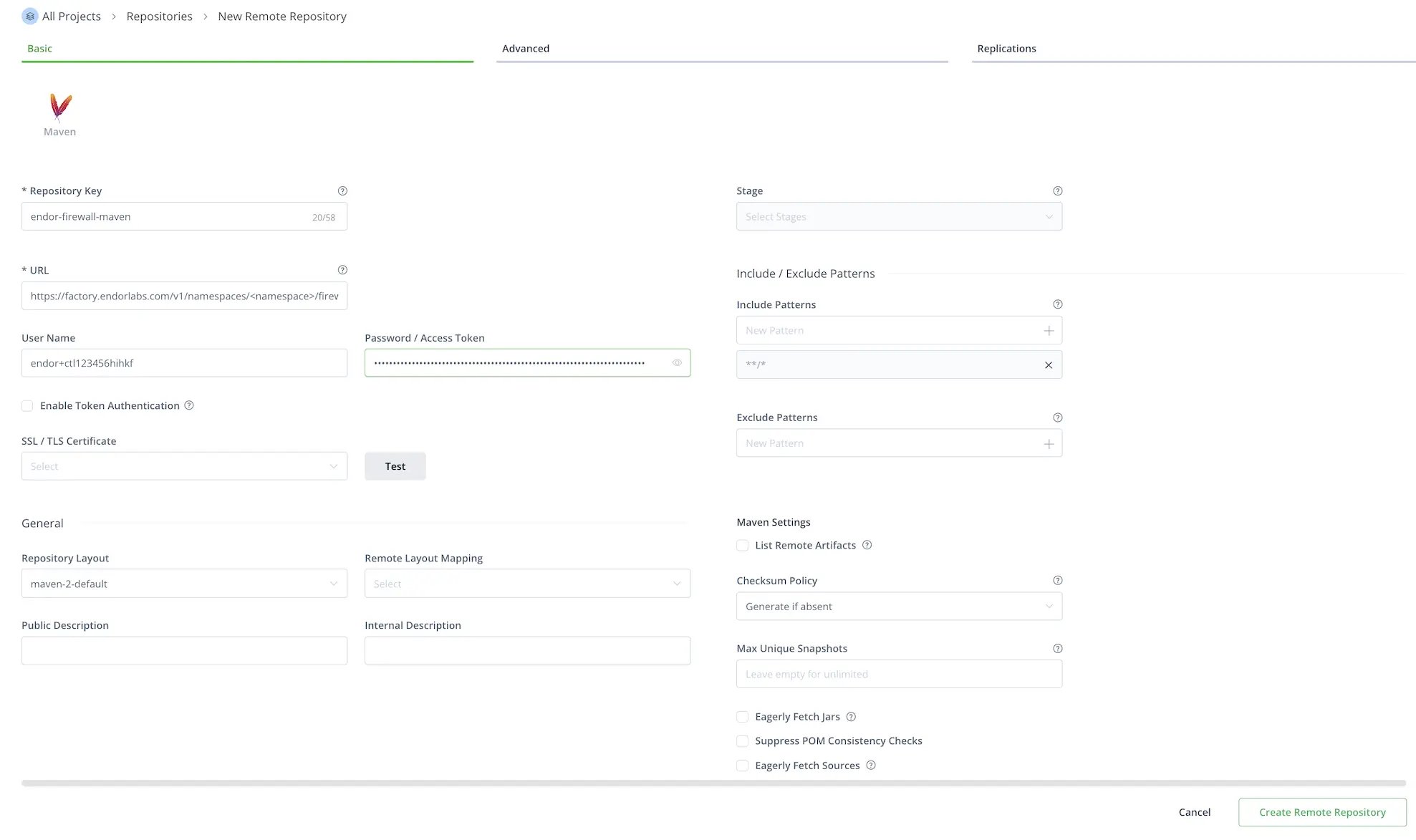
4. Select **Maven** as the package type.
5. Enter a **Repository Key**, for example `endor-firewall-maven`.
6. Enter the repository URL: `https://factory.endorlabs.com/v1/namespaces//firewall/maven/`. Replace `` with your Endor Labs namespace.
7. Enter the **User Name** and **Password** you saved when creating the API key.
8. Disable **Offline** to allow Artifactory to fetch remote artifacts.
9. Select **Advanced** and enable **Store Artifacts Locally**.
Optionally, enable **Priority Resolution** to prioritize this repository over other repositories.
10. Click **Create Remote Repository**.
Your Go remote and virtual repositories are now configured to route module requests through the Package Firewall.
1. [Log in to JFrog Artifactory](https://my.jfrog.com/login/).
2. Select **Administration** > **Repositories** from the left sidebar.
3. Click **Create a Repository** and select **Remote**.
4. Select **Maven** as the package type.
5. Enter a **Repository Key**, for example `endor-firewall-maven`.
6. Enter the repository URL: `https://factory.endorlabs.com/v1/namespaces//firewall/maven/`. Replace `` with your Endor Labs namespace.
7. Enter the **User Name** and **Password** you saved when creating the API key.
8. Disable **Offline** to allow Artifactory to fetch remote artifacts.
9. Select **Advanced** and enable **Store Artifacts Locally**.
Optionally, enable **Priority Resolution** to prioritize this repository over other repositories.
10. Click **Create Remote Repository**.
 ### Local setup for developers
Update your package manager to use Artifactory as its source, routing all installs through the Package Firewall instead of the public registry. Once you create the Artifactory remote:
1. Navigate to **Administration** > **Repositories**.
2. Click the vertical three dots next to the repository you configured and select **Set Me Up**. For Go, select the virtual repository you created.
3. Enter **Your JFrog account password** if prompted.
4. Click **Generate Token & Create Instructions**.
5. Follow the instructions to configure your local machine based on your package type. Edit `.npmrc` for npm, `pip.conf` for pip, or `settings.xml` for Maven.
For Go modules, select **Resolve**, copy the URL it provides, and run the following command. Replace `` with the copied URL. Ensure to URL-encode any `@` in the username as `%40`.
```bash theme={null}
go env -w GOPROXY=
```
Refer to [JFrog Artifactory documentation](https://docs.jfrog.com/artifactory/docs/use-artifactory-set-me-up-for-configuring-package-manager-clients) for more information.
### Local setup for developers
Update your package manager to use Artifactory as its source, routing all installs through the Package Firewall instead of the public registry. Once you create the Artifactory remote:
1. Navigate to **Administration** > **Repositories**.
2. Click the vertical three dots next to the repository you configured and select **Set Me Up**. For Go, select the virtual repository you created.
3. Enter **Your JFrog account password** if prompted.
4. Click **Generate Token & Create Instructions**.
5. Follow the instructions to configure your local machine based on your package type. Edit `.npmrc` for npm, `pip.conf` for pip, or `settings.xml` for Maven.
For Go modules, select **Resolve**, copy the URL it provides, and run the following command. Replace `` with the copied URL. Ensure to URL-encode any `@` in the username as `%40`.
```bash theme={null}
go env -w GOPROXY=
```
Refer to [JFrog Artifactory documentation](https://docs.jfrog.com/artifactory/docs/use-artifactory-set-me-up-for-configuring-package-manager-clients) for more information.
 6. Run the following command to verify that your local client is pointing to the Artifactory repository. Ensure the output matches the Artifactory remote URL you configured, or the virtual repository URL for Go modules.
* For npm packages, run `npm config get registry`.
* For PyPI packages, run `pip3 config list | grep index-url`.
* For Go modules, run `go env GOPROXY`.
* For Maven packages, run `mvn dependency:resolve -s settings.xml`.
### Verify your setup
To verify your setup, install a package that Endor Labs has classified as malware. The Package Firewall should block the installation and return an `HTTP 404`.
The following are examples of packages classified as malware by Endor Labs.
Run the following command to test the Package Firewall with npm.
```bash theme={null}
npm install endor-firewall-test@1.0.0
```
When the Package Firewall blocks the package, the output looks similar to the following. The `E404` error code and `404 Not Found` response confirm that the firewall blocked the package.
```bash theme={null}
npm error code E404
npm error 404 Not Found - GET https://johndoe.jfrog.io/artifactory/api/npm/johndoe/endor-firewall-test/-/endor-firewall-test-1.0.0.tgz
npm error 404
npm error 404 The requested resource 'endor-firewall-test@https://johndoe.jfrog.io/artifactory/api/npm/johndoe/endor-firewall-test/-/endor-firewall-test-1.0.0.tgz' could not be found or you do not have permission to access it.
npm error 404
npm error 404 Note that you can also install from a
npm error 404 tarball, folder, http url, or git url.
```
Run the following command to test the Package Firewall with pip.
```bash theme={null}
pip install endor-firewall-test==1.0.0
```
When the Package Firewall blocks the package, the output looks similar to the following. The `404` response confirms that the firewall blocked the package.
```bash theme={null}
Defaulting to user installation because normal site-packages is not writeable
Looking in indexes: https://johndoe.jfrog.io/artifactory/api/pypi/johndoe/simple
Collecting endor-firewall-test==1.0.0
ERROR: HTTP error 404 while getting https://johndoe.jfrog.io/artifactory/api/pypi/johndoe/packages/packages/61/05/6e99035fec6c7e407fffc052a0060495f6a2fcae2143db3239c7399d5b6e/endor_firewall_test-1.0.0-py3-none-any.whl#sha256=4df734939186708c595e72e50f5d31296d2ea9e54d5a0afc9e69d4e7d6f0d4b9 (from https://johndoe.jfrog.io/artifactory/api/pypi/johndoe/simple/endor-firewall-test/) (requires-python:>=3.7)
ERROR: Could not install requirement endor-firewall-test==1.0.0 from https://johndoe.io/artifactory/api/pypi/johndoe/packages/packages/61/05/6e99035fec6c7e407fffc052a0060495f6a2fcae2143db3239c7399d5b6e/endor_firewall_test-1.0.0-py3-none-any.whl#sha256=4df734939186708c595e72e50f5d31296d2ea9e54d5a0afc9e69d4e7d6f0d4b9 because of HTTP error 404 Client Error: for url: https://johndoe.jfrog.io/artifactory/api/pypi/johndoe/packages/packages/61/05/6e99035fec6c7e407fffc052a0060495f6a2fcae2143db3239c7399d5b6e/endor_firewall_test-1.0.0-py3-none-any.whl for URL https://johndoe.jfrog.io/artifactory/api/pypi/johndoe/packages/packages/61/05/6e99035fec6c7e407fffc052a0060495f6a2fcae2143db3239c7399d5b6e/endor_firewall_test-1.0.0-py3-none-any.whl#sha256=4df734939186708c595e72e50f5d31296d2ea9e54d5a0afc9e69d4e7d6f0d4b9 (from https://johndoe.jfrog.io/artifactory/api/pypi/johndoe/simple/endor-firewall-test/) (requires-python:>=3.7)
```
Run the following command to test the Package Firewall with Go.
```bash theme={null}
go install github.com/endorlabstest/endor-firewall-test@v1.0.0
```
When the Package Firewall blocks the package, the output looks similar to the following. The `404` response confirms that the firewall blocked the package.
```bash theme={null}
go get github.com/endorlabstest/endor-firewall-test@v1.0.0
go: github.com/endorlabstest/endor-firewall-test@v1.0.0: reading https://johndoe.com:xxxxx@johndoe.jfrog.io/artifactory/api/go/go-firewall-test-virtual/github.com/endorlabstest/endor-firewall-test/@v/v1.0.0.info: 404
```
Add `io.github.endorlabs:endor-java-webapp-demo:4.1` as a dependency in your `pom.xml`, then run the following command to test the Package Firewall with Maven.
```bash theme={null}
mvn dependency:resolve -s settings.xml
```
When the Package Firewall blocks the package, the output looks similar to the following. JFrog Artifactory does not serve the artifact, so resolution fails with a missing POM warning and a `Could not find artifact` error.
```bash theme={null}
[INFO] Scanning for projects...
[INFO]
[INFO] -----------------------< com.example:my-app >------------------------
[INFO] Building my-app 1.0.0
[INFO] from pom.xml
[INFO] --------------------------------[ jar ]---------------------------------
Downloading from endor-firewall: https://johndoe.jfrog.io/artifactory/endor-firewall-maven/io/github/endorlabs/endor-java-webapp-demo/4.1/endor-java-webapp-demo-4.1.pom
[WARNING] The POM for io.github.endorlabs:endor-java-webapp-demo:jar:4.1 is missing, no dependency information available
Downloading from endor-firewall: https://johndoe.jfrog.io/artifactory/endor-firewall-maven/io/github/endorlabs/endor-java-webapp-demo/4.1/endor-java-webapp-demo-4.1.jar
[INFO] ------------------------------------------------------------------------
[INFO] BUILD FAILURE
[INFO] ------------------------------------------------------------------------
[INFO] Total time: 4.000 s
[INFO] Finished at: 2026-06-09T19:41:11+05:30
[INFO] ------------------------------------------------------------------------
[ERROR] Failed to execute goal on project my-app: Could not resolve dependencies for project com.example:my-app:jar:1.0.0
[ERROR] dependency: io.github.endorlabs:endor-java-webapp-demo:jar:4.1 (compile)
[ERROR] Could not find artifact io.github.endorlabs:endor-java-webapp-demo:jar:4.1 in endor-firewall (https://johndoe.jfrog.io/artifactory/endor-firewall-maven)
[ERROR]
```
After you confirm that the Package Firewall blocks malware, you can view the recorded events. See [View Package Firewall logs](/package-firewall/logs) to learn more.
## Troubleshooting and FAQ
If Endor Labs flags a package as malware after Artifactory cached it, Artifactory continues to serve it until the cache expires. Use a short cache duration to reduce that window.
* Verify that the Package Firewall URL in Artifactory is correct.
* Ensure network connectivity from Artifactory to the Package Firewall.
* Ensure the firewall rules allow outbound connections from Artifactory.
* Verify the API key and secret are correct and that the key has the **Package Firewall User** role.
* Ensure that the credentials are in the format Artifactory expects.
* Check the Artifactory logs for authentication errors.
* Verify that Artifactory has sufficient storage for the cache.
* Set cache expiration to short durations so that more requests hit the Package Firewall.
* Check the cache hit and miss rates. Clear the cache if you need to test with a fresh request.
6. Run the following command to verify that your local client is pointing to the Artifactory repository. Ensure the output matches the Artifactory remote URL you configured, or the virtual repository URL for Go modules.
* For npm packages, run `npm config get registry`.
* For PyPI packages, run `pip3 config list | grep index-url`.
* For Go modules, run `go env GOPROXY`.
* For Maven packages, run `mvn dependency:resolve -s settings.xml`.
### Verify your setup
To verify your setup, install a package that Endor Labs has classified as malware. The Package Firewall should block the installation and return an `HTTP 404`.
The following are examples of packages classified as malware by Endor Labs.
Run the following command to test the Package Firewall with npm.
```bash theme={null}
npm install endor-firewall-test@1.0.0
```
When the Package Firewall blocks the package, the output looks similar to the following. The `E404` error code and `404 Not Found` response confirm that the firewall blocked the package.
```bash theme={null}
npm error code E404
npm error 404 Not Found - GET https://johndoe.jfrog.io/artifactory/api/npm/johndoe/endor-firewall-test/-/endor-firewall-test-1.0.0.tgz
npm error 404
npm error 404 The requested resource 'endor-firewall-test@https://johndoe.jfrog.io/artifactory/api/npm/johndoe/endor-firewall-test/-/endor-firewall-test-1.0.0.tgz' could not be found or you do not have permission to access it.
npm error 404
npm error 404 Note that you can also install from a
npm error 404 tarball, folder, http url, or git url.
```
Run the following command to test the Package Firewall with pip.
```bash theme={null}
pip install endor-firewall-test==1.0.0
```
When the Package Firewall blocks the package, the output looks similar to the following. The `404` response confirms that the firewall blocked the package.
```bash theme={null}
Defaulting to user installation because normal site-packages is not writeable
Looking in indexes: https://johndoe.jfrog.io/artifactory/api/pypi/johndoe/simple
Collecting endor-firewall-test==1.0.0
ERROR: HTTP error 404 while getting https://johndoe.jfrog.io/artifactory/api/pypi/johndoe/packages/packages/61/05/6e99035fec6c7e407fffc052a0060495f6a2fcae2143db3239c7399d5b6e/endor_firewall_test-1.0.0-py3-none-any.whl#sha256=4df734939186708c595e72e50f5d31296d2ea9e54d5a0afc9e69d4e7d6f0d4b9 (from https://johndoe.jfrog.io/artifactory/api/pypi/johndoe/simple/endor-firewall-test/) (requires-python:>=3.7)
ERROR: Could not install requirement endor-firewall-test==1.0.0 from https://johndoe.io/artifactory/api/pypi/johndoe/packages/packages/61/05/6e99035fec6c7e407fffc052a0060495f6a2fcae2143db3239c7399d5b6e/endor_firewall_test-1.0.0-py3-none-any.whl#sha256=4df734939186708c595e72e50f5d31296d2ea9e54d5a0afc9e69d4e7d6f0d4b9 because of HTTP error 404 Client Error: for url: https://johndoe.jfrog.io/artifactory/api/pypi/johndoe/packages/packages/61/05/6e99035fec6c7e407fffc052a0060495f6a2fcae2143db3239c7399d5b6e/endor_firewall_test-1.0.0-py3-none-any.whl for URL https://johndoe.jfrog.io/artifactory/api/pypi/johndoe/packages/packages/61/05/6e99035fec6c7e407fffc052a0060495f6a2fcae2143db3239c7399d5b6e/endor_firewall_test-1.0.0-py3-none-any.whl#sha256=4df734939186708c595e72e50f5d31296d2ea9e54d5a0afc9e69d4e7d6f0d4b9 (from https://johndoe.jfrog.io/artifactory/api/pypi/johndoe/simple/endor-firewall-test/) (requires-python:>=3.7)
```
Run the following command to test the Package Firewall with Go.
```bash theme={null}
go install github.com/endorlabstest/endor-firewall-test@v1.0.0
```
When the Package Firewall blocks the package, the output looks similar to the following. The `404` response confirms that the firewall blocked the package.
```bash theme={null}
go get github.com/endorlabstest/endor-firewall-test@v1.0.0
go: github.com/endorlabstest/endor-firewall-test@v1.0.0: reading https://johndoe.com:xxxxx@johndoe.jfrog.io/artifactory/api/go/go-firewall-test-virtual/github.com/endorlabstest/endor-firewall-test/@v/v1.0.0.info: 404
```
Add `io.github.endorlabs:endor-java-webapp-demo:4.1` as a dependency in your `pom.xml`, then run the following command to test the Package Firewall with Maven.
```bash theme={null}
mvn dependency:resolve -s settings.xml
```
When the Package Firewall blocks the package, the output looks similar to the following. JFrog Artifactory does not serve the artifact, so resolution fails with a missing POM warning and a `Could not find artifact` error.
```bash theme={null}
[INFO] Scanning for projects...
[INFO]
[INFO] -----------------------< com.example:my-app >------------------------
[INFO] Building my-app 1.0.0
[INFO] from pom.xml
[INFO] --------------------------------[ jar ]---------------------------------
Downloading from endor-firewall: https://johndoe.jfrog.io/artifactory/endor-firewall-maven/io/github/endorlabs/endor-java-webapp-demo/4.1/endor-java-webapp-demo-4.1.pom
[WARNING] The POM for io.github.endorlabs:endor-java-webapp-demo:jar:4.1 is missing, no dependency information available
Downloading from endor-firewall: https://johndoe.jfrog.io/artifactory/endor-firewall-maven/io/github/endorlabs/endor-java-webapp-demo/4.1/endor-java-webapp-demo-4.1.jar
[INFO] ------------------------------------------------------------------------
[INFO] BUILD FAILURE
[INFO] ------------------------------------------------------------------------
[INFO] Total time: 4.000 s
[INFO] Finished at: 2026-06-09T19:41:11+05:30
[INFO] ------------------------------------------------------------------------
[ERROR] Failed to execute goal on project my-app: Could not resolve dependencies for project com.example:my-app:jar:1.0.0
[ERROR] dependency: io.github.endorlabs:endor-java-webapp-demo:jar:4.1 (compile)
[ERROR] Could not find artifact io.github.endorlabs:endor-java-webapp-demo:jar:4.1 in endor-firewall (https://johndoe.jfrog.io/artifactory/endor-firewall-maven)
[ERROR]
```
After you confirm that the Package Firewall blocks malware, you can view the recorded events. See [View Package Firewall logs](/package-firewall/logs) to learn more.
## Troubleshooting and FAQ
If Endor Labs flags a package as malware after Artifactory cached it, Artifactory continues to serve it until the cache expires. Use a short cache duration to reduce that window.
* Verify that the Package Firewall URL in Artifactory is correct.
* Ensure network connectivity from Artifactory to the Package Firewall.
* Ensure the firewall rules allow outbound connections from Artifactory.
* Verify the API key and secret are correct and that the key has the **Package Firewall User** role.
* Ensure that the credentials are in the format Artifactory expects.
* Check the Artifactory logs for authentication errors.
* Verify that Artifactory has sufficient storage for the cache.
* Set cache expiration to short durations so that more requests hit the Package Firewall.
* Check the cache hit and miss rates. Clear the cache if you need to test with a fresh request.