> ## Documentation Index
> Fetch the complete documentation index at: https://docs.endorlabs.com/llms.txt
> Use this file to discover all available pages before exploring further.
# Review Malware
> Beta
Track newly discovered malicious packages and see whether they affect your monitored projects, in one tenant-wide view.
Malicious packages can reach your projects through the open source dependencies you already rely on, sometimes before a routine scan catches them. Review newly discovered malicious packages, so you can see which of your monitored projects might be affected and investigate before the risk spreads further.
Access **Threat Center** from the left sidebar and select **Malware** to review newly detected malicious packages and how they relate to your monitored projects.
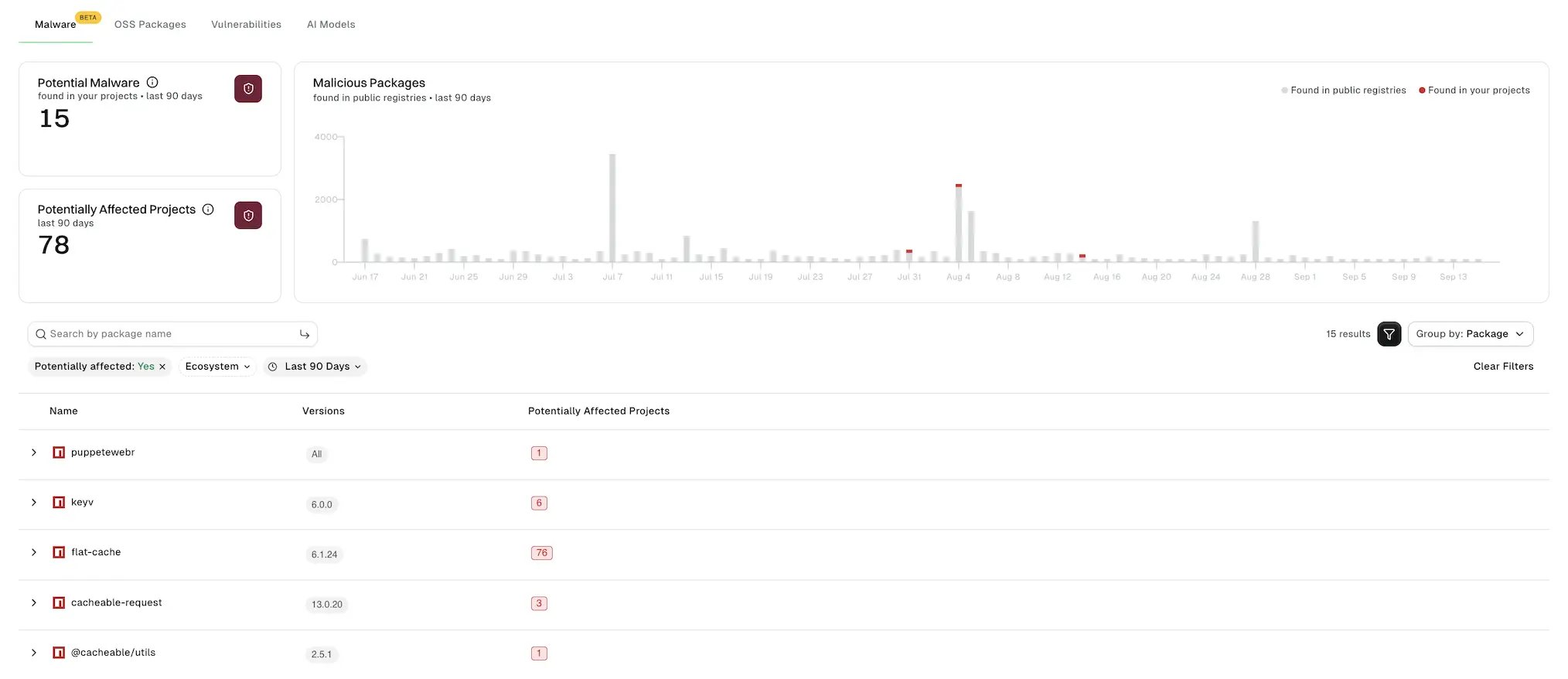
* **Potential Malware**: New malicious package versions that potentially affect at least one of your projects, for the selected time range. Select this card to jump to the list, filtered to **Potentially affected: Yes** and grouped by package.
* **Potentially Affected Projects**: Projects that have at least one dependency that could resolve to a new malicious package version at build time, for the selected time range. Select this card to jump to the list, filtered to **Potentially affected: Yes** and grouped by project.
* **Malicious Packages**: A chart showing the number of malicious packages found each day over the selected time range. Each bar represents a day, with the date shown along the bottom and the number of malicious packages shown by the bar’s height. Each bar stacks a gray segment for packages **Found in public registries** with a red segment for the subset of these packages also **Found in your projects**.
See [Determine malware exposure](/scan/malware#determine-malware-exposure) to learn the difference between potentially and definitely affected dependencies. Potentially affected and definitely affected dependencies are displayed the same way in the counts, chart, and list.
 ## Filter and search malicious packages
Use the following controls to narrow the list of malicious packages:
* Enter a package name to find a specific package.
* Select **Potentially affected** to show only packages that could affect a monitored project.
* Select **Ecosystem** to filter by package ecosystem.
* Select a time range, such as **Last 30 Days**, to limit results to malware Endor Labs detected within that window. The default is **Last Week**.
* Select **Group by** to organize the list. **None** lists each malicious package version on its own row. **Package** groups versions under their package. **Project** groups results by which of your monitored projects they affect.
* Click **Clear Filters** to reset all filters and your search.
Identifying potentially affected projects requires checking every dependency across every project. The results may take longer to load for large tenants. To improve load times, select a shorter time range, filter by **Ecosystem**, or, at the namespace, enable **All child namespaces excluded** to limit results to your current namespace.
Each malicious package is listed with its name, version, number of potentially affected projects, and published date. The **Published** date indicates when the package version was published to its registry, not when it was identified as malicious. You can sort the list by any of these values.
## Review a malicious package
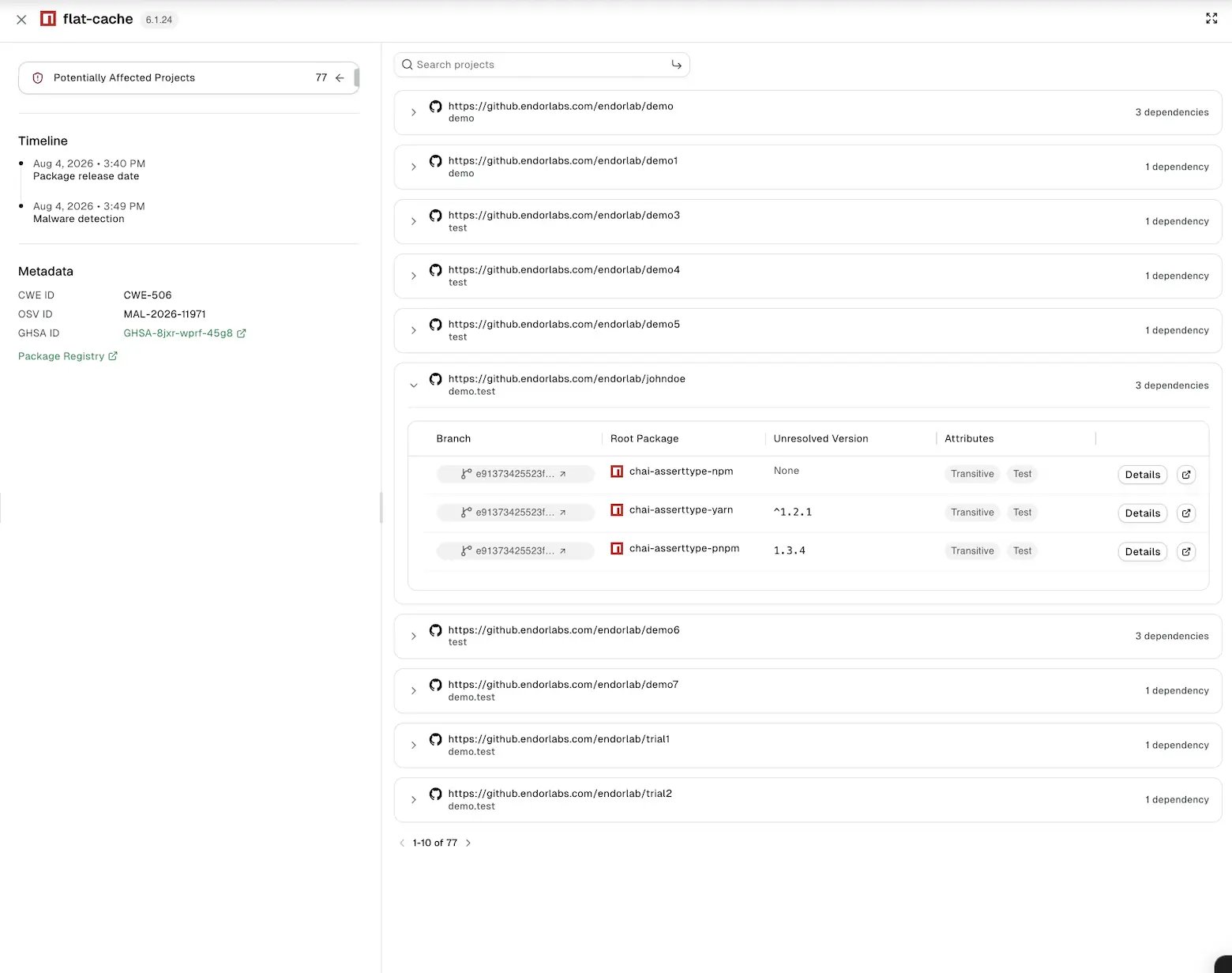
Select a package to see whether it's potentially affecting a monitored project, and if so, how many, along with the following information:
* **Reasoning**: An AI-generated explanation of why Endor Labs classified the package as malicious. Depending on the package, this can include several points of evidence: the reachability path, the observed harmful effect, whether a suspicious dependency the package introduces is actually used anywhere in its code, and signs that the maintainer account itself was compromised, such as an email change or a new version published immediately after another version from the same account was flagged as malicious. Select **more reasons** to see the full explanation.
* **Timeline**: The package's release date and the date Endor Labs detected the malware.
* **Metadata**: Identifiers for the finding, such as the CWE ID, OSV ID, and GHSA ID, when available.
Click **Open registry** to view the package on its public registry.
## Review potentially affected projects
When a package potentially affects one or more monitored projects, you can review which projects and how the malicious dependency reaches each one.
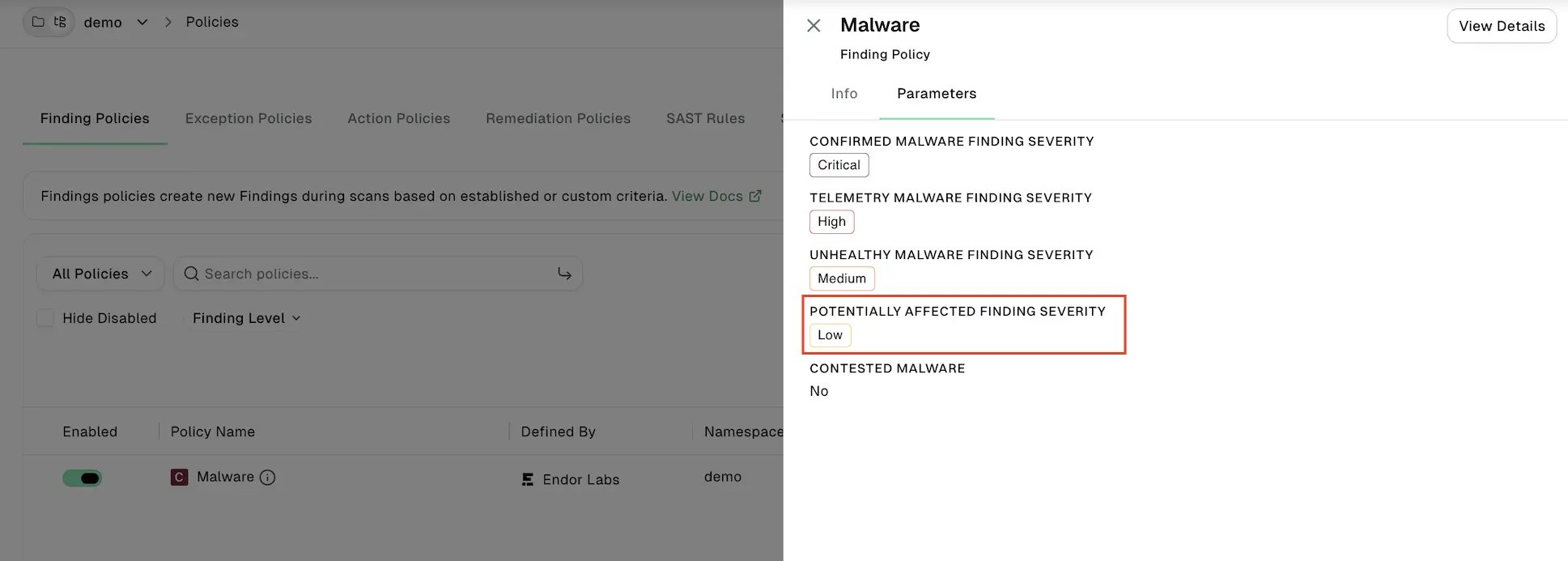
Set the Malware finding policy's **Potentially Affected Finding Severity** to a severity other than **None** to raise findings for potentially affected dependencies. See [Determine malware exposure](/scan/malware#determine-malware-exposure) to configure the policy.
## Filter and search malicious packages
Use the following controls to narrow the list of malicious packages:
* Enter a package name to find a specific package.
* Select **Potentially affected** to show only packages that could affect a monitored project.
* Select **Ecosystem** to filter by package ecosystem.
* Select a time range, such as **Last 30 Days**, to limit results to malware Endor Labs detected within that window. The default is **Last Week**.
* Select **Group by** to organize the list. **None** lists each malicious package version on its own row. **Package** groups versions under their package. **Project** groups results by which of your monitored projects they affect.
* Click **Clear Filters** to reset all filters and your search.
Identifying potentially affected projects requires checking every dependency across every project. The results may take longer to load for large tenants. To improve load times, select a shorter time range, filter by **Ecosystem**, or, at the namespace, enable **All child namespaces excluded** to limit results to your current namespace.
Each malicious package is listed with its name, version, number of potentially affected projects, and published date. The **Published** date indicates when the package version was published to its registry, not when it was identified as malicious. You can sort the list by any of these values.
## Review a malicious package
Select a package to see whether it's potentially affecting a monitored project, and if so, how many, along with the following information:
* **Reasoning**: An AI-generated explanation of why Endor Labs classified the package as malicious. Depending on the package, this can include several points of evidence: the reachability path, the observed harmful effect, whether a suspicious dependency the package introduces is actually used anywhere in its code, and signs that the maintainer account itself was compromised, such as an email change or a new version published immediately after another version from the same account was flagged as malicious. Select **more reasons** to see the full explanation.
* **Timeline**: The package's release date and the date Endor Labs detected the malware.
* **Metadata**: Identifiers for the finding, such as the CWE ID, OSV ID, and GHSA ID, when available.
Click **Open registry** to view the package on its public registry.
## Review potentially affected projects
When a package potentially affects one or more monitored projects, you can review which projects and how the malicious dependency reaches each one.
Set the Malware finding policy's **Potentially Affected Finding Severity** to a severity other than **None** to raise findings for potentially affected dependencies. See [Determine malware exposure](/scan/malware#determine-malware-exposure) to configure the policy.
 Select **Potentially Affected Projects** to see which of your monitored projects the package affects. If you open the package from a project already expanded in the **Group by: Project** view, the list is pre-filtered to that project.
* Enter a name in the search bar to find a specific project, or use the page controls at the bottom of the list when there are many results.
* Select a project to see the dependency paths that introduce the package: the branch, the root package that depends on it, the version constraints, and attributes such as whether the dependency is direct or transitive, pinned, or if it's a phantom dependency.
* Select the branch name to go to the dependency in the project's inventory.
* Click **Details** to see the full dependency path and links to the manifest file and lock file, when available. See [Dependencies](/inventory-insights/dependencies) to learn more about these attributes.
* Select the finding link to see the findings Endor Labs raised for that dependency, in that repository version, in that project.
This list includes every dependency in the project that matches the package name, not only the one that's potentially affected. For example, a project might depend on the same package three times: one dependency pinned to a safe version, one constrained to a safe range, and one with no version constraint. Only the dependency with no version constraint could resolve to the malicious version, so it's the only one flagged as potentially affected, and the only one that gets a finding if potentially affected findings are enabled.
Select **Potentially Affected Projects** to see which of your monitored projects the package affects. If you open the package from a project already expanded in the **Group by: Project** view, the list is pre-filtered to that project.
* Enter a name in the search bar to find a specific project, or use the page controls at the bottom of the list when there are many results.
* Select a project to see the dependency paths that introduce the package: the branch, the root package that depends on it, the version constraints, and attributes such as whether the dependency is direct or transitive, pinned, or if it's a phantom dependency.
* Select the branch name to go to the dependency in the project's inventory.
* Click **Details** to see the full dependency path and links to the manifest file and lock file, when available. See [Dependencies](/inventory-insights/dependencies) to learn more about these attributes.
* Select the finding link to see the findings Endor Labs raised for that dependency, in that repository version, in that project.
This list includes every dependency in the project that matches the package name, not only the one that's potentially affected. For example, a project might depend on the same package three times: one dependency pinned to a safe version, one constrained to a safe range, and one with no version constraint. Only the dependency with no version constraint could resolve to the malicious version, so it's the only one flagged as potentially affected, and the only one that gets a finding if potentially affected findings are enabled.