

High Level Usage Steps
- Setup authentication to Endor Labs
- Install your build toolchain
- Build your code
- Scan with Endor Labs
Authentication to Endor Labs
Endor Labs recommends using keyless authentication in continuous integration environments. Keyless Authentication is more secure and reduces the cost of secret rotation. To set up keyless authentication see the keyless authentication documentation If you choose not to use keyless authentication you can configure an API key and secret in GitLab for authentication using the following steps. See managing API keys for more information on getting an API key for Endor Labs authenticationConfigure API key and secret in GitLab
- In your GitLab environment, select the project you want to scan.
- Go to Settings > CI/CD.
- Click Expand in the Variables section.
- Click the Add variable button at the bottom of the section.
- In the Key field, enter ENDOR_API_CREDENTIALS_SECRET.
- In the Value field, enter your Endor Labs API secret.
- Under Flags, make sure you select Mask variable.
- Repeat the previous steps to add your API key as the variable ENDOR_API_CREDENTIALS_KEY.
Configure your GitLab CI pipeline
ImportantGitLab CI/CD pipelines check out commits in a detached HEAD state, which can lead to fragmented branch tracking in Endor Labs. See Set up branch tracking in GitLab to configure proper branch context.
- Create a
.gitlab-ci.ymlfile in the root directory of your project if you do not already have one. - In your
.gitlab-ci.ymlfile customize the job configuration based on your project’s requirements using the example below. - Modify the image field to align with the build tools necessary for building your software packages.
- Update the before_script section to include any additional steps required before executing the scan, such as installing dependencies or building your project.
- Save and commit the
.gitlab-ci.ymlfile to your GitLab repository. - GitLab will automatically detect the
.gitlab-ci.ymlfile and trigger the defined job whenever there are changes pushed to the repository. - Monitor the progress and results of the CI pipeline in the GitLab CI/CD interface.
If you use Endor Labs with an EU tenant, use
https://api.eu.endorlabs.com instead of https://api.endorlabs.com.SAST scans in GitLab
You can run SAST scans in your GitLab CI pipeline to identify security vulnerabilities and code quality issues in your source code. SAST scanning analyzes your source code for potential security weaknesses based on enabled rules and generates findings based on your configured finding policies.SAST scan
To run a SAST scan, add--sast to your ENDOR_ARGS variable.
AI SAST triage agent scan
To run an AI SAST triage agent scan, add--sast and --ai-sast-analysis=agent-fallback to your ENDOR_ARGS variable. The AI SAST triage agent automatically classifies findings as true positives or false positives, reducing the need for manual triage.
--ai-sast-rescan to your ENDOR_ARGS variable.
AI SAST detection agent scan
To run an AI SAST detection agent scan, add--ai-sast to your ENDOR_ARGS variable. The AI SAST detection agent identifies security vulnerabilities beyond traditional rule-based SAST detection.
AI SAST MR scan
To run an AI SAST MR scan, add--ai-sast, --pr, --pr-incremental, and --pr-baseline to your ENDOR_ARGS variable. The scan analyzes only the code changed by the merge request and surfaces the net new findings introduced by the change. A baseline AI SAST scan must exist on the target branch first. See AI SAST PR scans to learn more.
Set up branch tracking in GitLab
In Git, a detached HEAD state occurs when the repository checks out a specific commit instead of a branch reference. In this state, Git points the HEAD directly to a commit hash, without associating it with a named branch. As a result, actions performed, such as creating new commits or running automated scans, do not carry branch identity unless explicitly specified. Proper branch context enables Endor Labs to:- Associate scans with the correct branch
- Identify scans on the monitored default branch
- Track findings and display metrics accurately across branches
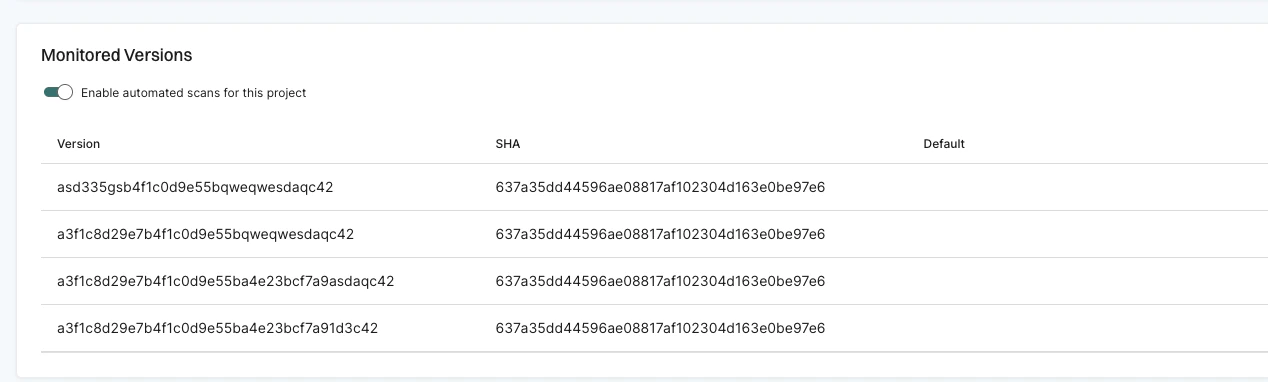
--detached-ref-name only to specify the branch name for a commit in detached HEAD state. This associates the commit with the correct branch without setting it as the default branch.
--detached-ref-name and --as-default-branch together when you want to associate the commit with a branch and set it as the default branch scan.
Run MR scans
MR scans are point-in-time scans that run on merge requests to detect new policy violations and security issues introduced by the changes. Unlike default branch scans which create monitored versions, MR scans compare findings against the baseline to surface only new issues. To run scans on merge requests, use the--pr flag. This flag tells endorctl to treat the scan as a merge request scan and compare findings against the target branch baseline.
The following example configuration runs an MR scan only when triggered by a merge request pipeline:
The
--detached-ref-name flag is recommended for MR scans in GitLab because merge request pipelines check out commits in a detached HEAD state. This flag provides the branch name context needed for proper baseline comparison.Enable MR comments
You can enable MR comments in your GitLab CI pipeline to automatically post comments on merge requests when policy violations are detected. MR comments build on top of MR scans by posting the scan results directly on the merge request.Configure a GitLab tokenConfigure a GitLab CI/CD variable following the same steps as described in Configure API key and secret in GitLab. Add a variable with the key
ENDOR_SCAN_SCM_TOKEN and set its value to your GitLab personal access token with the api scope. Make sure to select Mask variable under Flags.Configure the pipeline for MR comments
The following example configuration enables MR comments in your GitLab CI pipeline:--pr: Enables MR scan mode--enable-pr-comments: Enables posting comments on the merge request--scm-pr-id=$CI_MERGE_REQUEST_IID: Provides the merge request ID--scm-token=$ENDOR_SCAN_SCM_TOKEN: Provides the GitLab token for posting comments